
Lieferung heute & morgen

Qualitätsgarantie

Willkommens-Angebote freischalten: KOSTENLOSE Lieferung | Bis zu 80 % RABATT | Kostenlose 30-Tage-JoyPlus-Testphase
App herunterladen
An RTX 5080 graphics card is designed for users who need high frame rates, ray tracing, 4K gaming or demanding creative applications. However, the product name alone tells you little about how well it will suit your system. Case size, power supply, cooling and intended use all help determine whether it’s the right choice.
This buying guide explains what shoppers in the UK should look out for and which product variants suit different needs.
Several models use the NVIDIA GeForce RTX 5080 with 16 GB GDDR7, but differ in clock speed, cooler, dimensions and power supply. An RTX 5080 Triple-Fan card, for example, may have three fans but still take up significantly more than two or three slots.
Boost clock speeds also vary. Depending on the model, those listed here range from around 2,617 MHz to 2,805 MHz. These are manufacturer specifications, not a guarantee of a particular frame rate.
Many RTX 5080 models support a maximum digital resolution of 7,680 × 4,320 pixels and up to four monitors. This describes the card’s connectivity and signal processing. The frame rate you can actually achieve also depends on the game, graphics settings, processor and upscaling technology used.
So, if you’re choosing an RTX 5080 for 4K gaming, maximum resolution isn’t the only thing to consider. DisplayPort 2.1 or HDMI 2.1 connections, your monitor’s refresh rate and support for technologies such as DLSS 4 are also important, where supported by the specific model and software.
Several desktop cards in this selection have a power draw of around 360 watts and a recommended system power supply of 850 watts. This recommendation is for the whole system, not just the graphics card. A powerful processor, several SSDs or overclocking may mean you need more headroom.
Also check that you have a suitable, certified 12V-2x6 connector. The plug must be fully seated and shouldn’t be sharply bent right next to the socket.
The RTX 5080 16 GB GDDR7 uses a 256-bit memory interface and memory bandwidth of up to 960 GB/s on most of the desktop models listed here. This matters for high resolutions, textures, video editing and certain AI or 3D applications.
16 GB of video memory is a specific capacity figure, but it doesn’t replace checking the requirements of the software you use. For professional projects with very large scenes or extensive raw data, system memory and SSD capacity can also become limiting factors.
High-end cards are often large and heavy. Examples from this selection include:
Before you buy, check the maximum graphics card length your case supports, the clearance next to the PCIe slot and any potential clashes with front fans, radiators or drive cages. A support bracket may be useful for heavier models.
The desktop models listed use PCIe 5.0 x16. The card can generally also be used in a compatible older PCIe slot, but check that your platform is suitable in terms of bandwidth, BIOS and processor.
Cooling designs vary:
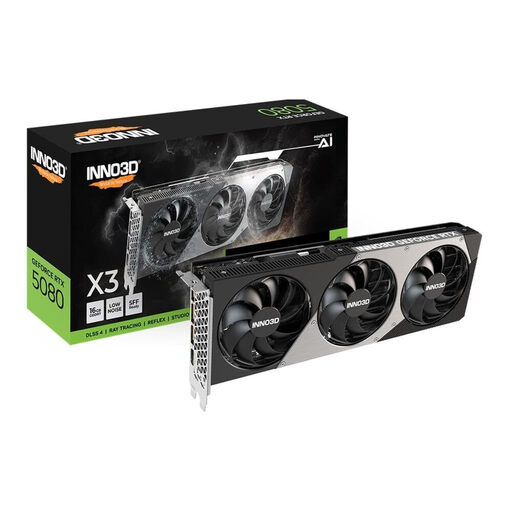
Why it suits this type of user: This card combines 16 GB GDDR7 and PCIe 5.0 with a 2.5-slot design and a length of 300 mm. That makes planning your case less demanding than with particularly wide models.
The stated dimensions and recommended 850-watt power supply make it easier to check compatibility before you buy.
300 mm long, 2.5 slots wide, three fans, 3 × DisplayPort 2.1b and 1 × HDMI 2.1b.
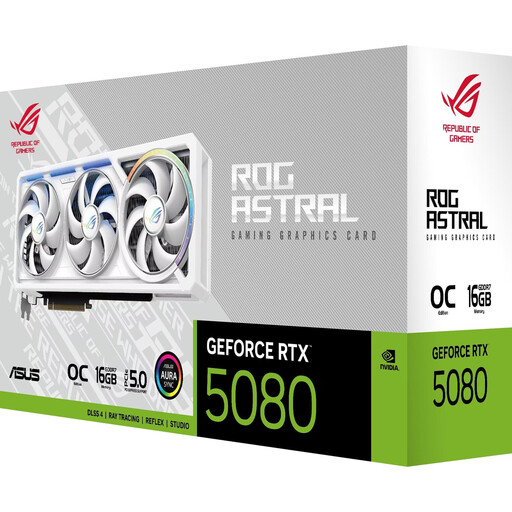
Why it suits this type of user: This model is for users who value high factory clock speeds, several display connections and an advanced cooler design.
The specifications clearly state that the card is 3.8 slots wide and 357.6 mm long, and recommend an 850-watt power supply. This makes its space and power requirements easy to see.
Boost clock speed of up to 2,790 MHz, four fans, 2 × HDMI 2.1b and 3 × DisplayPort 2.1b.
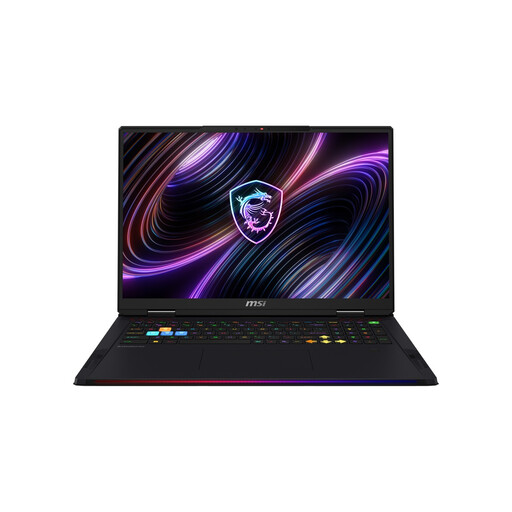
Why it suits this type of user: The RTX 5080 laptop pairs a mobile RTX 5080 with an 18-inch Mini LED display, 32 GB DDR5 and a 2 TB SSD. It’s a good fit if you don’t want to build a desktop PC.
The RTX 5080 laptop variant is listed with a 175-watt TGP. You can’t compare it directly with a desktop card drawing around 360 watts.
18-inch WQUXGA resolution, 120 Hz, 32 GB DDR5, 2 TB SSD, plus Wi-Fi 7 and Thunderbolt 5.

Why it suits this type of user: This RTX 5080 gaming PC is for buyers who want to purchase a processor, graphics card, memory and storage as a matched system.
The specifications list 64 GB DDR5, a 2 TB SSD, an 850-watt power supply and liquid cooling. That means you don’t need to add these key components separately.
AMD Ryzen 7 9800X3D, 64 GB DDR5, 2 TB M.2 SSD and Windows 11 Home.
We’ve put together a comprehensive, regularly updated list of products that meet these strict selection criteria and fully comply with the safety regulations in force in the EU.
A desktop card with a power draw of around 360 watts can have a significant impact on your gaming PC’s power consumption. Your actual running costs depend on the game, workload, usage time, the rest of your hardware and your electricity tariff. For a rough estimate, use this calculation:
Power consumption in kilowatts × operating hours × electricity price = cost.
Power consumption is usually lower when the card is idle or running less demanding applications than when the GPU is under full load. Good case ventilation, up-to-date drivers and a suitable power supply all help ensure stable operation, but they don’t replace regular cleaning.
The specifications of the models listed are designed for high resolutions: 16 GB GDDR7, PCIe 5.0 and connections such as DisplayPort 2.1b or HDMI 2.1b. Actual performance depends on the game, graphics settings, processor and whether you use DLSS 4. For 4K, your monitor should also support the refresh rate you want and have the right connection.
For several of these cards, a power supply of at least 850 watts is recommended. Treat this as a guide for the whole system. You may want more headroom if you have a particularly powerful processor, lots of drives or manual overclocking. A suitable 12V-2x6 plug and a good-quality power supply are also important.
There’s no reliable way to give a fixed lifespan. It depends on factors including temperature, dust, hours of use, power supply, case ventilation and physical stress. Clean the fans and filters regularly, keep air vents clear and let the card cool completely before removing it. Follow the manufacturer’s instructions when installing the card, and check the applicable warranty terms.