
Lieferung heute & morgen

Qualitätsgarantie

Willkommens-Angebote freischalten: KOSTENLOSE Lieferung | Bis zu 80 % RABATT | Kostenlose 30-Tage-JoyPlus-Testphase
App herunterladen
An RTX 5080 graphics card is designed for users who want to combine high resolutions, ray tracing, AI features and demanding applications. The GPU platform is identical across many models: 10,752 CUDA cores, 16 GB GDDR7, a 256-bit memory interface and PCI Express 5.0. The main differences lie in the cooler, dimensions, boost clock, connections and power supply.
When buying an expensive GeForce RTX 5080, unsuitable case dimensions or an inadequate power supply can make the purchase unnecessarily complicated. The following criteria will help you distinguish technical specifications from features that are genuinely relevant.
A model with a higher boost clock is not automatically noticeably faster in every game. Actual frame rates depend on factors including the game engine, processor, resolution, cooling and power limit. The difference between, for example, 2.617 MHz and 2.805 MHz is therefore just one parameter.
With an RTX 5080 OC, you should also check whether the manufacturer specifies the clock speed in standard or OC mode. For many systems, a suitable cooler and stable temperatures are more important than a small difference in clock speed.
Several RTX 5080 models support a maximum output resolution of 7,680 × 4,320 pixels and up to four monitors. This describes the signal and connection capabilities. The frame rate achievable in games, however, depends on the graphics settings, ray tracing, the game itself and supporting technologies such as DLSS 4.
If you are looking for a 4K gaming graphics card for high refresh rates, you should also consider the DisplayPort and HDMI versions, the monitor being used and the image quality you want.
Many RTX 5080 cards are significantly wider than standard models. As well as the length, buyers need to check the slot width, height and clearance from neighbouring PCIe slots. A card measuring 3.8 or 4 slots wide may block expansion cards.
The power connector also needs sufficient space. A cable that is bent too sharply can place mechanical strain on the 12V-2x6 connector. Before ordering, you should therefore check case clearances, the cable route and the position of the power supply.
The RTX 5080 models featured here come with 16 GB GDDR7 and a 256-bit memory interface. Several variants offer a specified memory bandwidth of 960 GB/s. This is relevant for high-resolution textures, ray tracing and creative applications.
However, having more graphics memory alone does not guarantee a particular level of performance. For professional workloads, you should check whether the software you use supports CUDA, Tensor cores or RTX acceleration.
Most models use three fans. Their main differences therefore concern case size, noise levels and space requirements. A 2.5-slot card may be more suitable for compact desktop cases than a 3.8-slot model.
Water cooling can reduce the card’s width, but requires additional radiator space. With the GIGABYTE AORUS model featuring XTREME WATERFORCE cooling, for example, you will need to allow room for a 240- or 360-mm radiator.
The RTX 5080 variants listed have power consumption or board power of around 360 W. Manufacturers frequently recommend an 850 W power supply; some individual models specify a higher rating. The processor, drives, overclocking and power supply quality are also important factors.
Pay attention to:
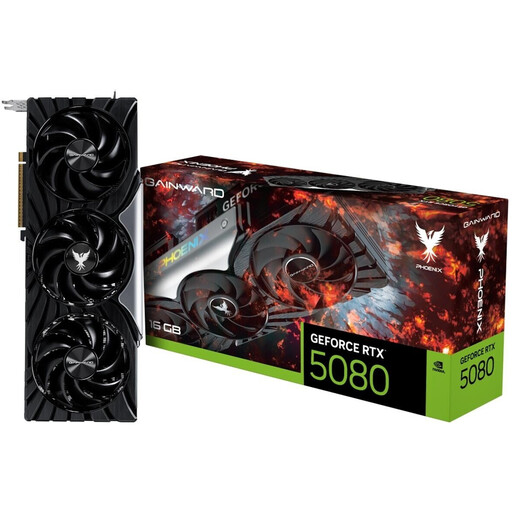
Why this product suits this profile: The specification focuses on the RTX 5080 platform, with 16 GB GDDR7, triple-fan cooling and reference clock speeds. This makes it easier to compare without factory overclocking.
The 2.617 MHz boost clock is clearly specified, allowing buyers to compare the card with OC models using concrete data.
16 GB GDDR7, 960 GB/s memory bandwidth, DLSS 4 and Zero-RPM mode.
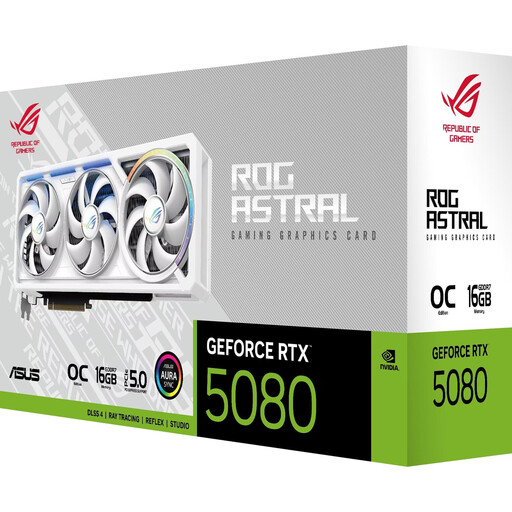
Why this product suits this profile: This model combines a 3.8-slot design with four fans and a boost clock of up to 2.790 MHz. It is intended for large cases with sufficient clearance.
The large design is explicitly stated in the technical specifications, making it possible to check compatibility before buying.
Four fans, 2× HDMI 2.1b and 3× DisplayPort 2.1b for up to four monitors.
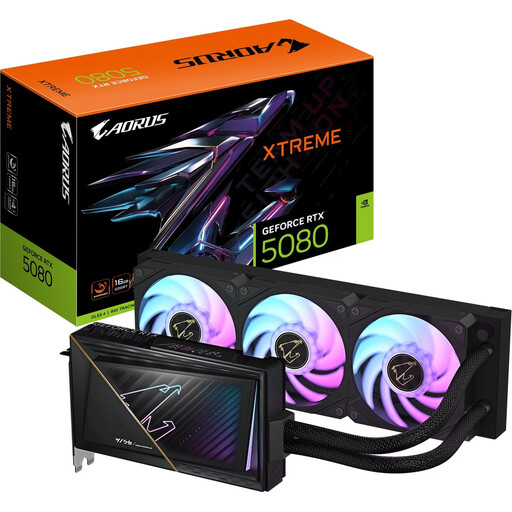
Why this product suits this profile: The water-cooling system is ideal for systems where graphics card width is restricted but there is room for a radiator inside the case.
The card is specified as 220 mm long and 2 slots wide. The additional radiator requirement is also clearly taken into account.
AORUS XTREME WATERFORCE cooling, 2-slot format and boost clock of up to 2.805 MHz.
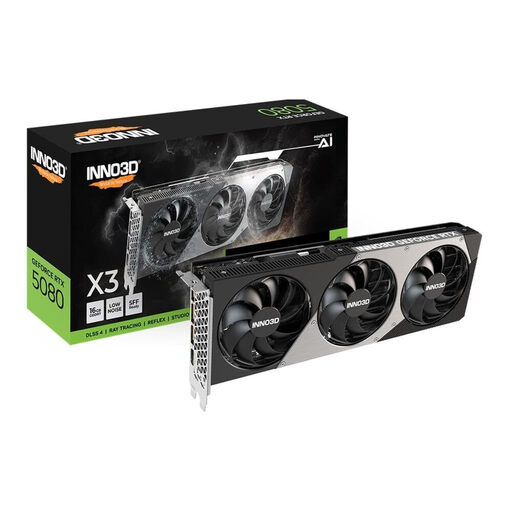
Why this product suits this profile: Measuring 300 × 116 × 41 mm and occupying 2.5 slots, this model is easier to accommodate in a space-constrained setup than particularly wide RTX 5080 versions.
The dimensions and 2.5-slot format are clearly specified, allowing you to measure your case accurately before buying.
Triple-fan cooling, 16 GB GDDR7 and support for up to four 8K output devices.
We have put together a complete, regularly updated list of products that fully meet these strict selection criteria and the safety regulations applicable in the EU.
Many models recommend an 850 W power supply. With a high-performance processor, several drives or overclocking, a higher capacity may be advisable. In addition to the wattage, a certified power supply and correctly connected 12V-2x6 connector are essential.
A fixed service life cannot be guaranteed. It depends on case ventilation, operating hours, ambient temperature, game requirements and the desired resolution. Regular dust removal, unobstructed fan openings and up-to-date drivers help support reliable operation over the long term.
The RTX 5080 is technically designed for high-resolution applications and supports both 4K and 8K output. For gaming, ray tracing, texture quality, frame rate and DLSS all influence the actual image. Before buying an RTX 5080, you should therefore establish which resolution and refresh rate your monitor actually uses.