
Lieferung heute & morgen

Qualitätsgarantie

Willkommens-Angebote freischalten: KOSTENLOSE Lieferung | Bis zu 80 % RABATT | Kostenlose 30-Tage-JoyPlus-Testphase
App herunterladen
Purchasing a high-end graphics card like the GIGABYTE GeForce RTX 5090 Gaming OC 32G is a significant investment. Anyone planning to buy an RTX 5090 is looking for maximum performance for 4K/8K gaming or professional applications. However, the path to the right purchasing decision is often filled with marketing hype and technical pitfalls. Many users invest in specifications they don't need or overlook critical compatibility issues that compromise the performance of their entire system.
As your Joybuy Product Recommendation Officer, I'm here to help you navigate these hurdles. We will focus on the objective facts and show you what to look for to make an informed decision and avoid expensive errors.
Before we dive into the technical details, let's clear up two common misconceptions that often lead to disappointment.
To ensure your investment is future-proof and delivers the expected performance, you should carefully examine three core parameters.
The GIGABYTE GeForce RTX 5090 Gaming OC 32G comes equipped with 32GB of GDDR7 graphics memory. While this may sound like overkill to many, it's a decisive factor for forward-thinking users.
As mentioned, cooling is critical. The factory-overclocked "OC" model from Gigabyte (model number: GV-N5090GAMING OC-32GD) requires a potent cooling system to maintain its higher clock speeds stably. Look for features like a large vapor chamber, multiple heatpipes, and high-quality fans.
At the same time, power consumption is a key consideration. A card like this needs a powerful, high-quality power supply. Before buying, check the manufacturer's recommended minimum wattage (often in the 1000W range or higher) and ensure your PSU has the necessary power connectors, typically a 16-pin (12VHPWR) connector.
Support for PCI Express 5.0 doubles the theoretical bandwidth compared to PCIe 4.0. This enables even faster communication between the GPU, CPU, and fast NVMe SSDs. While the advantage in current games is still moderate, it is an essential feature for future-proofing and for applications that stream large amounts of data.
Connectors like DisplayPort 2.1a are also crucial for driving future monitors at 4K with very high refresh rates or 8K displays without compression. Technologies like DLSS 4 leverage the new architecture's AI power to further boost frame rates at high resolutions.
Here are some recommendations tailored to different user profiles and budgets.
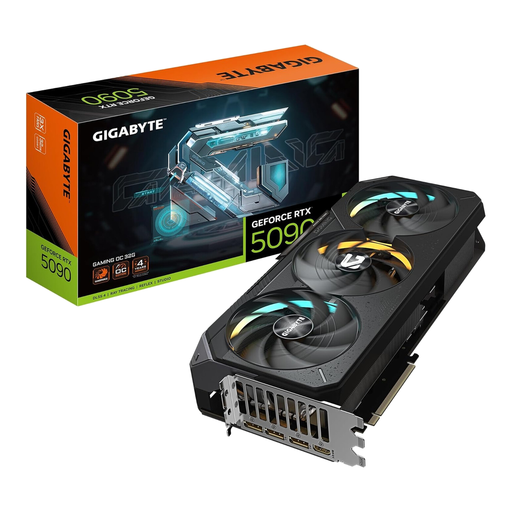
Why This Fits Their Persona: For users who demand the absolute maximum graphics performance for smooth 4K or 8K gaming at the highest settings with ray tracing. They are willing to pay the premium price for a future-proof solution.
Gigabyte's powerful WINDFORCE cooling system is designed to keep the OC version's high clock speeds stable even under sustained load, thus preventing performance loss from overheating.
32 GB of GDDR7 VRAM and a 512-bit interface provide enormous performance headroom for upcoming game titles and extremely high resolutions.
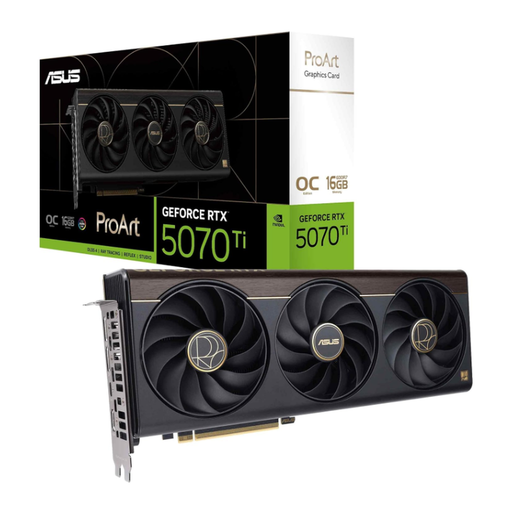
Why This Fits Their Persona: Ideal for video producers, 3D artists, and AI developers who need high, but above all, stable and reliable performance for their workflows. The focus is on certified drivers and professional features.
Instead of just focusing on gaming benchmarks, this card is optimised for application stability. You're not paying for extreme gaming features, but for reliability and specialised connectors like USB-C.
Offers a balanced combination of high computing power, 16 GB of GDDR7, and a design geared towards professional workflows with good case compatibility.

Why This Fits Their Persona: Perfect for gamers who want to leverage current technologies like DLSS 4 and the Blackwell architecture for excellent 1080p or 1440p gaming without spending the budget for a top-tier model.
This card offers a clear entry point into the new generation without forcing a complete system upgrade. Its lower power consumption and compact design are compatible with many existing systems.
The compact 2.5-slot design and efficient cooling with two axial-tech fans ensure broad compatibility with various cases and great performance for the price.
We have compiled a complete, real-time list of products that fully satisfy these strict selection criteria and UK safety regulations.
Although final specifications must be confirmed by manufacturers, a high-quality power supply with a rating of at least 1000 to 1200 watts is recommended for a graphics card in this performance class. Also, ensure that the PSU has a native 16-pin (12VHPWR) power connector or that a suitable adapter is included to guarantee a stable power supply.
Measure the available space in your case and compare it with the official dimensions of the graphics card (length, height, and width in slots). The GIGABYTE RTX 5090 Gaming OC is a large card, typically measuring over 30 cm in length and occupying 3 to 4 slots in width. Plan for additional space to ensure good airflow.
DLSS 4 (Deep Learning Super Sampling) is a key technology of the NVIDIA GeForce RTX 50-series. It uses AI to dramatically increase performance in supported games at high resolutions, often with the same or even improved image quality. For gamers playing in 4K or 8K, this is a very compelling reason to upgrade. Whether it's the deciding reason depends on the games you primarily play and your target resolution.