
Lieferung heute & morgen

Qualitätsgarantie

Willkommens-Angebote freischalten: KOSTENLOSE Lieferung | Bis zu 80 % RABATT | Kostenlose 30-Tage-JoyPlus-Testphase
App herunterladen
An RTX graphics card should deliver high frame rates, support ray tracing and perform reliably for streaming, video editing and AI applications. In practice, though, the GPU series and boost clock aren’t the only things that matter. Case size, power supply, VRAM and cooling all determine whether a card is the right fit for your system.
Many product pages quote a maximum output resolution of 8K. This mainly tells you which displays you can connect. It doesn’t mean that current games will run at high frame rates in 8K. For 1080p, 1440p and 4K gaming, the GPU chip, memory bandwidth, game settings and features such as DLSS 4 all matter.
A 3-slot or 3.8-slot card can block neighbouring PCIe slots. Length and height matter too: the ASUS ROG Astral GeForce RTX 5080, for example, is 357,6 mm long and 3,8 slots wide. For compact systems, consider cards such as the Palit GeForce RTX 5060 Ti Infinity, which is 291,9 mm long and 2 slots wide, or the Palit GeForce RTX 5050 StormX, which is 169,9 mm long and has a single-slot design.
According to its product specifications, an RTX 5080 can draw 360 W; a power supply of at least 850 W is recommended. Selected RTX 5070 Ti models draw 300 W, with a recommended power supply of at least 750 W. An RTX 5060, by comparison, draws around 145 W depending on the model and requires a power supply of at least 550 W. You’ll also need the right 12V-2x6 or 8-Pin connectors. Make sure the cables are fully plugged in and aren’t sharply bent at the connector.
An RTX 5060 or RTX 5050 is often enough for 1080p gaming, provided the rest of your hardware is up to the task. An RTX 5060 Ti with 16 GB of VRAM gives you more memory headroom for high-quality textures and demanding applications. For 1440p and 4K, consider models in the RTX 5070 and RTX 5070 Ti classes. The RTX 5080 is aimed at users who prioritise high settings, ray tracing, 4K gaming or demanding creative workloads.
This is a general guide. Actual performance depends on the game, image quality, processor and upscaling technology you use.
A GDDR7 graphics card offers high memory speeds. However, memory type alone doesn’t tell the whole story. Memory capacity and the memory interface are important too. A graphics card with 16 GB of VRAM can offer advantages when working with high-resolution textures, video projects and several applications at once.
Examples from our selection:
More fans can help dissipate heat, but they also take up extra space. Triple-fan and quad-fan coolers won’t automatically fit every case. Before buying, compare the following:
A PCIe 5.0 graphics card will generally work in a compatible PCIe slot of a different generation, but depending on the platform, it may not be able to use the maximum interface bandwidth. DisplayPort 2.1b and HDMI 2.1b are useful for high refresh rates and modern monitors, but they can’t make up for insufficient GPU performance.
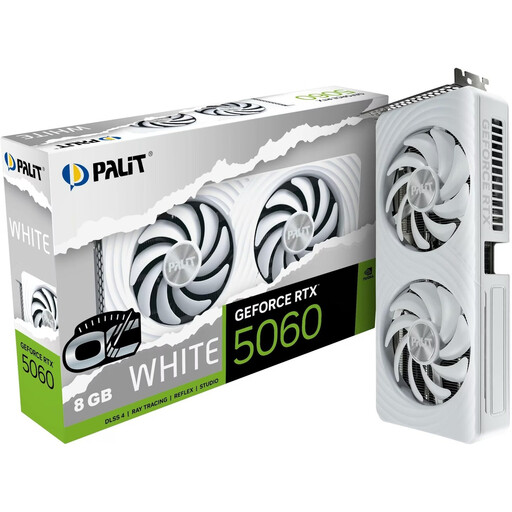
Why this product suits this profile: The white RTX 5060 is designed for 1080p and 1440p gaming, and is a good fit for more compact gaming PCs. It has 8 GB GDDR7, PCIe 5.0 and a 2-slot design.
At 262,2 mm long and 40,1 mm high, it’s easier to plan around when choosing a case. The recommended power supply is 550 W.
8 GB GDDR7, 3× DisplayPort 2.1b, 1× HDMI 2.1b and support for up to four monitors.
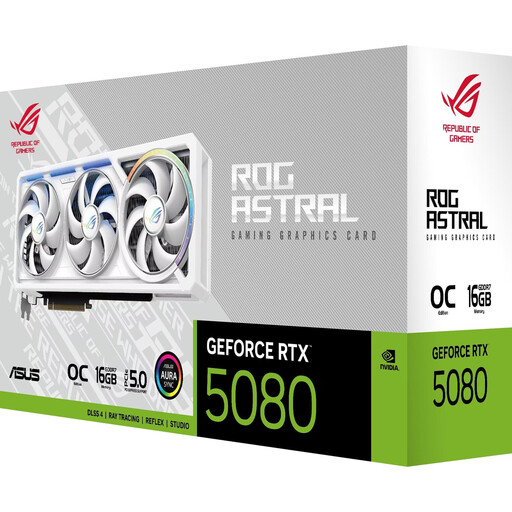
Why this product suits this profile: This card combines 16 GB GDDR7 with a quad-fan cooler, making it suited to systems for 4K or 8K output, rendering and demanding games.
The product specifications clearly state its 3.8-slot design, 357,6 mm length and recommended 850 W power supply, making it easier to check compatibility.
10,752 CUDA cores, 960 GB/s memory bandwidth, plus 3× DisplayPort 2.1b and 2× HDMI 2.1b.
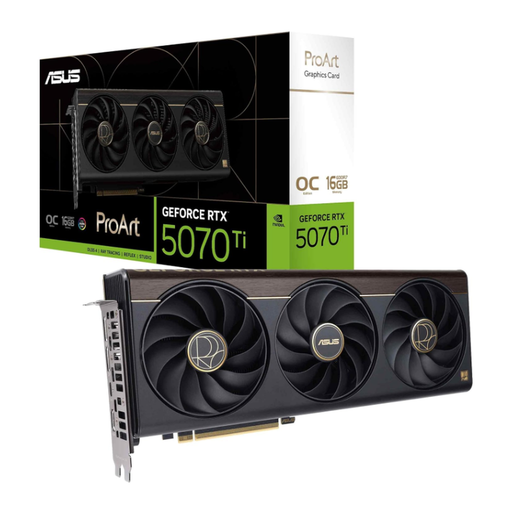
Why this product suits this profile: The ProArt edition is designed for content creators and users who combine gaming with video editing, 3D applications or AI workflows.
Its 2.5-slot design takes up less space than larger coolers. You should still check the stated card length against your system.
16 GB GDDR7, a 256-bit memory interface, boost clock speeds of up to 2.610 MHz in OC mode and a USB-C connection.
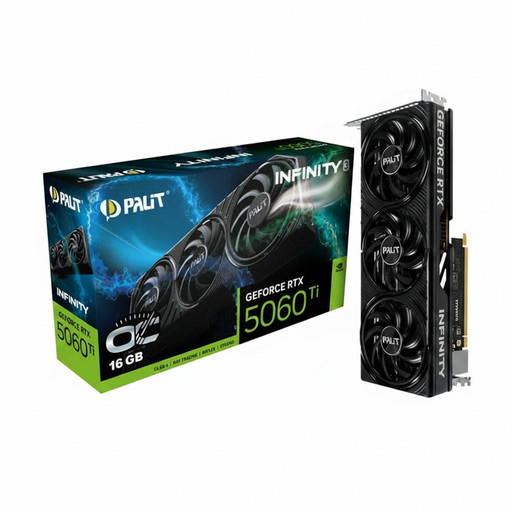
Why this product suits this profile: This 2-slot card with SFF-Ready compatibility is designed for users with small desktop cases who need 16 GB of VRAM for games and applications.
At 291,9 mm long, with a 2-slot design and 180 W power draw, its case and power supply requirements are relatively modest. The manufacturer recommends a 600 W power supply.
16 GB GDDR7, 3× DisplayPort 2.1b, 1× HDMI 2.1b and support for up to four monitors.
We’ve put together a complete, regularly updated list of products that meet these strict selection criteria and fully comply with EU safety regulations.
Before installation, switch off your PC completely and unplug it from the mains. Handle the card by its edges and avoid touching the gold contacts. Once it’s installed, it’s worth checking the following:
Your electricity costs will depend on how long you play, the card’s power draw and your electricity tariff. A card with higher power consumption may use more energy with daily use, even if it isn’t constantly running at full load.
Depending on the game and the level of detail you want, models such as the RTX 5060 Ti or RTX 5070 may be suitable for 1440p. Ray tracing and high frame rates may require extra GPU headroom. DLSS 4 can affect image output in supported games, but it can’t replace suitable core hardware.
For many 1080p systems, 8 GB is a reasonable starting point. If you’re planning to use high-quality textures, play at 1440p, run creative software or keep your card for longer, you could consider an RTX graphics card with 16 GB of VRAM. The right choice depends on the game, software and project settings.
Lifespan depends on temperature, dust, hours of use and power supply quality. Keeping the fans clear, choosing a suitably rated power supply and cleaning the card regularly can help improve operating conditions. There’s no reliable way to guarantee a fixed lifespan for individual models.