
Lieferung heute & morgen

Qualitätsgarantie

Willkommens-Angebote freischalten: KOSTENLOSE Lieferung | Bis zu 80 % RABATT | Kostenlose 30-Tage-JoyPlus-Testphase
App herunterladen
If you are looking for RTX graphics cards for gaming, video editing or AI applications, you will quickly come across many similar product names. However, an NVIDIA GeForce RTX 5080, RTX 5070 Ti or RTX 5060 Ti can differ considerably in terms of memory capacity, power consumption, form factor and cooling. The description “gaming graphics card” alone therefore says little about whether a model is suitable for your existing PC.
As a Joybuy Product Recommendation Officer, I filter the relevant market data according to practical criteria. This makes it easier to assess marketing terms and avoid common purchasing mistakes.
Many product descriptions mention 8K support. This primarily refers to the possible signal output via DisplayPort or HDMI. Smooth 8K gaming also depends on the specific game engine, graphics settings, refresh rate and use of upscaling.
An RTX graphics card for 4K gaming should not be selected based solely on its maximum resolution either. CUDA cores, memory bandwidth, VRAM and the required ray-tracing performance are more relevant to real-world use.
A graphics card with 16 GB VRAM provides more memory headroom for high texture details, large projects and certain AI or 3D workloads. A graphics card with 8 GB VRAM, on the other hand, may be sufficient for Full HD and many WQHD scenarios. The key factors are which games and programmes you use and how long you intend to keep the card.
More VRAM cannot compensate for insufficient processing power. Memory capacity and GPU class must be considered together.
Triple-fan models are often several slots wide and more than 30 cm long. According to the product specifications, cards such as the GIGABYTE GeForce RTX 5080 Gaming OC measure 340 × 140 × 70 mm and use a 4-slot design. This may block adjacent expansion slots.
Powerful NVIDIA Blackwell graphics cards also generally require a 12V-2x6 connector and a suitably rated power supply. Before buying, compare the manufacturer’s specifications for power-supply wattage and cable type with your own system.
The current selection includes RTX 5080, RTX 5070 Ti, RTX 5070, RTX 5060 Ti and RTX 5060, among others. According to the product data, the RTX 5080 models in this selection are based on the NVIDIA Blackwell architecture, feature 10,752 CUDA cores and have 16 GB GDDR7. The RTX 5070 Ti is specified with 8,960 CUDA cores and also 16 GB GDDR7.
For 1440p gaming, an RTX 5070 or RTX 5060 Ti may be a good fit. For 4K, demanding ray tracing, rendering or extensive video projects, higher model classes provide more performance headroom. Actual gaming performance still depends on the software, processor and settings.
A GDDR7 graphics card uses modern video memory with a high data rate. The RTX 5080 models in this selection are specified with 16 GB GDDR7, a 256-bit interface and memory bandwidth of 960 GB/s. The RTX 5070 Ti is listed with 16 GB and 896 GB/s, while the RTX 5070 offers 12 GB and 672 GB/s.
These figures are particularly relevant for high resolutions, large textures, 3D scenes and multi-monitor setups. For compact systems and typical 1080p applications, smaller memory and cooling solutions may be more suitable.
A PCIe 5.0 graphics card can generally be installed in a compatible PCIe x16 slot. Existing systems with older PCIe generations may also be compatible, but actual platform compatibility should be checked against the motherboard, power supply and case.
DisplayPort 2.1 and HDMI 2.1 support modern monitors as well as high resolutions and refresh rates. Several cards in the selection offer up to four monitor connections. Power-supply requirements vary considerably: 550 watts are recommended for some RTX 5060 models, while RTX 5080 products often require 850 watts or more. The relevant manufacturer specification remains the deciding factor.
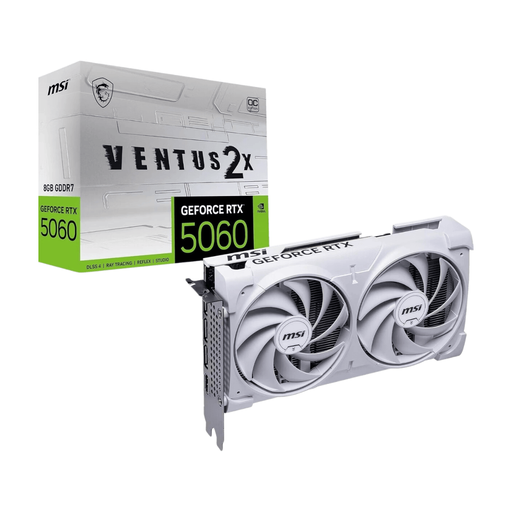
Why this product suits the profile: The compact RTX 5060 is aimed at users with a 1080p or 1440p monitor and an existing power supply rated at 550 watts or more. The card is 197 mm long, making it suitable for a range of desktop cases.
The product data specifies 8 GB GDDR7, PCIe 5.0, an 8-pin connector and a length of 197 mm. This makes the memory, power requirements and space needed easier to assess.
8 GB GDDR7, 3 × DisplayPort 2.1b, 1 × HDMI 2.1b and a dual-fan cooling system.
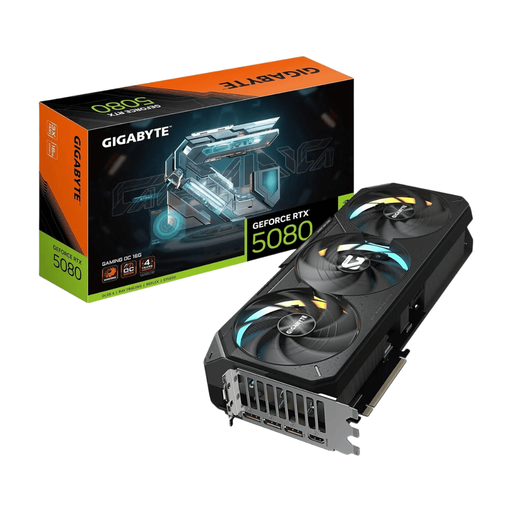
Why this product suits the profile: For 4K gaming, ray tracing and creative applications, the manufacturer’s specifications list 16 GB GDDR7 and memory bandwidth of 960 GB/s.
The selection considers not only the RTX chip, but also the 340 mm length, four occupied slots and the recommended 850-watt power supply.
16 GB GDDR7, PCI Express 5.0, 3 × DisplayPort 2.1b and 1 × HDMI 2.1b.
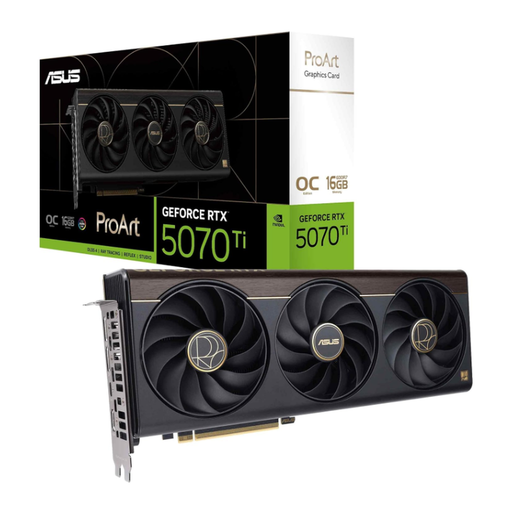
Why this product suits the profile: The card combines 16 GB GDDR7 with a 2.5-slot design and a USB-C connection. This makes it an interesting option for content creators and users with multiple peripherals.
Alongside DLSS 4 and the Blackwell architecture, the product details specify the dimensions, memory capacity and interfaces. This makes planning a work or gaming PC easier.
16 GB GDDR7, 256-bit memory interface, USB-C and a 2.5-slot form factor.
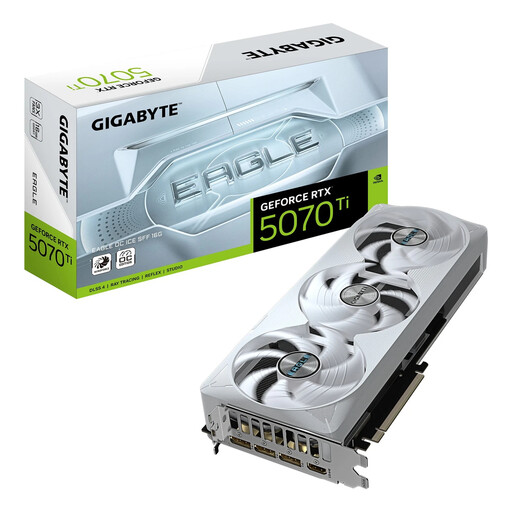
Why this product suits the profile: The SFF-Ready designation and dimensions of 304 × 126 × 50 mm make it easier to choose a card for smaller cases, provided three slots are available.
The SFF designation is not treated as meaning an especially small form factor. Check the actual length, height and slot width against your case before ordering.
16 GB GDDR7, 256-bit interface, PCIe 5.0 and three DisplayPort connections.
We have put together a complete, regularly updated list of products that fully meet these strict selection criteria and the safety regulations applicable in the EU.
This depends on the game, frame rate and ray-tracing settings. Models such as the RTX 5080 and RTX 5070 Ti in the current selection feature 16 GB GDDR7 and are designed for high resolutions. An RTX 5070 may also be suitable if you use adjusted settings or upscaling.
For Full HD and many WQHD games, 8 GB may be sufficient. If you are planning to use high texture details, 4K, modifications, 3D programmes or video projects, compare models with 12 or 16 GB. The amount you need depends on your software and workflow.
Power consumption varies significantly between model classes. For example, the product data specifies 145 watts for an RTX 5060 and 360 watts for several RTX 5080 cards. Actual running costs depend on usage time, load, electricity tariff and the other components in your PC.