
Lieferung heute & morgen

Qualitätsgarantie

Willkommens-Angebote freischalten: KOSTENLOSE Lieferung | Bis zu 80 % RABATT | Kostenlose 30-Tage-JoyPlus-Testphase
App herunterladen
An RTX 50 graphics card should deliver high frame rates and be a good fit for your power supply, case and intended use. PC gamers often focus on the GPU model and boost clock, but overlook important details such as video memory, card length and power connector. This can mean extra costs for PC builders in the UK, such as buying a larger case, a more powerful power supply or better cooling.
This buying guide from the Joybuy Product Recommendation Officer explains which specifications really matter when choosing an NVIDIA GeForce RTX 50 Series card, and which models suit different types of user.
A high boost clock sounds impressive at first. However, CUDA cores, memory capacity, memory interface, cooling and power consumption also matter when choosing a gaming graphics card. Two cards with the same GPU chip can differ in their cooler, dimensions and factory settings.
Many powerful cards need three or more slots. The GIGABYTE AORUS GeForce RTX 5080 MASTER 16G, for example, is 360 mm long and 150 mm wide. According to the product specifications, the GIGABYTE GeForce RTX 5080 Gaming OC takes up four slots and measures 340 × 140 × 70 mm. Before buying, check the card’s length, width and height, as well as the clearance around other PCIe slots.
The RTX 5080 models in this selection have a specified power draw of 360 W and a recommended 850 W power supply. For the Palit RTX 5090 model mentioned here, a power supply of 1,000 W or more is recommended. It’s also essential to fully insert a certified 12V-2x6 connector, or the cable specified by the manufacturer. Only use an adapter if it’s suitable for the particular combination of components.
Memory specifications affect how well a card can handle high-resolution textures, large 3D scenes and multiple applications running at once. An RTX 50 Series graphics card with GDDR7 offers high memory bandwidth:
An RTX 5060 or RTX 5070 may be enough for 1440p gaming, while 4K gaming, 3D rendering and AI workloads can benefit more from additional memory. The right choice depends on your software, settings and project size.
The Blackwell graphics card supports the latest technologies, including DLSS 4, provided the game and installed driver support these features. Depending on the game, DLSS can change how images are rendered and upscaled. Its actual effect depends on the software and settings, so it isn’t a general guarantee of improved performance.
Connections matter if you’re using multiple monitors. Many models have three DisplayPort connections and one HDMI connection. According to the manufacturers, the RTX 5080 variants in this selection support up to four monitors and a maximum resolution of 7,680 × 4,320 pixels. You’ll need to check that your monitor, cable, refresh rate and DSC support are compatible.
A large cooler can be useful during extended periods of heavy use, but it needs enough room. Check the following:
A PCIe 5.0 graphics card can be used in many systems. However, the actual connection speed depends on the motherboard, processor, slot and BIOS configuration. For example, the Palit RTX 5090 model in this selection is listed as PCIe 4.0 x16, while the RTX 5080 and RTX 5070 models mainly use PCIe 5.0.
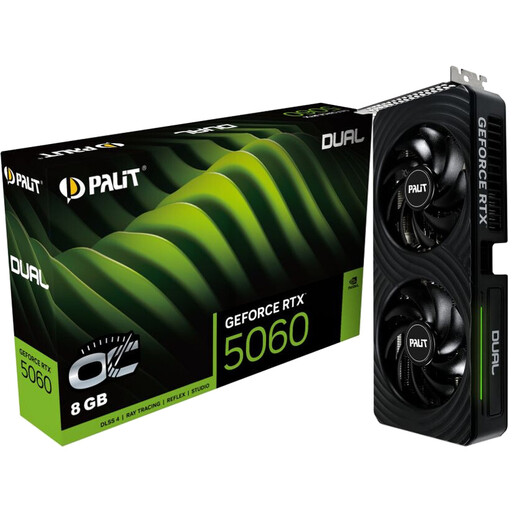
Why it suits this type of user: This compact, dual-slot card is designed for desktop PCs where space and moderate power consumption are important.
The product specifications list a 145 W TDP, a two-slot design and a recommended power supply of at least 300 W. This makes it easier to check compatibility.
8 GB GDDR7, PCIe 5.0 x8, three DisplayPort connections and one HDMI 2.1b connection.
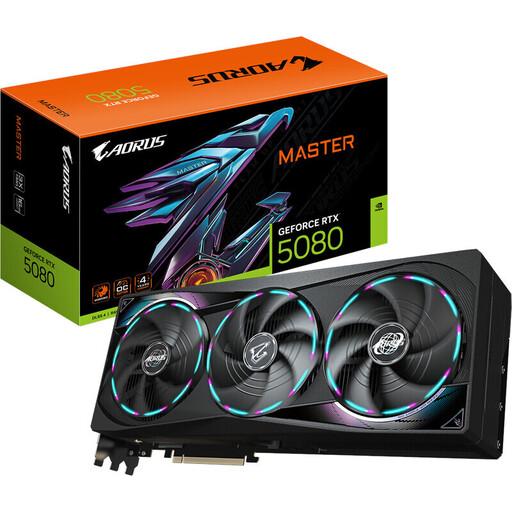
Why it suits this type of user: This card combines 16 GB GDDR7 with comprehensive cooling and connections for high-resolution multi-monitor setups.
The product description clearly states that it is 360 mm long and 150 mm wide, and recommends an 850 W power supply.
10,752 CUDA cores, 960 GB/s memory bandwidth, PCIe 5.0 and three DisplayPort 2.1b outputs.
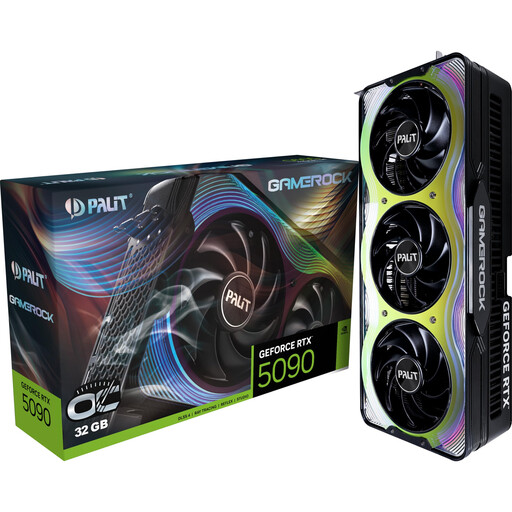
Why it suits this type of user: 32 GB of memory and a wide memory interface make this card worth considering for large 3D scenes, AI applications, and 4K and 8K workloads.
The specifications list a length of 332 mm, a support bracket to prevent GPU sag and a recommended power supply of at least 1,000 W.
21,760 CUDA cores, 32 GB GDDR7, 512-bit and 1,792 GB/s memory bandwidth according to the product specifications.
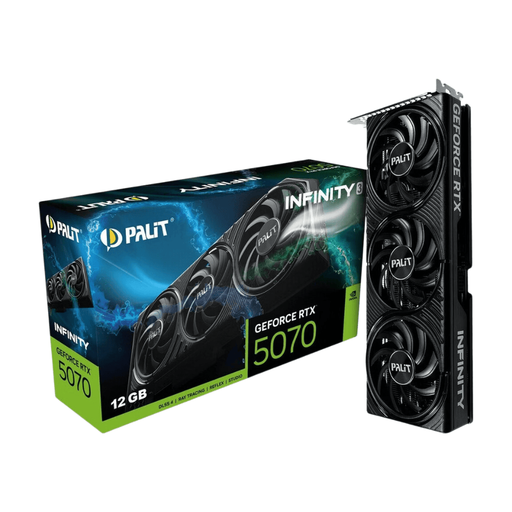
Why it suits this type of user: Its dual-slot design and SFF-Ready certification make it easier to fit into more compact desktop cases.
At 291.9 mm long and 41.3 mm high, it places fewer demands on your case than many larger RTX 50 cards.
12 GB GDDR7, PCIe 5.0, three fans, DLSS 4 support and a stated recommended power supply of 650 W.
We’ve put together a complete, regularly updated list of products that meet these strict selection criteria and fully comply with the safety regulations in force in the EU.
Depending on the game, quality settings and frame rate you’re aiming for, options for 4K gaming include the RTX 5070, RTX 5070 Ti and RTX 5080. The RTX 5080 models in this selection have 16 GB GDDR7 and 960 GB/s memory bandwidth. It isn’t possible to give a general frame rate, as the game engine, processor, drivers and DLSS settings all affect the result.
It depends on the model and the rest of your system. The selected product specifications, for example, recommend 300 W for the RTX 5060, 650 W for the RTX 5070, 750 W for the RTX 5070 Ti and 850 W for several RTX 5080 variants. For the RTX 5090, a power supply of at least 1,000 W is recommended. You’ll also need to consider the connectors, cable quality and having enough power in reserve.
There’s no reliable way to guarantee a set lifespan. Factors include temperature, dust, hours of use, power supply quality and mechanical stress. Regular cleaning, unobstructed airflow, correctly fitted cables and a support bracket for heavy cards can help improve operating conditions. Check the relevant warranty and returns policy before you buy.