If you only need to label files with a year that’s already available, pre-printed labels may be enough. For changing years and additional file titles, a label maker gives you more flexibility. The key factors are the format you need, the right consumables and how you’ll use it at your workstation. If you’re keeping files for a long time, check how durable the specific label is.
Which option is right for you?
School offices labelling files every year
If you label lots of files every year, you can choose between pre-printed year labels and labels you create yourself. Avery Zweckform offers pre-printed year labels, while Brother has devices for creating your own labels.
Admin teams with changing file titles
If you want to add short titles as well as the year, look for a suitable label format and an easy-to-use text input method. Brother and DYMO describe models operated via a keyboard or computer.
Long-term records storage
For files you’ll be keeping for longer, the material matters too: Brother notes that DK labels are not designed for long-lasting, permanent labelling.
What should you look for when buying?
Pre-printed year labels
A good fit if: You only need one of the available years on the file spine and don’t need to add your own text.
Bear in mind: The year and format are limited to the labels available.
Label maker
A good fit if: You want to create year labels and changing file titles yourself.
Bear in mind: The device must be compatible with the tape or roll. Also consider whether you want to work from a keyboard, computer or mobile device.
For files in a school office, first decide whether a year on its own is enough or whether you also need to add individual titles.
| What you need |
What to check when buying |
Who it matters most to |
| Reusability and flexibility |
Check whether a pre-printed year is enough or whether you also want to enter your own titles. |
If I label files every year and want to add titles flexibly, I need one solution that does both. Around 36% of consumers prioritise repeat labelling and the ability to make changes. |
| Readability and space |
Measure the usable space on the file spine, then check it with a sample text and the intended tape width. |
If I want to add a longer title alongside the year, I’d like to check in advance that the format and text will fit. Around 29% of consumers place particular importance on readability and space. |
| Input method at work |
Decide whether you want to create labels on the device, on a computer or using a smartphone or tablet. |
If I create labels in the school office, the input method should work with the devices available there. Around 21% of consumers focus above all on having the right input method. |
| Durability and material |
Compare the tapes or rolls compatible with the device and choose the material to suit how long the files will be stored. |
If I need files to remain legible for a long time, I want to choose label material that suits how long they’ll be used. Around 14% of consumers pay particular attention to durability and consumables. |
Common buying and usage mistakes
-
Focusing only on the device
Brother P-touch uses compatible TZe tapes, the DYMO LabelManager 280 uses D1 tapes, and the Brother QL-800 uses DK rolls. These consumables are not interchangeable.
Compare the device and its intended materials together before deciding what to buy.
Remember to factor in replacing the tapes or rolls that are compatible with your chosen model when needed.
-
Using any roll label for a long-term archive
Brother specifically notes that DK labels are not designed for long-lasting, permanent labelling.
Choose the material to suit how long the labels need to last. For long-term labelling, Brother recommends laminated P-touch labels.
If you need to relabel files later, this could mean extra work.
-
Overlooking how an app-based device works
According to Brother, the Brother PT-P300BT is set up using a smartphone or tablet app; it does not offer its own keyboard as an alternative.
If you want to enter text by the filing shelves without a mobile device, look for a model with its own keyboard.
A guide to relevant brands
Brother
Brother offers P-touch devices for creating custom labels and QL desktop printers for compatible roll formats. The systems use different consumables.
- According to the official specifications, the PT-D210 handles TZe tapes up to 12 mm, while the PT-D410 handles TZe tapes up to 18 mm and offers USB. The QL-800 uses DK rolls.
- Brother notes that DK labels are not designed for long-lasting, permanent labelling. This information applies to the models and materials listed.
DYMO
The DYMO LabelManager 280 is a keyboard label maker for creating your own office labels.
- DYMO says that you can operate the model using its keyboard or a connected PC or Mac.
- The LabelManager 280 uses D1 tapes in 6, 9 or 12 mm widths. The device and cassette must be compatible.
Avery Zweckform
Avery Zweckform offers pre-printed year labels as an alternative to creating your own.
- The manufacturer lists its year label as an opaque 60 × 24 mm format for covering old labels.
- A pre-printed label is not suitable for custom text or years that aren’t included in the range.
Label makers at Joybuy
The Joybuy products below are app-controlled label makers for creating custom labels. Before choosing one, check whether using a mobile device fits your workflow.
 No image available
Phomemo M110 label printer with 1 label roll
For changing years and short file titles, if you want to create labels using an app.
According to the product details, it supports label widths from 20 to 50 mm.
The Print Master app and an iOS or Android device are required for designing and connecting.
View at Joybuy
 No image available
Phomemo P15 2-in-1 satin ribbon label printer with 1 refill
For creating your own text labels if you want to use a mobile phone or tablet.
According to the product description, the app offers symbols, borders and several fonts.
Design labels using a mobile phone or tablet via Bluetooth.
View at Joybuy
 No image available
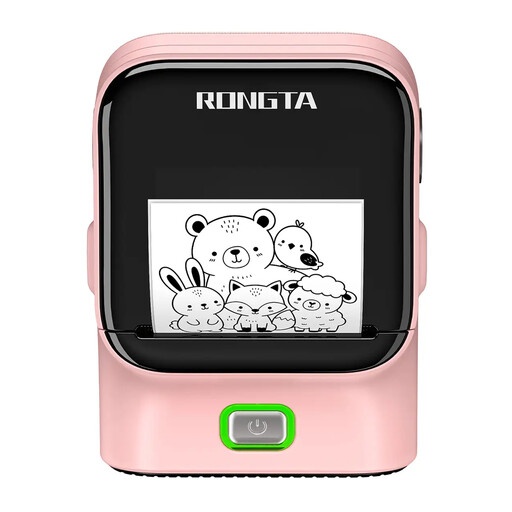
RONGTA R22A/B label printer, Bluetooth and USB
For office organisation labels if Bluetooth or USB connectivity suits your workflow.
The product description lists 203 DPI and a print width of 48 mm.
The described Bluetooth operation uses a smartphone app.
View at Joybuy
 No image available
Phomemo D30 Bluetooth label printer with 1 refill
For custom office labels if you want to create the text using a mobile phone or tablet.
The product details list Bluetooth and a built-in rechargeable battery.
Design and print using a Bluetooth connection with a mobile phone or tablet.
View at Joybuy
Frequently asked questions
How do I choose between 12 mm tape and a wider label?
First, measure the usable space on the file and check it with a sample text. The Brother PT-D210 supports TZe tapes up to 12 mm, while the PT-D410 supports tapes up to 18 mm. Brother lists a maximum print height of 15.8 mm for the PT-D410 when using 18 mm tape; the actual character size may be smaller.
Do I need a computer or smartphone to use a label maker in the school office?
It depends on the model: the Brother PT-D210 and DYMO LabelManager 280 have a keyboard, while the Brother PT-D410 also offers USB input. The Brother PT-P300BT is set up using a smartphone or tablet app. Choose according to which work devices are available for entering text.
Which material is suitable for files that will be used for longer?
First check which materials are compatible with your device: P-touch devices need the relevant TZe tapes, the LabelManager 280 uses D1 tapes, and the QL-800 uses DK rolls. Brother does not consider DK labels suitable for long-lasting, permanent labelling and recommends laminated P-touch labels for long-term use.
Can names or other personal pupil data appear on visible file labels?
There’s no blanket yes or no for every label. The General Data Protection Regulation also applies to public bodies in Germany, and personal data must have a valid legal basis for processing. The school should assess whether visible information is necessary and permitted for the specific purpose and depending on who can access the file. A year on its own does not include this additional personal information.


