Layout team working in one place
You put together lots of pages with images and text, so the right software and a usable screen area are your main priorities.


Choose your laptop to suit your layout software and print workflow first. Screen size and portability should come into the decision afterwards. If you do a lot of layout work at a shared desk, a larger built-in display gives you more room to work, while a more compact device can be more practical if you often move between workspaces. Managing access permissions and keeping a separate backup are important tasks with any laptop.
You put together lots of pages with images and text, so the right software and a usable screen area are your main priorities.
You hand over drafts at a shared workstation. Clear editing permissions, easy-to-find files and separate backups matter to you.
You take your laptop to meetings or other workspaces, so you need to weigh up screen space, portability and connectivity.
Start by choosing your layout software and print export. Then compare the display, connections and portability with the way you actually work. You’ll need to manage access permissions and backups separately, whatever device you choose.
| What you’re looking for | What to check | Who it matters to |
|---|---|---|
| Software and print workflow | Check the software, operating system, processor and PDF export against the requirements of your specific workflow. For InDesign 21.3 and later, Adobe recommends 16 GB RAM; this recommendation doesn’t apply across the board to other programmes. | If I need to use a particular layout programme and print service, I want a laptop that’s a good fit for both. Around 36% of consumers put software and print workflow first. |
| Screen and image checking | Compare the display size and resolution of the exact model variant. For detailed photo checks, also look at the display specifications. A larger display alone doesn’t guarantee a particular level of colour accuracy. | If I’m checking pages and photos side by side at a fixed workstation, the amount of visible workspace matters to me. Around 29% of consumers prioritise screen space and image checking. |
| Handovers and backups | Set editing, commenting and viewing permissions, and arrange a separate backup method for local files. The Federal Office for Information Security recommends regularly checking that backups are complete and readable. | If several people are editing or commenting on drafts, I want to assign access clearly and be able to restore files. Around 21% of consumers put handovers, access permissions and backups first. |
| Portability and connections | Check the connections on the exact laptop variant against your existing monitors, storage devices and input devices. Check separately whether you need adapters and what’s included in the box. | If I take the device between meetings and workspaces, I want to be able to connect it to the peripherals I already have. Around 14% of consumers prioritise portability and connectivity. |
Adobe recommends 16 GB for InDesign 21.3 and later. This isn’t a general minimum requirement for every browser-based editor.
First, decide which programme you’ll use, then compare its requirements with the exact laptop variant.
Lenovo lists a colour gamut of 45% NTSC for the ThinkPad E16 Gen 3 variant 21ST001YGE. Screen size and resolution don’t tell you everything about colour reproduction.
If you need to assess photos in detail, check the display specifications for the exact variant and your intended print workflow separately.
Canva offers separate permissions for editing, commenting and viewing. A shared file isn’t a separate, verified backup.
Limit sharing to the people who need access and set up a separate backup method.
Connections and what’s included in the box can vary between specific configurations. For example, the MacBook Air M5 variant listed on Joybuy is described as coming without a power adapter.
Before you buy, compare the exact model variant with your devices and the accessories you’ll need.
You may need an extra adapter to connect your existing devices. Also check whether a power adapter is included if you need one.
The ThinkPad E16 Gen 3 is an example of a larger Windows business laptop for a layout workspace that’s used mainly in one place.
The TravelMate P2 16 is a 16-inch option with connections suited to a shared workstation.
The Vivobook 16 M1607KA-MB053W is a larger Windows option with several types of connection.
The 13-inch MacBook Air M5 is a more compact macOS option, provided your yearbook software and peripherals are compatible.
These Joybuy models have been selected for layout work at a shared desk. Before buying, check that the software, connections and exact specifications suit the way your team works.
 No image available
This 16-inch model is designed for layout work at a shared desk. Check that it’s compatible with your software and existing peripherals.
16-inch WUXGA display with 1920 × 1200 pixels, AMD Ryzen 3 PRO 7335U, 16 GB DDR5 RAM, 512 GB SSD and Windows 11 Pro Education.
The product description lists USB4, USB-A, HDMI and RJ-45.
 No image available
The product title describes a 16-inch laptop with Windows 11 Pro. Check that the exact specifications suit your layout programme.
The product title lists an Intel Core i5-8210Y, 16 GB RAM, a 512 GB SSD and RJ-45.
 No image available
This 16-inch model is an option for layout work at a fixed workstation. Check the display specifications against your specific print workflow.
WUXGA IPS display with 1920 × 1200 pixels, 16 GB DDR5 RAM, 512 GB SSD and Windows 11 Pro.
The product specifications list USB-A, USB-C and HDMI, as well as a weight of 1.75 kg.
 No image available
This 16-inch model is designed for layout work at a shared desk. Before choosing it, check that the exact software and connections meet your needs.
The product title lists an AMD Ryzen 5 6600H, 16 GB RAM, a 512 GB SSD and a German keyboard.
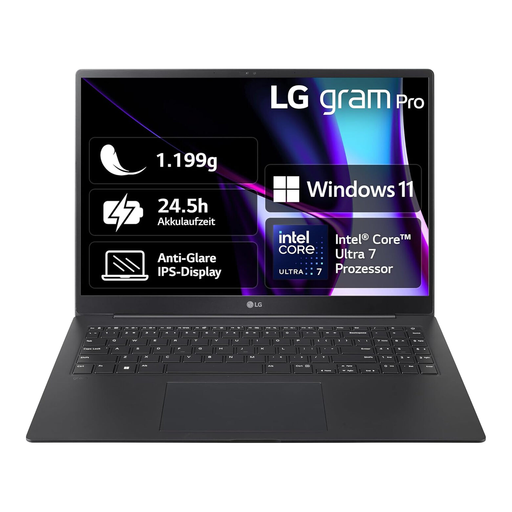 No image available
This model combines a 16-inch display with a listed weight of 1.19 kg. Check that its connections and software are right for the way you plan to use it.
IPS display with 2560 × 1600 pixels, 16 GB RAM, 1 TB SSD and Windows 11.
The product description lists USB-C and HDMI.
Adobe’s published general requirements for InDesign 21.3 and later don’t make a dedicated graphics card a universal requirement. Check the requirements for the programme and features you’ll actually use. Adobe’s additional GPU specifications relate to optimal GPU performance.
If you use Canva, you can assign separate permissions for editing, commenting and viewing. For local files, you’ll also need a shared system for storing and backing them up. The Federal Office for Information Security recommends making backups regularly and checking from time to time that they’re readable.
Before ordering, check which software you need, what’s included and whether you may need adapters. For a typical online consumer purchase in Germany, you generally have a 14-day right to cancel. Your statutory warranty rights against the seller are separate from any voluntary guarantee.
No. Buying a laptop or using a technical sharing feature doesn’t in itself give you permission to process or publish photos. The Rhineland-Palatinate data protection authority explains that identifiable photos of people require consent or another appropriate legal basis. The school responsible must establish which permissions apply to the specific yearbook, the service used and how it will be distributed.
Follow the requirements of the print service you’ve chosen. CEWE gives one specific example: using an InDesign template generator and exporting the cover and inside pages as PDFs according to its own specifications. This doesn’t mean there’s one universal file format for every print service.