First, choose a gamepad that works with your platform and the specific RPG you want to play. Then consider power, comfort and extra features. Valve points out that gamepad-only controls work only in games that support gamepads. Glare in a bright room, on the other hand, depends on your screen and the light coming into the room, not your controller; Sony notes that lighting conditions can affect image quality.
Which controller is right for you?
RPG players with a dedicated console
If you mainly play on PS5, Xbox or a particular generation of Switch, your controller should be compatible with that specific platform. Microsoft, Sony and Nintendo each specify which platforms and models their controllers support.
PC players who enjoy long sessions
Whether you play at a desk or on the sofa, check game support, connectivity and power together. Valve points out that gamepad-only controls require a game designed to support them.
Players looking for extra features
If you want to assign frequent actions to extra buttons or use supported effects, check the features available in the specific game and controller. Sony, 8BitDo and PowerA describe features whose usefulness depends on the model and game support.
What should you look for when buying?
Check your platform and game first, then consider the things that affect your everyday gaming: visibility in a bright room, power and which extra features you can actually use.
| Buying priority |
What to check |
Who it matters most to |
| Platform and game compatibility |
Check the platform, full model name and whether the RPG supports gamepads; also check the available connection options. |
If I’m looking for a controller for my console or PC, I want it to work with the specific RPG too; around 33% of consumers put compatibility first. |
| Playing in a bright room |
Assess screen position, incoming light and suitable display settings separately from your controller choice. |
In a bright room, I want to see the action clearly, so I’d check for reflections and adjust the screen position first; around 20% of consumers prioritise visibility in daylight. |
| Comfort and power |
Check the grip, batteries or rechargeable battery, and the space needed for cables, a receiver or charging dock on the specific model. |
For longer gaming sessions, I want a comfortable controller with a suitable power source; around 27% of consumers put these points first. |
| Extra controls and feedback |
Check which extra buttons are available and how they can be configured; for effects, check game support and, on PC, whether USB is required. |
If I want easier access to frequent RPG actions or to use supported effects, I’ll check how useful they are in practice; around 20% of consumers prioritise extra controls or feedback. |
Common buying mistakes to avoid
-
Expecting controller lighting to fix screen glare
Lighting on your controller won’t change the light falling on your screen. Sony notes that the lighting conditions in a room can affect image quality.
Check your screen position, reflections and available display settings before choosing a controller for its lighting.
-
Assuming PC compatibility means every in-game effect will work
Sony says adaptive triggers require game support. Haptic feedback on PC also requires a compatible game and a USB connection.
Check that the features you want work with the specific RPG and your chosen connection method.
-
Assuming similarly named Switch controllers are interchangeable
Nintendo says the Switch 2 Pro Controller is only for Switch 2; it is not the same model as the older Switch Pro Controller.
Before buying, compare the full model name with your Switch generation.
-
Overlooking power and space requirements
The models covered here vary in their power and connection options, including AA batteries, a receiver with charging dock, and wired use.
For the specific model, check what’s included, which ports are available and whether you have space for a cable, receiver or dock.
Key brands at a glance
Microsoft Xbox
Xbox controllers for Xbox consoles and supported Windows games.
- Microsoft lists Bluetooth, a hybrid D-pad and customisable button mapping. For Windows, connection options include USB, Bluetooth or the Xbox Wireless Adapter.
- The Xbox Wireless Controller uses AA batteries or a compatible rechargeable power solution; check support for the specific RPG separately.
Sony PlayStation
DualSense controllers for PS5 and supported PC games, if game-dependent trigger or haptic features matter to you.
- Sony lists adaptive triggers and haptic feedback as DualSense features.
- These features require game support; Sony also says haptic feedback on PC requires USB. That doesn’t mean they’ll benefit every sci-fi RPG.
Nintendo
Pro Controllers for each Switch generation, including a dedicated model for Switch 2.
- Nintendo lists assignable GL and GR buttons on the Switch 2 Pro Controller, with an estimated battery life of around 40 hours.
- Nintendo says the Switch 2 Pro Controller can only be used with Switch 2; the older Switch Pro Controller is a different model.
8BitDo
Customisable controllers for the systems listed as supported by the manufacturer, including Windows.
- For the Ultimate 2 Wireless, 8BitDo lists extra buttons, a USB receiver and a charging dock.
- Check the exact model version and its connection and platform details. Claims of especially low latency are manufacturer figures based on ideal laboratory conditions.
PowerA
A wired alternative for Xbox and Windows: the Enhanced Wired Controller for Xbox Series X|S.
- PowerA lists two assignable buttons, a headset socket and a detachable 3-m USB cable for this model.
- Wired use requires a suitable cable connection; specifications for other PowerA models don’t necessarily apply.
Controller selection at Joybuy
This selection includes controllers for Xbox and Windows, PS5 and Nintendo Switch 2, with both wired and wireless models. For each model, check whether your specific RPG supports gamepad controls.
 No image available
Razer Wolverine V3 Tournament Edition White
Suitable for Xbox or Windows if you want to assign frequent actions to extra buttons; check that your RPG supports gamepad controls too.
The description lists four rear paddles, six assignable buttons and Hall Effect sticks. This wired model comes with a detachable 3-m USB-C cable, so make sure you have a suitable cable route.
View at Joybuy
 No image available
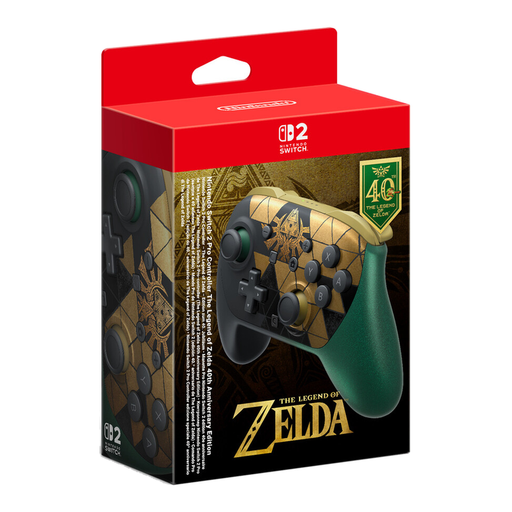
Nintendo Switch 2 Pro Controller, The Legend of Zelda 40th Anniversary Edition
For a supported RPG on Nintendo Switch 2; before buying, check that the game supports gamepad controls.
The product description lists assignable GL and GR buttons and HD Rumble 2. Nintendo says the Switch 2 Pro Controller can only be used with Switch 2.
View at Joybuy
 No image available
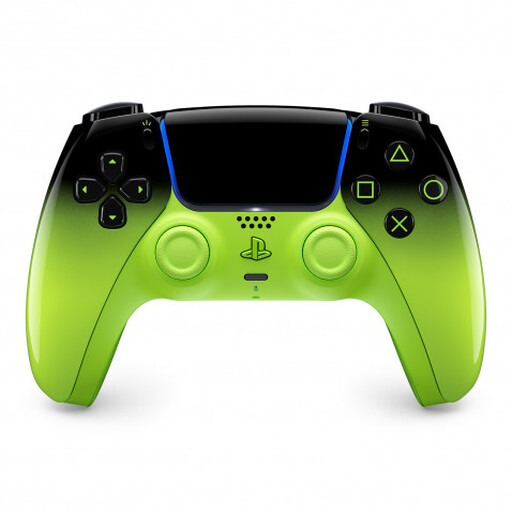
PlayStation DualSense Wireless Controller V3, Remix Green Edition
For PS5 or a supported PC game if you want to use DualSense features; check that the specific RPG supports them.
The product description lists adaptive triggers, haptic feedback, a touchpad and motion sensors, as well as Bluetooth and a built-in battery charged via USB-C. Sony says adaptive triggers require game support; haptic feedback on PC requires a compatible game and USB.
View at Joybuy
 No image available
Microsoft Xbox Wireless Controller, Pulse Red
For Xbox or Windows if you’re looking for a wireless gamepad with customisable button mapping; remember to check that your specific RPG is supported.
The description lists Bluetooth, Xbox Wireless and Windows 10 PCs, as well as a hybrid D-pad. Two AA batteries are required for wireless use.
View at Joybuy
 No image available
GameSir G7 HE Wired Controller, Black
For Xbox or Windows if you’re looking for a wired gamepad with customisable button mapping; check that it’s compatible with your RPG.
The product description lists Hall Effect sticks, micro-switch face buttons and a detachable 3-m USB-C cable. Wired use requires a suitable cable route.
View at Joybuy
Frequently asked questions
Will every PC-compatible controller work with my sci-fi RPG?
No, not necessarily. First check whether the specific game supports controllers, then check the model’s platform compatibility, input mode and connection. Valve points out that gamepad-only controls work only in games that support gamepad input.
How do I connect an Xbox Wireless Controller to a Windows PC?
Microsoft lists a USB cable, the Xbox Wireless Adapter for Windows or Bluetooth as connection options. Check which of these your PC supports, and whether the RPG allows gamepad controls.
Can I expect DualSense haptics to work wirelessly on PC?
No. Sony says haptic feedback on PC requires a compatible game and a USB connection; adaptive triggers also require game support.
Will a different controller help with glare in a bright room?
A controller won’t fix reflections on your screen. Sony notes that lighting conditions in the room can affect image quality, so check your screen position, incoming light and suitable display settings separately from your gamepad choice.
Will the Nintendo Switch 2 Pro Controller work with the older Switch?
No. Nintendo says the Switch 2 Pro Controller can only be used with Nintendo Switch 2. Before deciding, compare the full model name with your console.


