Start by considering your operating system, screen reader and the keys you actually need for navigation, editing and browser testing. A familiar full-size keyboard is a natural starting point if direct access to arrow, modifier and function keys matters. For longer writing sessions, you could try a split keyboard; compact models with customisable key mappings, on the other hand, require you to check carefully which keys aren’t directly available and allow time to get used to them. No keyboard can make the booking website itself accessible.
Who should consider which keyboard features?
Screen reader users who rely on lots of keyboard shortcuts
When you switch between your editor, browser and booking form, it’s important to have modifier, navigation and function keys in familiar positions. NV Access, Microsoft and Apple describe different default keyboard layouts for their screen readers.
Developers who work for long periods
If you spend long hours at your computer, you could try a split layout and see whether the hand position and key reach feel right for you. The German Social Accident Insurance recommends choosing input devices to suit the individual; no particular design is a one-size-fits-all solution.
Developers who want custom key mappings
If you’d like to assign frequently used commands to custom keys or layers, make sure you also allow time for setup and consider how you’ll access keys that aren’t available individually. Dygma explains how to customise its keyboards using Bazecor software.
What should you look for when choosing a keyboard?
Start by identifying your operating system and screen reader. Then check which keys you need for your commands and make sure the connection type and keyboard design suit your workstation.
| Priority |
What to check before buying |
Who is this important for? |
| Navigation and screen reader commands |
Check that the modifier, arrow and function keys are positioned as you expect for your screen reader. |
If I rely on familiar key positions when switching between my editor, browser and forms, I check that the keys I need are directly accessible before buying. Around 36% of consumers prioritise navigation and screen reader commands. |
| Hand position during long sessions |
If possible, try out the split layout and key reach for yourself. |
If I write for long periods, I want to find out whether a split layout suits my hand position rather than assume it will make a difference. Around 29% of consumers prioritise hand position for extended use. |
| Connection and operating system |
Check whether it uses USB-A, Bluetooth or a receiver, and confirm the system and layout variant. |
When I connect a keyboard to my computer, it needs to work with the available ports and my operating system. Around 21% of consumers prioritise connectivity and operating system compatibility. |
| Customisable shortcuts |
Check how to set up custom layers and access arrow or function keys that aren’t included as separate keys. |
If I want to assign recurring commands myself, I allow time for setup and practice, and check which keys are directly available. Around 14% of consumers prioritise custom command mappings. |
Common misconceptions about screen reader keyboards
-
Compact doesn’t mean every command is directly accessible
According to the review, the Dygma Raise 2 doesn’t have separate arrow, function or number pad keys. Layers therefore don’t automatically provide the same direct access you’re used to.
Make a note of the screen reader and editor commands you use most often, then check how you would access them on the specific keyboard.
Allow extra time to set up the key mappings and get used to them.
-
A split keyboard isn’t guaranteed to relieve discomfort
The German Social Accident Insurance emphasises that suitable input devices should be chosen to suit the individual. Perixx notes that it may take time to get used to the PERIBOARD-512 B.
Try out the hand position and key reach rather than assuming the design will have a particular effect on your health.
-
The same model name doesn’t always mean the same connection or language
The models covered here are available with different wired and wireless connections, as well as different language and keycap variants.
Check the full variant, layout, connection and items included in the specific listing.
Keyboard brands to consider
CHERRY
The German KC-1000 variant is a wired, full-size option for a Windows workstation.
- CHERRY lists cursor keys, a number pad and USB-A for this model.
- This information doesn’t confirm that it will work with your individual screen reader setup; check the operating system requirements for the specific variant.
Perixx
The PERIBOARD-512 B combines a permanently split layout with a USB-A cable and number pad.
- Perixx offers a German QWERTZ version.
- The manufacturer notes that it may take time to get used to the keyboard, and distinguishes full Windows compatibility from functionality on other systems.
Logitech
The ERGO K860 is a wireless, permanently split, full-size option; the MX Keys S for Mac has a different, Mac-focused layout.
- Logitech describes the MX Keys S for Mac as having a Mac layout and Bluetooth connectivity; the ERGO K860 review mentions switchable F-key assignments.
- Details about the MX Keys S for Mac don’t automatically apply to the ERGO K860. Check the connection and key mappings for the model you’re considering.
Dygma
The Raise 2 is a split, customisable keyboard for people who want to set up their own key layers.
- Dygma provides instructions for customising the keyboard with Bazecor.
- The review notes that it doesn’t have separate arrow, function or number pad keys. Before ordering, check that you’re choosing the language and keycap variant you want.
Joybuy keyboards for development workstations
The Joybuy models below range from compact keyboards to split and full-size options. Check that each model’s key layout and connection work with your screen reader commands and computer.
 No image available
Inateck KB01003G Bluetooth keyboard, QWERTZ
An option to consider if you’re looking for a German QWERTZ layout and the ability to switch between multiple devices.
QWERTZ layout; Bluetooth; product description states that it can switch between up to three devices.
Joybuy
 No image available
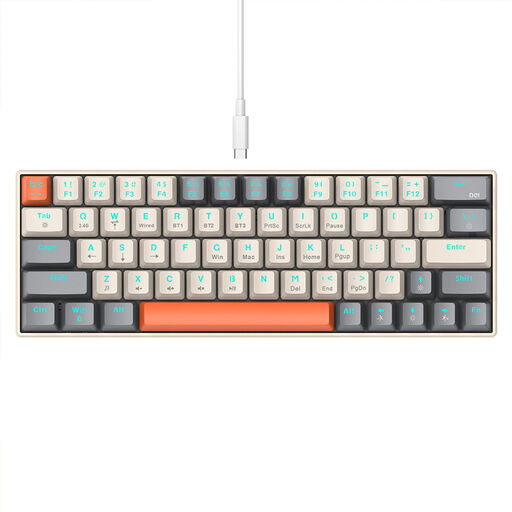
KINSI compact keyboard with 63 keys
A compact option if you’re considering different connection types and can check in advance how you’ll access the screen reader keys you need.
63 keys; Bluetooth, 2.4 GHz wireless and USB-C connection options.
Joybuy
 No image available
Wireless QWERTZ keyboard and mouse set, full-size
A full-size option if a separate number pad and familiar key positions matter to you.
QWERTZ layout; full-size with number pad; 2.4 GHz wireless connection. The product title lists Windows and Mac as supported systems.
Joybuy
 No image available
Logitech ERGO K860, QWERTZ
A split design to try if you’re considering a different layout for longer writing sessions.
Split keys and palm rest; QWERTZ layout; Bluetooth and USB receiver. The product description lists Windows and macOS.
Joybuy
Frequently asked questions
What should I check first when setting up Narrator or VoiceOver?
First, check which keys your screen reader uses as modifiers. Microsoft lists Caps Lock and Insert as the default Narrator modifier keys. Apple lists Control-Option or Caps Lock as the default for VoiceOver; Fn may also be needed for certain F-key commands. Check how the keys are mapped on your system.
How do I test the booking process using a keyboard?
Go through the service selection, appointment selection, input fields, error messages and confirmation without using a mouse. Check that you can reach the controls using the keyboard and that the focus order makes sense. Form fields need clear labels; these checks relate to the website, not the keyboard itself.
What should I check about connectivity and setup before buying?
Check that the cable, Bluetooth or receiver you need will work with your computer’s ports. If you’re buying a programmable keyboard, also check how it’s set up and whether your frequently used commands are accessible without relying on hard-to-reach layers.
Does a screen reader-friendly development keyboard make a repair booking website legally accessible?
No: choosing a suitable development keyboard doesn’t prove that the booking website you build will be accessible. Subject to certain conditions, the BFSG has applied to certain e-commerce services since 28 June 2025. The Federal Accessibility Agency lists an exemption for micro-enterprises providing services with fewer than ten employees and an annual turnover of no more than two million euros. Whether a particular repair booking service and its operator fall within the scope depends, among other things, on the contract being offered and the circumstances of the business. The website’s accessibility must be assessed separately.


