What should you look for when buying?
First check the key layout and commands, then make sure the layout suits your data entry needs, and finally consider connectivity and switching between devices.
The considerations below are for consumers choosing a keyboard for development, data entry and screen reader testing on a museum collection website.
| Buying consideration |
What to check |
Who is this particularly important for? |
| Screen reader commands |
Check the German key layout, modifier keys, F keys and Fn behaviour with your screen reader and operating system; check your own shortcuts for conflicts. |
When I use a screen reader to check navigation and focus while developing, I need to be able to access my usual commands. Around 36% of consumers would prioritise key layout and command compatibility. |
| Entering text and reference numbers |
Check whether the familiar key layout and a numeric keypad meet your needs; if you use NVDA, also consider the selected keyboard layout. |
When entering lots of object descriptions and reference numbers, I want a key layout that makes data entry straightforward. Around 29% of consumers would prioritise this. |
| Hand position during long sessions |
Measure the space available and try a different key layout with your usual typing and screen reader tasks. |
When I have long catalogue sessions, I want to try a different hand position without assuming it will have a particular effect. Around 21% of consumers would put this consideration first. |
| Connectivity and switching between devices |
Check your available ports, operating system and preferred connection; if you switch between computers, check the specific keyboard variant. |
When I switch between workstations or computers, I want the connection to fit the way I work. Around 14% of consumers would prioritise switching between devices. |
Joybuy keyboards for collection work
This selection includes wired and wireless keyboards, as well as full-size, split and compact layouts for data entry and computer work.
 No image available
CHERRY XTRFY MX 3.1, Brown, German layout, white
A wired full-size keyboard for a fixed workstation, with a German key layout.
MX2A Brown switches, USB cable and programmable media panel; check the key layout for conflicts with your screen reader commands.
Joybuy
 No image available
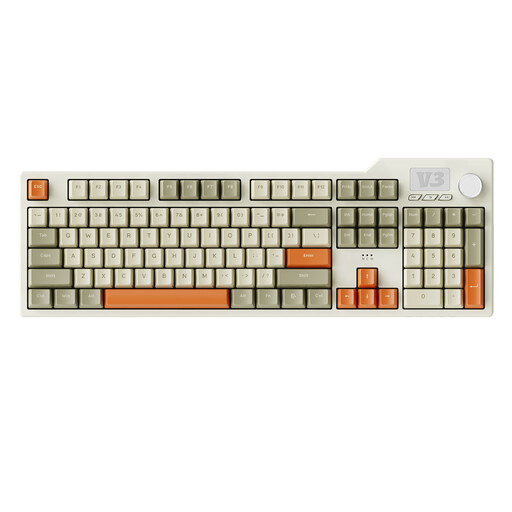
AJAZZ AK35I V3, wired, 104 keys
The full-size layout with numeric keypad is an option if you enter lots of reference numbers for collection records.
USB-C connection; check that programmable macros don’t conflict with the screen reader, browser and operating system commands you use.
Joybuy
 No image available
Logitech ERGO K860, split QWERTZ layout
The split layout may appeal if you’d like to try a different key arrangement.
Wireless connectivity via Bluetooth and USB receiver; check the adjustable Fn keys and application shortcuts for conflicts before use.
Joybuy
 No image available
AJAZZ AK35I V4, German QWERTZ layout, 104 keys
The full-size layout with numeric keypad is one option for entering German text and reference numbers.
Bluetooth, 2.4 GHz wireless and USB-C cable offer different connection options; check which one suits your workstation.
Joybuy
 No image available
CHERRY XTRFY K4V2 TKL, German QWERTZ layout
The compact layout could be a good fit if you want to save space and don’t need a separate numeric keypad.
Wired USB-A connection with MX2A RED Linear switches; TKL means there’s no numeric keypad.
Joybuy
Frequently asked questions
Do I need a numeric keypad for NVDA?
No. NVDA offers desktop and laptop keyboard layouts. If you want to use the numeric keypad for collection reference numbers, check the NVDA setting: according to NV Access, NumLock is normally off with the desktop layout; the laptop layout may be better suited to entering numbers.
How should I test a new keyboard when building a collection website?
Test your usual screen reader commands, interactive elements and focus order without a mouse. The W3C Web Accessibility Initiative recommends checking your website shortcuts for conflicts with commands used by assistive technologies, browsers and operating systems. A particular keyboard won’t automatically make a website accessible.
What should I check about connectivity and setup?
Check the connection type and operating system against the specific variant. CHERRY lists USB-A and Windows for the KC 6000 SLIM, and USB-C for the KC 6000C FOR MAC. Then check the F-key layout and, if applicable, Fn Lock with your screen reader.
Can I return a keyboard bought online if the layout doesn’t suit me?
According to the consumer advice centre, online consumer purchases generally come with a 14-day right to cancel, starting from receipt of the goods; you must notify the other party to the contract that you’re cancelling. Check the terms of your specific purchase, particularly if you’re buying the keyboard for an organisation rather than as a consumer.
Which accessibility regulations apply to a museum collection?
This depends on who runs the website and what it does. Section 12a of the BGG requires public bodies at federal level to provide accessible websites; the Federal Accessibility Agency explains BITV 2.0 as the corresponding framework. The BFSG applies to certain private-sector products and services, including e-commerce services, but not automatically to every website that only presents a collection.


