What should you look for when buying?
First, check that the specific laptop configuration supports your screenwriting software. Then consider the keyboard, screen space, how often you move between workspaces and how you collaborate with others to narrow down the right features for your shared desk.
| Consideration |
What to check before buying |
Who is it important to? |
| Software compatibility |
Check the software version, operating system and processor against the provider’s requirements. For version 13 on Windows, Final Draft specifies Intel or AMD. |
I want to use the screenwriting programme I know, so I’ll first check whether it runs on the specific configuration. Around 25% of consumers put software compatibility first. |
| Typing comfort |
Check the keyboard and German layout on the specific model, and whether you can use an external keyboard and mouse at the desk. |
I want to type comfortably for long periods, while still being able to clear the desk when needed. Around 25% of consumers prioritise typing comfort during longer sessions. |
| Screen space and privacy |
Compare screen size, resolution and how the laptop will sit on the desk. For confidential drafts, also consider screen locking and approved storage locations. |
If I want to see my script and research at the same time, I need enough working space and want to keep my draft private at a shared desk. Around 20% of consumers prioritise screen space and how visible text is handled. |
| Portability and battery life |
Check the weight and charging connection of the configuration on offer. Don’t assume the manufacturer’s battery-life claims will match your own writing time. |
If I take my device with me often and don’t always work near a power socket, weight and everyday charging are key considerations. Around 15% of consumers put these portability requirements first. |
| Collaboration and backups |
Check the collaboration, offline working and backup features in the programme and plan you’ll actually use. |
When I work on a draft with others, I want to be able to track changes and find my files again. Around 15% of consumers prioritise collaborative editing and backing up their draft. |
Joybuy products for your writing space
The following devices cover compact Windows and macOS options, as well as different screen sizes for writing at a shared desk.
 No image available
Microsoft Surface Pro 11 for Business, 13-inch OLED, Core Ultra 7 266V, 16 GB/512 GB SSD
This 13-inch 2-in-1 with an adjustable stand and a stated weight of 0.872 kg could suit you if you often need to clear the shared desk.
Specifications include Windows 11 Pro, an Intel Core Ultra 7 266V, 16 GB of RAM, a 512 GB SSD, a 2880 × 1920-pixel OLED display and two Thunderbolt 4 ports. For Final Draft 13 on Windows, the provider specifies Intel or AMD processors. Also check the keyboard layout and any accessories you need.
View at Joybuy
 No image available
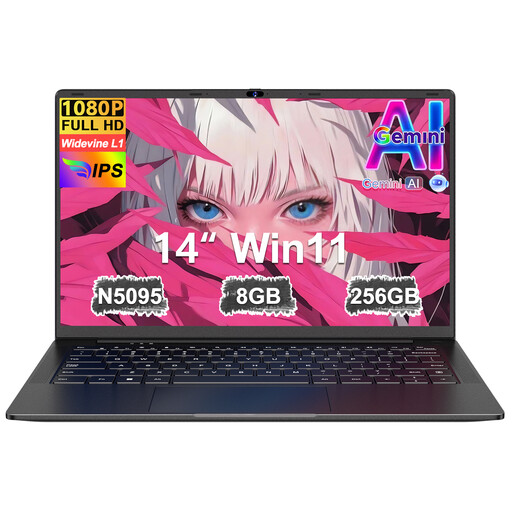
Ruzava 14-inch laptop, N5095, 8 GB RAM/256 GB SSD
The 14-inch format gives you a built-in workspace at a shared desk. Before buying, check that the stated operating system is compatible with your screenwriting software.
Specifications include an FHD display, 8 GB of RAM, a 256 GB SSD and the option to expand storage up to 1 TB. The processor is listed as an N5095 with speeds of up to 2.9 GHz.
View at Joybuy
 No image available
Apple 13-inch MacBook Air M5, 16 GB/512 GB SSD, German QWERTZ
This macOS option could work well for a frequently changing workspace if you want a German QWERTZ keyboard and the Mac programmes you need. Final Draft says its application runs natively on Apple silicon.
Specifications include a 13.6-inch display, M5 chip, 16 GB of RAM, a 512 GB SSD and a weight of 1.23 kg. Two Thunderbolt 4 ports are listed.
View at Joybuy
 No image available
ASUS Zenbook 14 UX3405CA-QD1303W, Core Ultra 7 255H, 16 GB/1 TB SSD
The stated weight of 1.22 kg and the listed connections may be useful if you move between workspaces with an external display or other accessories.
Specifications include a 14-inch WUXGA OLED display, an Intel Core Ultra 7 255H, 16 GB of RAM, a 1 TB SSD, Windows 11 and a German keyboard. HDMI 2.1 and Thunderbolt 4 are listed as connections. Check the processor requirements of your screenwriting software against this specific configuration.
View at Joybuy
 No image available
11.6-inch YOGA laptop, Intel Pentium Gold 6500Y, 8 GB/256 GB SSD
The compact 11.6-inch format takes up little room at a shared desk. If you want to view your script and research side by side on the built-in display, bear in mind that the screen is smaller.
Specifications include a 360° touchscreen, Windows 11 Pro, an Intel Pentium Gold 6500Y, 8 GB of RAM and a 256 GB SSD. Check the requirements for your specific software version before buying.
View at Joybuy
Frequently asked questions
Can I install Final Draft 13 on a Chromebook or Linux laptop?
No. According to Final Draft, Chromebooks and Linux aren’t supported. For version 13, the provider specifies macOS 12 or later, or Windows 10 or later with an Intel or AMD processor. If you use another application, check its specific requirements.
How can I set up a shared desk for longer writing sessions?
If there’s room, add an external keyboard and mouse to your laptop, and ideally an external monitor too. This is the DGUV’s recommendation for prolonged use of mobile devices, not a requirement for every laptop purchase.
Do I need additional software for collaborative writing?
It depends on the programme and the features you need. WriterDuet lists real-time collaboration and offline writing with automatic synchronisation in its Plus plan. Fade In describes Access as an optional cloud service, separate from the desktop software. Check the terms of the specific plan you intend to choose.
What are my rights when buying a laptop online in Germany?
For a standard distance purchase by a consumer, you generally have a 14-day right to cancel, starting from delivery. Exceptions may apply, and return costs may need to be considered. If a newly purchased item is faulty, statutory rights relating to defects should generally be raised with the seller; the standard limitation period is two years from delivery. This is separate from any voluntary manufacturer’s guarantee.


