Writing screenplays at a fixed desk
If you write and edit long scenes at a desk, pay particular attention to a comfortable keyboard and enough space to view your script and research.


Start by choosing a laptop that supports the screenwriting software you actually need, then compare the keyboard, usable screen space and total cost. A larger Windows laptop can give you more room for your script and research at a fixed desk, while a compact MacBook or Windows device may suit you better if you write on the move. According to its provider, Final Draft 13 is not compatible with Chromebooks, although one could be an option with a suitable web app.
If you write and edit long scenes at a desk, pay particular attention to a comfortable keyboard and enough space to view your script and research.
If you also need your laptop for coursework, compare its specification with your actual requirements. Factor in the software and accessories you need, rather than paying for features you won't use.
If you often take your device with you or work on drafts with others, check software compatibility, file sharing and backup options as well as its size and weight.
Choose this if: You need to use Final Draft 13 and want to choose a screen size and specification to suit your desk. Final Draft's current product page lists Windows 11 or later, with an Intel or AMD processor, as a platform requirement.
Things to consider: Specifications can vary significantly within a model range. An older Final Draft support page lists a different minimum Windows version, so check the requirements for your specific software version and the full model number.
Choose this if: You prefer macOS and want a compact device you can use away from your room, too. Final Draft 13 lists macOS 12 or later as a supported platform.
Things to consider: Apple lists 16 GB of memory and a 512 GB SSD for the base 13-inch MacBook Air M5; the MacBook Neo comes with 8 GB and, depending on the version, a 256 or 512 GB SSD. Check the specification and what's included with the individual offer.
Choose this if: You plan to write in a suitable web app and aren't required to use Final Draft 13. WriterDuet describes export options and writing without an internet connection, with files syncing later.
Things to consider: Final Draft 13 does not support Chromebooks. Check that your chosen web app and plan support the sign-in, export and offline features you need for your writing workflow.
| Buying priority | What to check | Who is it important to? |
|---|---|---|
| Keyboard and screen space | Keyboard layout and backlighting on the specific version; screen size, resolution and anti-glare finish. | If you often write for long periods at a desk, you'll want to type comfortably and see your script and research clearly. Around 31% of consumers put writing comfort first. |
| Total cost | Compare the configuration, the software you need and what's included. | If your budget also has to cover coursework and essential accessories, the price of the device alone won't tell the whole story. Around 31% of consumers prioritise total spend. |
| Software and file sharing | Check the required operating system and processor, as well as the export and offline features of the specific app. | If a course or collaboration requires a particular programme or file format, you'll want to make sure your workflow is compatible before you buy. Around 25% of consumers put software compatibility first. |
| Portability and backups | Compare the dimensions and weight of the specific version; set up and check its backup features. | If you move between your room, university and writing group, you'll need a device that's easy to carry and a way to restore your drafts. Around 13% of consumers prioritise portability and available versions. |
Final Draft lists ChromeOS as an unsupported platform. Using a different writing app doesn't change this limitation.
Before you buy, check which application you actually need to use and make sure the laptop supports its operating system requirements.
A power adapter or required software may mean extra purchases and preparation.
The Aspire Go range is a Windows option if a larger display matters at your desk.
The ThinkPad E14 Gen 7 AMD is a 14-inch Windows model range for a more compact workspace.
The MacBook Air M5 and MacBook Neo are macOS options for those who prefer this operating system.
The OmniBook 5 is another Windows range to consider when comparing compact laptops for study.
The Vivobook 15 X1504 range is worth considering when comparing Windows devices with larger screens.
This selection includes Windows laptops for a fixed writing space and more compact MacBook versions for writing screenplays on the go.
 No image available
The 14-inch format could suit you if you travel between your room and university and want a clearly specified screen area for your script and research.
14-inch FHD display with 1920 × 1080 pixels; 8 GB RAM; 256 GB SSD, expandable to 1 TB according to the product name; N5095 processor. The description lists a weight of 1,39 kg. Check the full software requirements for the processor and the specific version.
 No image available
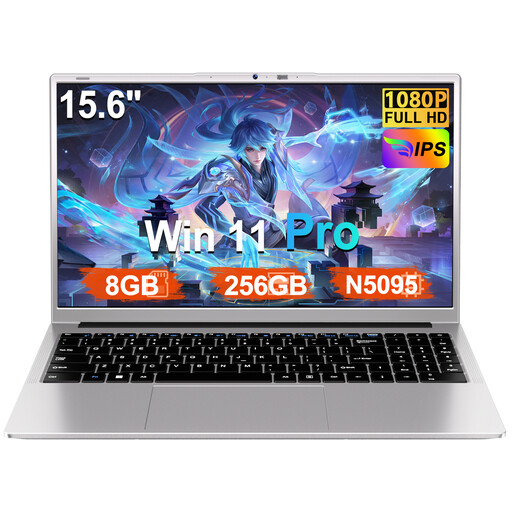
The larger display is an option if you mainly write at a desk and want to keep your research open alongside your script.
15.6-inch FHD display; 8 GB RAM; 256 GB SSD, expandable to 1 TB according to the product name; N5095 processor; Windows 11 Pro; numeric keypad. The description lists an AZERTY keyboard cover as included, but does not confirm the layout of the built-in keyboard. Check before you buy.
 No image available
The 16-inch display is designed for a writing space where a large screen area matters more than an especially compact format.
FHD display; 16 GB DDR4 RAM; 1 TB SSD; Windows 11; 20 mm thick and weighing 1,8 kg according to the product description. Check the requirements of your screenwriting software for the specific processor.
 No image available
This compact macOS version could suit you if you plan to use Final Draft 13 and often take your device with you. The description lists a backlit German QWERTZ keyboard.
13.6-inch display; 16 GB memory; 512 GB SSD; 10-core CPU and 8-core GPU. The product description lists a weight of 1,23 kg and notes that a power adapter is not included.
No image available
This compact macOS version could suit you if you plan to use Final Draft 13 and often take your device with you. The description lists a backlit German QWERTZ keyboard.
13.6-inch display; 16 GB memory; 1 TB SSD; 10-core CPU and 10-core GPU. The product description lists a weight of 1,23 kg and notes that a power adapter is not included.
No. Final Draft lists Chromebooks as an unsupported platform. If you'd rather use a web app, check that its export and offline features suit your specific workflow.
Final Draft's current product page lists Windows 11 or later, with an Intel or AMD processor. An older support page lists a different minimum Windows version, so base your buying decision on the current requirements for the software version you plan to use.
Enable and check the Auto-Save and Backup settings in Final Draft 13. For a Mac, Apple also describes Time Machine with an external storage device. Check occasionally that you can restore an older version.
No. For goods you buy from a trader in the EU, EU consumer information specifies a minimum two-year legal guarantee from the date you receive them. A manufacturer's warranty is an additional voluntary service with its own terms.
Radio equipment must meet EU conformity requirements. As part of its market surveillance, the German Federal Network Agency checks details including CE marking, product traceability and manufacturer information. A CE claim in a product description is not, on its own, an independent safety assessment of the specific offer.