For those who do a lot of typing at a fixed desk
If you write long stretches of script, look for a comfortable typing feel and a familiar key layout. CHERRY describes the STREAM KEYBOARD WIRELESS as a low-profile keyboard with SX scissor technology.


For long stretches of scriptwriting, a comfortable typing feel and a familiar German layout matter; if you make frequent revisions, easy-to-reach navigation keys or well-set-up shortcuts are useful too. Split keyboards can offer a different hand position, but may take some getting used to; compact layouts save space, but change the positions of familiar keys. Before buying, check the exact layout, connections and any software you may need.
If you write long stretches of script, look for a comfortable typing feel and a familiar key layout. CHERRY describes the STREAM KEYBOARD WIRELESS as a low-profile keyboard with SX scissor technology.
If you often move between sections of text and add recurring notes, easy-to-reach navigation keys and configurable shortcuts may matter more than extra gaming or multimedia features. Logitech and Keychron list customisation features for certain models.
If you want to try a different position for your hands and arms at a fixed desk, you could consider a split keyboard. Perixx notes that the PERIBOARD-512 may take some getting used to.
| What matters when buying | What to look for | Who is this especially important to? |
|---|---|---|
| Typing feel and layout | Check the German layout, key shape and spacing; try the typing feel for yourself if possible. | When working on long drafts, I want a familiar layout and keys that feel comfortable for extended typing. Around 29 % of consumers prioritise typing feel and layout. |
| Revisions and shortcuts | Check the position of the navigation keys you need and whether the customisation software is compatible. | When I often switch between sections of text and notes, I want to be able to access or set up recurring commands easily. This is a priority for around 23 % of consumers who want to handle revisions more smoothly. |
| Hand position at your desk | Check the split layout and dimensions, and allow time to get used to it. | At a fixed desk, I want to try a different position for my hands and arms without assuming it will have a particular effect. Around 18 % of consumers put this first. |
| Typing noise | If possible, listen to the specific keyboard in a similar working environment; don’t treat manufacturers’ claims as a direct comparison. | If I share a workspace with other people, I want to choose a typing sound that is acceptable for everyone there. Around 18 % of consumers prioritise being considerate of others who use the space. |
| Desk space and switching devices | Check the case size, the ISO-DE variant you want, and the connections and connection types you need. | When I work in different places or have limited desk space, I want to position the keyboard comfortably and still find the keys I need quickly. Around 12 % of consumers prioritise space and switching between devices. |
A split keyboard has a different layout from a conventional one and may take some getting used to. The German Federal Institute for Occupational Safety and Health’s ASR A6 applies to fixed-location screen-based work; it does not prove that a particular keyboard will have an individual effect.
Try the specific layout and assess the keyboard, desk and your posture together, rather than assuming it will relieve discomfort.
A different layout may take time to get used to and require extra desk space.
The Keychron K8 Version 2 has an 80% layout and supports key remapping. That doesn’t automatically mean your frequently used revision shortcuts will be where you expect them.
Check the position of the keys you need and the ISO-DE version you’ve chosen before buying.
CHERRY and Logitech describe noise-reducing benefits for their respective models, but they do not use a shared comparison method.
If possible, listen to the specific keyboard in a similar working environment and use the manufacturer’s claims only to help narrow down your options.
For scriptwriting, relevant options include the low-profile MX Keys S and the split ERGO K860.
The STREAM KEYBOARD WIRELESS is a low-profile office keyboard with a conventional layout.
The K8 Version 2 is a compact mechanical option for customising your key layout and switching between devices.
The PERIBOARD-512 is a wired split keyboard with a wrist rest, designed for a fixed workstation.
This Joybuy selection includes keyboards for long writing sessions, revisions with customisable commands, compact workspaces and trying out a split layout.
 No image available
An option for typing in German and using recurring commands if you’re looking for a wired mechanical keyboard.
Listed features include 87 keys in a TKL layout, a USB-C connection and Akko Macro V1.0. This version is listed with Cream Yellow Switches.
 No image available
For writers looking for a compact layout and customisable keys for recurring revision commands.
Listed features include a 75% layout, ISO-DE, macros and key remapping. Connection options are Bluetooth, 2.4 GHz wireless and wired USB-C.
 No image available
For a fixed writing desk where you’d like to try a split keyboard.
The model is described as having a QWERTZ layout, Bluetooth and a USB receiver. F.A.Z. Kaufkompass notes that the ERGO K860 lacks key backlighting and wired operation; the review also points out that the gap between the wrist rest and keyboard is difficult to clean.
 No image available
An option for typing in German if you prefer mechanical switches and a wireless connection.
Listed features include a German QWERTZ layout, Bluetooth, Logi Bolt and backlighting. Logitech describes the switches as “Tactile Quiet”; this is not a direct noise comparison with other models.
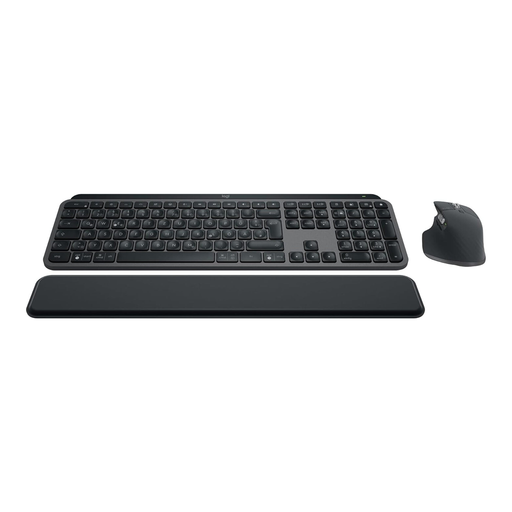 No image available
For long drafts and recurring workflows if you’re looking for a full-size keyboard and mouse set.
Listed features include a German QWERTZ layout, Bluetooth and Logi Bolt connectivity, and the ability to connect to up to three devices. Smart Actions require setup in Logi Options+.
First, check which commands your writing software offers and which keys you actually need. Smart Actions for the MX Keys S are set up through Logi Options+; Keychron lists a web app for remapping keys on the K8 Version 2. Check separately whether the relevant software can be used in your working environment.
You shouldn’t assume so: Perixx notes that the PERIBOARD-512 may take some getting used to if you’re switching from a conventional keyboard. Try your usual key combinations before working on important deadlines.
Check whether the gaps in the specific design are easy to reach. F.A.Z. Kaufkompass notes that the gap between the wrist rest and keyboard on the ERGO K860 is difficult to clean.
No. According to consumer information from the European Union, when you buy from a trader in the EU, you have a statutory guarantee of at least two years from the date you receive the goods. This is separate from any voluntary guarantee. If something is faulty, contact the seller about your statutory rights.
Check the information for the specific version being offered. The German Federal Network Agency lists CE marking among the points to check in its market surveillance guidance; a brand name alone does not prove that an individual product is compliant.