Recording a seated speaker
You want to capture a single voice close to the speaker, and you can keep the cable and recording device in a fixed position.


If your speaker will remain seated, a wired lavalier is an obvious choice, provided the microphone input and power requirements are compatible with your recording device. RØDE’s smartLav+ uses a TRRS connector, while the Lavalier GO uses TRS. Wireless is worth considering if a cable would get in the way or you want to allow for movement; you’ll need to check the receiver, power supply and connection at the location. Whichever you choose, a test recording with the mic close to the speaker’s voice can help you spot any clothing noise.
You want to capture a single voice close to the speaker, and you can keep the cable and recording device in a fixed position.
You want to record directly on your phone, so you’ll need to match its microphone input to a TRRS or TRS connector, or use a suitable adapter.
You need more distance from the recording device or want freedom to move. You’ll need to factor the wireless connection, receiver and batteries into your setup.
For a single seated speaker recording a village audio guide, first make sure the microphone will connect to your recording device. Then weigh up sound quality, setup and reliability.
| What to consider | What to check before buying | Who it matters most to |
|---|---|---|
| Compatible microphone input | Check whether the device needs TRS or TRRS, whether it requires power, and whether you’ll need an adapter for your particular device. | I want to connect the microphone to my recording device without having to find an adapter on the day. The connection is likely to be the most important buying consideration for around 33% of consumers here. |
| Clear speech | Clip the mic close to the speaker and make a test recording with the clothes they’ll actually be wearing. | I want the voice to sound clear, without rustling or other background noise getting in the way. Around 27% of consumers are likely to put speech clarity first. |
| Freedom to move | With a wired mic, check that the cable is long enough for your setup. With a wireless one, check the receiver, transmitter and connections included with that version of the set. | I want to be able to move the speaker or recording device without a cable limiting the setup. Freedom to move is likely to be the main reason for buying for around 20% of consumers. |
| Reliability | Test the wireless connection at the actual recording location. Check the charge level and, if applicable, whether the mic can record independently. | I want to plan longer takes with confidence and know how the recording will be saved. Reliability is likely to be decisive for around 20% of consumers. |
A 3.5 mm plug alone doesn’t tell you whether the mic will work with your recording device’s TRS or TRRS input.
Check the microphone connector, device input and power requirements together. You may need to factor in a suitable adapter.
DJI’s battery life measurement for the Mic Mini is based on specific conditions. Your recording location and setup may produce different results.
Test the wireless connection where you plan to record and check the charge before longer sessions. Read battery life figures alongside the conditions they were measured under.
Features vary by model and generation. DJI lists internal recording for the Mic Mini 2S, but you can’t assume the Mic Mini has the same feature. According to Bonedo, the RØDE Wireless ME needs a connected recording device and doesn’t record internally.
Check whether the exact model and version you’re buying has the backup or internal recording feature you want.
Worth considering if you’re choosing between a TRRS smartphone lavalier, a TRS lavalier or a wireless setup with a compatible receiver.
The Mic Mini and Mic Mini 2S are different compact wireless options. The model, receiver and contents of each version are what matter.
The LARK M2 is worth considering if you’re looking for a compact wireless setup with a receiver and connection option that suits your recording device.
The ME 2 is mainly worth considering if you already have a compatible Sennheiser bodypack transmitter; the EW-D ME2 Set is a complete wireless setup.
The Joybuy products below are compact wireless sets for voice recording, including one option bundled with a camera.
 No image available
A flexible wireless setup for recording a seated narrator; the product description mentions internal recording.
Includes two transmitters, a standard receiver and a charging case. Connections to cameras, smartphones and PCs are listed.
 No image available
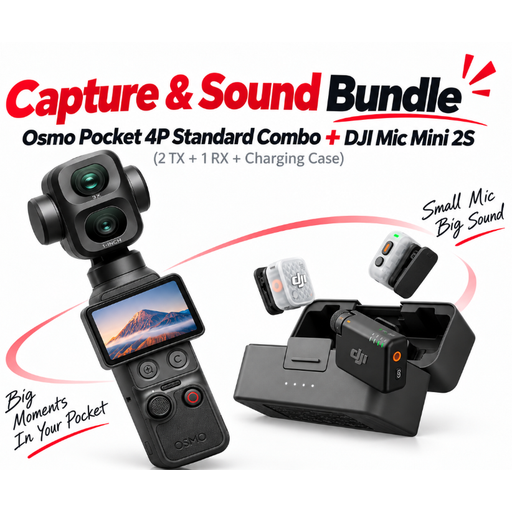
A flexible recording setup with a wireless microphone and camera; the bundle also includes an Osmo Pocket camera and accessories.
The Mic Mini 2S set includes two transmitters, a receiver and a charging case. A camera cable and USB-C adapter are listed for connecting to a camera and USB-C mobile device.
Clip it to the speaker’s clothing, close to their voice, and make a test recording in the position they’ll be sitting in. Listen back for rustling from the clothes they’ll actually be wearing. If the model comes with a pop shield, you can use it too.
Not without a suitable adapter: RØDE lists the smartLav+ as TRRS and the Wireless GO II TX transmitter as having a TRS microphone input. RØDE suggests a TRRS-to-TRS adapter, such as the SC3, as one possible connection.
Check that your recording device has a compatible connection and whether you’ll need an adapter or a particular receiver. What’s included can vary between versions of a set, so check that the version you choose suits your recording setup.
Section 201 of the German Criminal Code (StGB) makes it an offence to record another person’s private spoken words without authorisation, as well as certain uses of the recording. Make sure the person knows about the recording before you begin. If you plan to process or publish a voice that identifies someone, you’ll also need to clarify the purpose and the appropriate legal basis under data protection law. The Data Protection Conference explains that consent must be freely given, informed and specific to the situation.
Don’t assume that consent to a recording automatically covers every later use or publication. The Data Protection Conference describes consent as being tied to a specific, informed purpose. So make sure you explicitly discuss your plans to publish the audio guide with the speaker.