What should you look for?
First, think about which documents you need to read at the same time. Then measure the space for the monitor and stand, and check your computer’s video output and charging requirements.
| Consideration |
What to check before buying |
Who is this important to? |
| Readable workspace |
Check your usual window layout, the native resolution and text scaling. |
If I want to read teaching materials and a draft at the same time, I need to know whether the windows will fit with a comfortable text size. This is the top priority for around 36% of consumers. |
| Computer connection |
Check the video output and cable. For USB-C, also check that the specific computer supports video and provides the charging power you need. |
If I connect my laptop regularly, I want to know whether the connection carries a video signal and meets my charging needs. Around 29% of consumers put compatibility with their existing computer first. |
| Space and positioning |
Measure the desk’s width and depth, including the stand, and check that the specific model has the adjustments you need. |
If there’s little room beside my existing screen, I need a size and position that will fit on my desk. For around 21% of consumers, a space-saving second monitor that can be positioned to suit their setup comes first. |
| Features and energy use |
Check whether you need a webcam or hub, and compare the energy label and model specifications for the products you’re considering. |
If I mainly use the screen for documents, I don’t want to pay for features I won’t use, and I want to consider energy consumption too. Around 14% of consumers say features and running costs are their top priority. |
Joybuy products for a second screen
This selection includes 27-inch QHD monitors for your desk, a portable dual display and models with USB-C docking. Before buying, check which size and connection will suit your workspace and computer.
 No image available
GIGABYTE G27Q26, 27-inch, QHD
A larger workspace for displaying teaching materials and a draft side by side.
2560 × 1440 pixels; stand adjusts for height, tilt, swivel and rotation.
View at Joybuy
 No image available
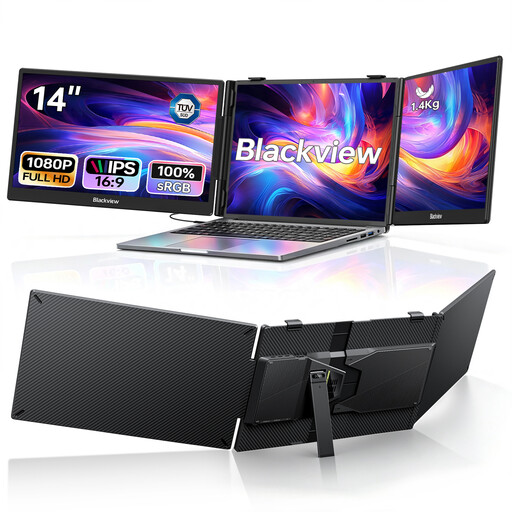
Blackview DCM5, portable dual display, 14-inch
For a mobile setup when you want to add extra screens to a compatible laptop.
Two 14-inch screens, each with a resolution of 1920 × 1080 pixels; listed as suitable for laptops from 13 to 17.3 inches. USB-C and 100 W PD are specified in the product title.
View at Joybuy
 No image available
INNOCN 2751S PLUS, 27-inch, QHD
Extra desktop space for working with documents side by side, with a screen you can adjust to suit your workspace.
2560 × 1440 pixels; according to the product description, the stand adjusts for height, tilt, swivel and rotation.
View at Joybuy
 No image available
MSI PRO MP275QPDGDE, 27-inch, WQHD
For a laptop workspace where you need docking features and extra screen space for documents.
2560 × 1440 pixels; features listed include USB-C with 98 W PD, daisy chaining, KVM and an integrated webcam. Video output and sufficient charging power depend on the laptop and connection.
View at Joybuy
 No image available
Dell Pro Plus P2725DE, 27-inch, QHD
For working with teaching materials and drafts on an extra screen, with a laptop connection at your desk.
2560 × 1440 pixels; USB-C with up to 90 W PD and a USB hub. Height adjustment, tilt and pivot are listed for this model. Video output and sufficient charging power depend on your specific laptop and connection.
View at Joybuy
Frequently asked questions
How do I split teaching materials and a draft across two screens?
In Windows, you can arrange connected screens in Display settings and extend your desktop. Microsoft Support recommends setting the resolution and scaling to suit your needs. For clear, readable text, use each screen’s native resolution and adjust the scaling if needed.
Do I need a monitor with daisy chaining to use two screens?
No, not if your computer or dock can connect the screens another way. EIZO describes daisy chaining for the EV2490; whether it works with your setup depends on compatibility.
What should I know about energy consumption and faults?
Compare the specific monitor’s EU energy label and model information in EPREL; the European Commission explains energy labelling for electronic displays. In Germany, the statutory right to have goods made good by the seller is separate from a voluntary guarantee. If a product is faulty, you’re initially entitled to have the issue remedied, as explained by Verbraucherzentrale.
Am I legally required to buy two monitors for lesson planning?
ASR A6 does not create a general requirement to buy two monitors. The Federal Institute for Occupational Safety and Health describes requirements for screen work in workplaces and at teleworking locations; whether they apply to a particular workspace depends on how it is classified and the circumstances involved.
Can I return a monitor I bought online?
In Germany, consumers generally have a 14-day right to cancel a contract made online; you must notify the retailer that you wish to cancel. Check the terms of your specific purchase, and distinguish cancellation rights from claims relating to a faulty product. Verbraucherzentrale explains these rights separately.


