If you regularly open a draft, solution and template side by side, an adjustable-height 27-inch QHD monitor is a sensible starting point. Check readability at your preferred text size. A compact 23.8-inch Full HD monitor may suit a smaller desk, while a 27-inch 4K model is worth considering for checking fine layout details – provided the scaling, connections and desk space work for your setup. The DGUV notes that the effect of using multiple screens depends on the task and the way they are arranged.
Who this monitor comparison is useful for
Working with a draft and template side by side
When creating maths worksheets, you can keep a draft and template, solution or print preview open on separate screens. The German Social Accident Insurance (DGUV) describes the growing need for screen space when using multiple programmes; observed effects on performance depended on the task and setup.
Working at a small desk
You need a second screen but want to leave room for paper and input devices. EIZO lists the EV2490 as having a 23.8-inch screen diagonal and a visible width of 527 mm. Also check the monitor’s dimensions, including its stand, and compare them with your desk.
Connecting a laptop to two displays
If you switch between working on the move and at a desk, your computer, monitors and connection all need to be compatible. USB-C docking or daisy-chain connections may affect how you arrange the cables; check your computer’s video output and confirm that the complete combination of devices is supported.
What to consider when choosing
Start by thinking about how much workspace you actually want to see at once, then check how the monitors will fit and connect at your desk.
23.8-inch Full HD
A good fit if: you usually have a template or solution on the second screen and have limited desk space.
The trade-off: The models covered in this selection have fewer pixels than the QHD and 4K models mentioned. Check that your documents are comfortable to read at your preferred text size.
27-inch QHD
A good fit if: you regularly work with a draft and reference side by side and want more pixels than Full HD offers.
The trade-off: The larger format takes up more desk space than a 23.8-inch monitor; QHD has fewer pixels than the 27-inch 4K model covered here. Resolution alone does not determine readability.
27-inch 4K
A good fit if: you often check small formulae, grids or page layouts and the display remains easy to read at your chosen scaling.
The trade-off: A higher pixel count does not guarantee larger text or an advantage for every task. Extra features for colour work are not automatically necessary for black-and-white worksheets.
| Consideration |
What to check before buying |
Who should pay particular attention |
| Readable workspace |
Display a typical worksheet alongside its solution or print preview at your usual text size. Compare screen size and resolution: the examples documented here range from 23.8-inch Full HD through 27-inch QHD to 27-inch 4K. |
When I check a draft and solution side by side, I want to be able to read formulae and the page view at my usual text size. Around 36% of consumers put a clearly readable workspace first. |
| Desk setup |
Measure the space needed for both monitors, including their stands, and allow room for paper and input devices. Check the adjustment options on the specific model. |
When I need to make room for paper and input devices as well as two displays, I want to be able to position the screens to suit my setup. Around 29% of consumers prioritise the desk setup. |
| Connecting both displays |
Check how many external displays your computer supports and which video outputs it has. Compare these with the monitor inputs and, where relevant, support for daisy-chain connections. |
When I connect a laptop, I want to be sure it supports my planned dual-screen setup. Around 21% of consumers put compatible connections first. |
| Purchase and running costs |
Compare the features you need and the energy information for specific models on the same basis. The EU energy label rates electronic displays on a scale from A to G. |
When I mainly work on text, formulae and simple page layouts, I don’t want to choose features I won’t use. Around 14% of consumers prioritise purchase and running costs. |
The DGUV notes that the effect of using multiple screens depends on the task and setup. Manufacturer specifications for resolution and stands describe individual models; they do not show how easy a particular text size will be to read at your desk.
Avoiding common buying mistakes
-
Assuming 4K automatically makes formulae easier to read
A higher pixel count alone does not tell you how large text and formulae will appear at your chosen scaling, or whether the display will suit your task.
Open one of your own worksheets, including formula symbols and the print preview, and check it at the scaling you actually plan to use.
-
Assuming USB-C docking guarantees support for two external monitors
A docking connection on a monitor does not automatically mean that your computer, operating system and connection will support the number of external displays you want.
Note down your computer model, video outputs, operating system and planned cable setup, then check that they work with both monitors.
Depending on the connections you already have, you may also need a suitable cable or connection solution.
-
Checking only the screen size, not the complete setup
Two displays need more than digital workspace: you also need room for stands, input devices and paper. The DGUV describes the effect of different configurations as dependent on the task.
Measure both monitors, including their stands, and plan where they will go before choosing a larger format.
Monitor brands worth considering
Dell
The models documented here show the range of features available across Dell’s monitor line-up.
- Dell lists the S2725DSM as a 27-inch monitor with 2.560 × 1.440 pixels and height adjustment.
- The P2725DE is listed as a QHD monitor with a USB-C hub. These specifications apply to the models named.
EIZO
The FlexScan EV2490 is a documented 23.8-inch Full HD office monitor with USB-C.
- EIZO lists a resolution of 1.920 × 1.080 pixels and a visible width of 527 mm.
- Its smaller format has fewer pixels than the QHD and 4K models described here; whether it gives you enough room for several document areas depends on how you use it.
ASUS
The ProArt PA279CRV is a documented 27-inch 4K model with additional features for colour-critical design work.
- ASUS lists 3.840 × 2.160 pixels, height adjustment, pivot and USB-C Power Delivery at 96 W.
- These specifications apply to the PA279CRV model; they do not demonstrate a specific benefit for creating maths worksheets or confirm that a particular computer supports two displays.
Philips
The 273S1/00 is a documented 27-inch Full HD monitor with USB-C docking.
- Philips lists 1.920 × 1.080 pixels and describes daisy-chain connections and charging compatible laptops through the docking station.
- Single-cable use requires a compatible laptop and a suitable connection.
LG
The UltraFine 27UQ850V-W is a documented 27-inch 4K model with USB-C and a pivot stand.
- LG lists 3.840 × 2.160 pixels and 90 W power delivery over USB-C.
- These features apply to this model and do not confirm that a particular computer supports two external displays.
Joybuy monitors for a dual-screen workspace
This selection includes compact 23.8-inch models and 27-inch QHD or 4K monitors for a dual-screen workspace.
 No image available
Z-Edge AGEX 27-inch QHD monitor
A QHD option for a second screen; check that its size and connections suit your workspace and computer.
27 inches; QHD; 144 Hz; height-adjustable stand.
Joybuy
 No image available
INNOCN CB27U1 27-inch 4K UHD monitor
A 4K option for checking layout details; make sure it remains easy to read at your preferred scaling.
27 inches; 3.840 × 2.160 pixels; USB-C with 90 W Power Delivery; height-adjustable stand; PIP and PBP.
Joybuy
 No image available
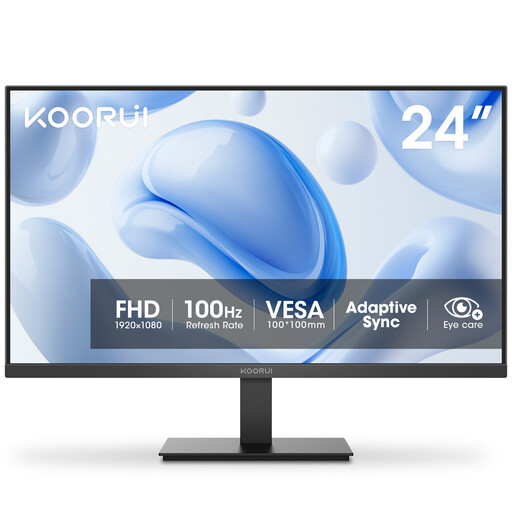
KOORUI E2412F 23.8-inch monitor
This more compact format is worth considering if you’re looking for a second screen and need to make the most of limited desk space.
23.8 inches; VA; 100 Hz; VGA and HDMI.
Joybuy
 No image available
MSI PRO MP275QPDGDE 27-inch WQHD docking monitor
A WQHD option for working with documents side by side; check that your computer and operating system support the connection you plan to use.
27 inches; WQHD; USB-C with 98 W Power Delivery; daisy-chain; KVM; built-in webcam; height-adjustable, tiltable, swivel and pivot.
Daisy-chain requires support for the entire connection chain, including your computer.
Joybuy
 No image available
Dell Pro Plus P2725DE 27-inch QHD monitor
A QHD option for keeping a draft and reference on separate displays; check that it connects to your computer and that you have enough desk space.
27 inches; 2.560 × 1.440 pixels; USB-C hub.
Joybuy
Frequently asked questions
Do both monitors need to have the same resolution?
No. What matters is whether you can read the worksheet and reference on both displays at your chosen text size, and whether your computer supports the number of screens you plan to use. The models documented here have different resolutions; that does not mean the monitors need to match, nor does it guarantee compatibility with a particular computer.
Can I simply connect two monitors one after the other via USB-C?
Not just because there’s a USB-C port. With daisy-chain, the monitors are connected to each other; check the connections and make sure your computer and operating system support the complete chain. Separate video outputs are another option if your computer supports them.
How should I set up two screens for longer working sessions?
Arrange your setup around the task you spend most of your time on, and check your viewing position, readability, glare and available desk space at your actual workstation. The DGUV considers general ergonomic recommendations to be largely applicable to dual-screen workstations too, although the effect depends on the task and setup.
How can I compare the power consumption of two monitors?
Compare the energy information for specific models on the same basis, taking into account how long you use them and your electricity tariff. The European Commission rates the energy efficiency of electronic displays from A to G; further model information is available through EPREL.


