Notable brands and model ranges
The examples below refer to specific models and manufacturer specifications; they are not a general assessment of the brands.
Dell
The P2725DE is a QHD USB-C hub option for a laptop-based writing setup.
- Dell lists a 27-inch screen, 2560 × 1440 pixels and adjustment options for this model.
- These manufacturer specifications don’t prove it will improve your writing. Check that the connections are compatible with your computer.
BenQ
The GW2790QT combines QHD with USB-C, DisplayPort output and pivot for different dual-screen setups.
- BenQ lists 65 W USB-C Power Delivery, an MST output and an adjustable-height, swivelling stand for this model.
- Whether charging or daisy-chaining works also depends on the connected computer.
AOC
The Q27P3CV is a 27-inch QHD option with USB-C for a laptop desk setup.
- AOC lists 2560 × 1440 pixels and USB-C with DP Alt Mode and up to 65 W power delivery.
- The charging specification for this model doesn’t guarantee that it can charge every laptop.
LG
The 27UP850K-W is better suited to people who view high-resolution images as well as text.
- LG lists a 27-inch screen, 4K resolution and an adjustable stand for this model.
- These manufacturer specifications don’t mean that 4K is generally necessary for scriptwriting alone.
Philips
The 27E1N5600HE/00 is designed for workspaces where video calls are a regular part of the day alongside writing.
- Philips promotes a built-in 5 MP webcam and microphone for this model.
- If you don’t need these features, base your choice instead on text display and connectivity needs.
Joybuy products for your writing setup
This selection includes standard QHD and 4K monitors, as well as portable laptop screen extenders. Choose according to the screen space, connections and location you need.
 No image available
Lenovo ThinkVision T27Q-40, 27-inch QHD IPS monitor
An option if you want to read your script and research on separate screens.
27 inches, 2560 × 1440 pixels, HDMI 2.1 and DisplayPort 1.4. The stand is height-adjustable, tiltable, swivelable and rotatable.
View at Joybuy
 No image available
Blackview DCM8 Pro, 15.3-inch FHD dual-screen monitor
A portable laptop extension for when you want to take extra screen space with you.
15.3-inch IPS panel with 1920 × 1200 pixels and a 16:10 aspect ratio. The product title lists a weight of 1.2 kg, a protective case, two USB-C ports and support for portrait orientation.
View at Joybuy
 No image available
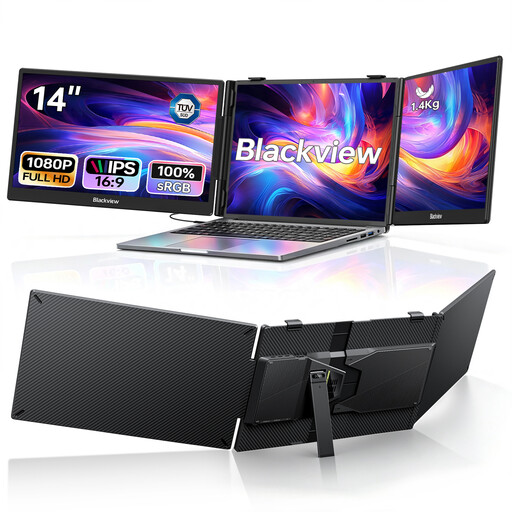
Blackview DCM5, 14-inch dual portable monitor
A laptop extension for writers who want to use two extra screens while travelling.
The title lists two 1080p IPS screens and compatibility with laptops from 13 to 17.3 inches. USB-C and HDMI are listed as connections, and the description mentions an adjustable stand.
View at Joybuy
 No image available
INNOCN CB27U1, 27-inch 4K UHD monitor
An option if you want to view high-resolution images as well as text at your writing desk.
3840 × 2160 pixels. The description lists USB-C with 90 W Power Delivery, picture-in-picture and picture-by-picture features, and an adjustable-height, rotatable stand. Check which text scaling works best for you.
View at Joybuy
 No image available
Philips 276B1, 27-inch QHD monitor
An additional screen for text-based work with a laptop, if you need QHD resolution and an adjustable setup.
2560 × 1440 pixels. The product description lists USB-C with up to 90 W Power Delivery, and a height-adjustable, tiltable, swivelable and rotatable stand.
View at Joybuy
Frequently asked questions
How should I arrange my script and notes across two screens?
In Windows, connect both screens and set their arrangement in Display settings. For versions 12 and 13, Final Draft also explains how to arrange open documents using “View > Arrange All Open Documents > Tile”. For other programmes, check their display options.
What should I check when using USB-C with a second monitor?
First, check how many external screens your computer or dock supports. A USB-C input on the monitor doesn’t confirm that your laptop supports video output or daisy-chaining. An MST output is documented for the BenQ GW2790QT model.
Is a portrait monitor useful for script pages?
A screen in portrait orientation may suit you if you want to view more text at once and the stand or mount allows it to rotate. Final Draft Support documents display issues with some Windows configurations using a vertical second monitor, so check your software and display settings too.
Do screen-positioning guidelines apply to personal writing?
The Workplace Ordinance and ASR A6 apply to workplaces and the employment situations they cover; they don’t automatically apply to every home desk. Within the scope of ASR A6, the Federal Institute for Occupational Safety and Health recommends positioning screens used equally close together within the field of view.
What rights do you have when shopping online in Germany as a private consumer?
According to the Verbraucherzentrale, online purchases generally come with a 14-day right to cancel; when the cancellation period starts depends on the circumstances. Claims relating to faulty goods are separate and are generally made against the seller. A voluntary guarantee is an additional benefit.


