A portable second monitor can be useful when you’re writing a covering letter on the train and want to see it alongside the job advert, provided both devices fit safely on the table. For a short piece of writing or a cramped seat, using your laptop alone may be more practical. Before buying, check the available space, video connection and power requirements. Deutsche Bahn describes different table layouts on ICE trains, and a USB-C port alone doesn’t guarantee video output.
Who is a second monitor on the train suitable for?
Applicants with limited space
If you want to use your laptop and possibly a job advert at your seat, make sure you allow for both the table space and the monitor stand. Deutsche Bahn describes fixed and folding tables at many, but not all, ICE seats.
Applicants working with several documents
A separate display can show your covering letter alongside the job advert or your CV, provided your laptop, monitor and power supply are all compatible.
Applicants unsure about connections
If you’re not sure whether your laptop can output a video signal to a second monitor, check the specific connection you’ll be using. ASUS says the ZenScreen MB16AHVE requires DP Alt Mode on the laptop for video over USB-C.
What should you look for when buying?
Laptop screen only
A good choice if: you’re writing a short piece, have limited space or want to avoid an extra connection.
The trade-off: You may need to arrange your covering letter and reference document on one screen, or switch between them.
Compact second monitor
A good choice if: you want to set up your laptop and monitor side by side in a limited space and view documents separately. Lenovo and Dell offer 14-inch models for this purpose.
The trade-off: The smaller screen offers less viewing space than a 15.6-inch model. Touch is an optional feature on the Lenovo ThinkVision M14t Gen 2, not a requirement for writing.
15.6-inch second monitor
A good choice if: there’s enough room at your seat and you’d prefer a larger display for your documents.
The trade-off: A larger screen takes up more room alongside your laptop. ASUS and AOC offer Full HD models in this size; check the connections and set-up for each one.
Deutsche Bahn notes that table layouts vary between ICE trains, so plan around the specific seat rather than assuming there’ll be a certain amount of space.
| What matters |
What to look for when buying |
Who will find this especially important? |
| Space and portability |
Allow room for the monitor and its stand alongside your laptop; consider the weight and dimensions when travelling. |
If I need to fit my laptop, monitor and stand on a train table that may vary, the overall space needed matters to me. Around 33% of consumers prioritise space and a portable size. |
| Reading documents side by side |
Check the screen format and the text size you want; a higher pixel count alone doesn’t guarantee a more comfortable view of text. |
If I want to see my covering letter and the job advert at the same time, I need two separate views rather than having to keep switching between them. Around 25% of consumers prioritise viewing text side by side. |
| Video connection and cable |
Check your laptop’s video output, the monitor’s input and the cable you plan to use together; if you’re using USB-C, check that it supports video. |
If I want to connect my existing laptop, the connection I choose needs to carry a video signal. Around 25% of consumers prioritise connection compatibility. |
| Power supply |
Check whether the monitor is powered by your laptop or an external source; don’t assume there’ll be a socket at your seat. |
If the monitor needs power during the journey, I want to plan ahead for the right power source. Around 17% of consumers prioritise power supply. |
Common buying and set-up mistakes
-
Assuming a USB-C port supports video
According to ASUS, video over USB-C on the ASUS ZenScreen MB16AHVE requires DP Alt Mode on the laptop. A matching port shape alone doesn’t confirm that it supports this feature.
Check your laptop and monitor specifications, along with the cable you intend to use.
-
Looking only at the screen size
You’ll also need room at your seat for your laptop, the monitor stand and the cables. Deutsche Bahn lists tables at many, but not expressly all, ICE seats.
Check that your full set-up will fit in the space available. If it’s too cramped, use your laptop on its own.
-
Confusing power pass-through with a built-in battery
For the ASUS ZenScreen MB16AHVE, ASUS describes pass-through power with a USB-C power bank or mains adaptor connected, and specifies power requirements for this model.
Check the monitor’s power supply and your laptop’s charging needs as separate requirements.
Notable brands and models
Lenovo
The ThinkVision M14t Gen 2 is a documented 14-inch model with a touchscreen.
- Lenovo lists a resolution of 2240 × 1400 pixels, a 16:10 aspect ratio, a weight of 700 g and two USB-C ports with power pass-through.
- Touch functionality and the higher pixel count aren’t automatically necessary for writing a covering letter.
Dell
The Pro P1425 is a documented 14-inch option with a tilt-adjustable stand.
- Dell lists an IPS display with a resolution of 1920 × 1200 pixels at 60 Hz.
- These specifications don’t prove that the monitor will work with every laptop or fit on every train table.
ASUS
The ZenScreen MB16AHVE has a 15.6-inch display, with USB-C and Mini-HDMI.
- ASUS describes power pass-through for this model.
- According to ASUS, video over USB-C requires DP Alt Mode on the laptop; HDMI also requires a USB-C power supply.
AOC
The 16T3EA is a portable 15.6-inch Full HD monitor with a built-in stand.
- AOC lists an IPS display and a resolution of 1920 × 1080 pixels for this model.
- According to AOC, i-Menu software must be enabled for auto-pivot.
HP
The Series 5 Pro 514pn is a compact option with a 14.36-inch display.
- For the B88JWAA#ABB variant, the German HP Store lists a resolution of 2560 × 1600 pixels and USB-C.
- Specifications for the Series 5 Pro range as a whole don’t automatically apply to the 514pn.
Joybuy products for this purpose
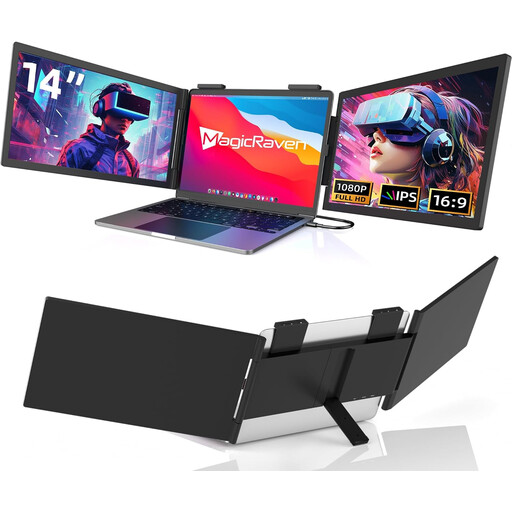
These portable monitors are described as second screens for laptops and reference documents. Before buying, pay particular attention to the connection type, compatibility information and set-up.
 No product image available
14-inch USB-C monitor, FHD, 60 Hz
For viewing text separately on a laptop, if its screen size falls within the stated 14 to 16 inches.
IPS, FHD (1080p) and 60 Hz; USB-C connection, no HDMI.
View at Joybuy
 No product image available
14-inch IPS monitor for dual-screen set-ups
For viewing your covering letter and reference text separately, if your laptop falls within the stated size range.
FHD (1080p), IPS and 60 Hz; HDMI, USB-A and USB-C connections. Listed as compatible with laptops from 14 to 16.5 inches.
View at Joybuy
 No product image available
Blackview DCM6 PRO, 14-inch monitor
For an additional laptop display, if your device falls within the stated compatibility range of 13 to 17.3 inches.
Full HD with a resolution of 1920 × 1080 pixels; the description lists a clamp mount and a single USB-C connection.
View at Joybuy
 No product image available
Blackview DCM5, 14-inch IPS LCD monitor
For viewing documents separately alongside a laptop, provided it meets the stated size compatibility requirements.
14 inches, 16:9 and IPS LCD; listed for laptops from 13 to 17 inches.
View at Joybuy
 No product image available
Blackview SCM6, 14-inch FHD IPS monitor
For a second text view, if your laptop falls within the stated compatibility range of 13 to 17 inches and the built-in stand suits your set-up.
FHD and IPS; according to the product title, it weighs 600 g, is 4.5 mm thick and has a built-in stand.
View at Joybuy
Frequently asked questions
Is a USB-C port on my laptop enough to connect a monitor?
Not necessarily. For video over USB-C on the ASUS ZenScreen MB16AHVE, ASUS requires DP Alt Mode on the laptop. Alternatively, ASUS describes using HDMI for video and USB-C for power. Check your laptop’s specifications and the cable set-up you plan to use.
How should I set up a second screen on the train?
Check that your laptop, monitor and stand all fit in the space available. Deutsche Bahn lists fixed or folding tables at many, but not all, ICE seats. When packing away, stow the devices and cables so they won’t become a trip hazard.
Can I rely on having a power socket at my ICE seat?
Not in every case. Deutsche Bahn says there is generally one power socket per pair of seats in second class; on selected train series, there is one per seat. Plan your power supply without assuming a socket will be free.
What are my rights when buying a monitor online?
For a typical online purchase from a business seller, you generally have 14 days from delivery to cancel the order; exceptions may apply, and return costs should be checked. For faulty goods in the EU, the European Commission describes a minimum two-year legal guarantee against the seller. This is separate from a voluntary manufacturer’s warranty.


