
Lieferung heute & morgen

Qualitätsgarantie

Willkommens-Angebote freischalten: KOSTENLOSE Lieferung | Bis zu 80 % RABATT | Kostenlose 30-Tage-JoyPlus-Testphase
App herunterladen
A selfie stick with tripod and Bluetooth needs to do several jobs: take hands-free selfies and group photos, and support livestreams and video recording. In practice, though, models vary considerably in stability, reach and ease of use. If you focus only on maximum extension or a long list of marketing claims, you could end up with an accessory that proves unreliable in everyday use.
An extendable selfie stick with plenty of reach can be useful for group shots or vlogging. However, the further you extend the telescopic arm, the greater the leverage on the phone holder and base. So a lightweight tabletop tripod for a smartphone won’t necessarily work well as a floor-standing tripod.
Look out for:
A phone tripod with a remote control will usually connect to your smartphone via Bluetooth. However, some camera apps, operating system versions or device features may behave differently. Before buying, check that the remote works with your Android or iOS device and your preferred camera app.
With a Bluetooth selfie stick, it’s also worth checking whether the remote can be detached, which type of battery it uses and what range the manufacturer states. A quoted range of up to 10 metres is a technical guideline; walls, people and other wireless signals can reduce it.
Lighting, face tracking, motorised rotation and magnetic holders can all be useful, but not everyone needs them. Electronic components need power and often must be kept dry. If you choose a model with a lithium battery, check the charging instructions and operating temperature, and whether there are any restrictions on use in the rain.
The clamp should hold your smartphone firmly and evenly without pressing any buttons. Check the stated clamp width and maximum load. If you’re adding a microphone, LED light or action camera, make sure the total weight doesn’t exceed the manufacturer’s limit.
A phone holder for photos and videos should also let you switch between portrait and landscape orientation. An easily adjustable tilt angle is useful for livestreams and short videos.
Aluminium is commonly used for telescopic poles and tripod legs. Thermoplastic elastomers, or TPE, can provide a flexible, adaptable grip on models with bendable legs. The design matters just as much as the material: can the joints be locked? Can you position the legs securely on a flat surface? Is there a safety catch to prevent them folding in accidentally?
A flexible mini tripod can be attached to railings or branches. Make sure the legs are wrapped tightly around the structure and check the holder is secure before letting go.
A selfie stick with remote control can replace the self-timer and make it easier to capture spontaneous shots. Look out for:
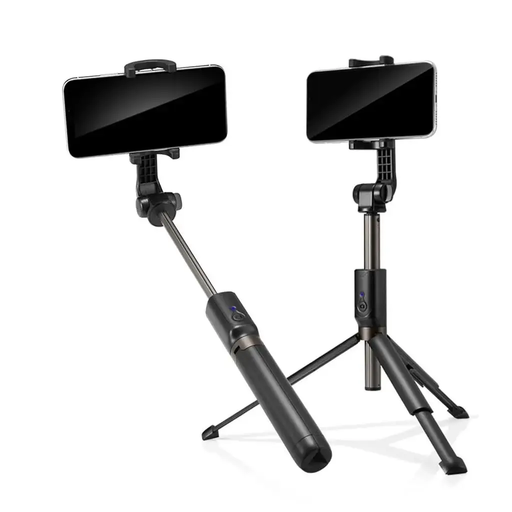
Why this product suits this user: This model combines an extendable selfie stick with an integrated Bluetooth shutter. It folds down for easy carrying when you’re taking selfies or group photos.
The Bluetooth function and shutter button are designed for Android and iOS smartphones. Check that the phone holder is secure before each shot.
Aluminium and matt-finish plastic components, an ergonomic grip, telescopic extension and an integrated remote shutter.
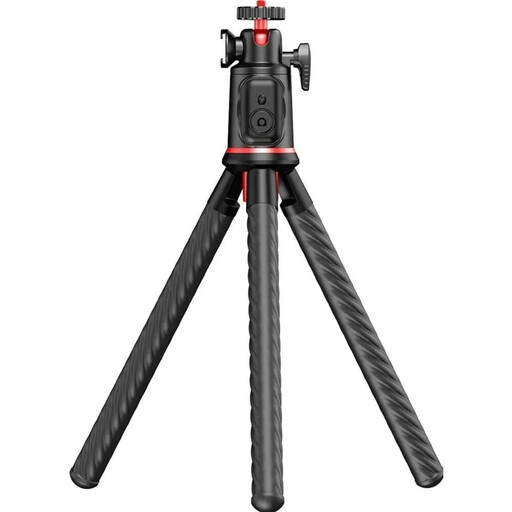
Why this product suits this user: Its flexible design is well suited to travel, vlogging and shooting from a range of mounting points.
The three flexible TPE legs can be wrapped around suitable structures. The stated maximum load is 2 kg, but you should still check the mount is secure before use.
360° ball head, Cold Shoe mount for a microphone or LED light, height adjustable from 25 to 46 cm, Bluetooth 5.4 and detachable phone holder.

Why this product suits this user: With a stated length of around 193 cm and two lights, this model is aimed at livestreams, full-length shots and wider framing.
The maximum extension length and remote control range of around 10 metres are clearly stated. When fully extended, a stable, level surface is especially important.
Maximum length of around 1.93 m, Bluetooth control, portrait and landscape orientation, plus integrated dual lights for adjustable illumination.
We’ve put together a complete, regularly updated list of products that meet these strict selection criteria and fully comply with the safety regulations in force across the EU.
Turn on Bluetooth on your smartphone, switch on the remote and select the device name shown in your Bluetooth settings. Then open your camera app. If you have any problems, it often helps to disconnect an existing connection and pair the remote again.
Its lifespan depends on the joints, holder, telescopic mechanism and how it’s transported. Avoid overextending the pole, subjecting it to heavy impacts or exposing it to moisture. The battery in a Bluetooth remote may need replacing from time to time, depending on the model and how often you use it. Rechargeable models need regular charging.
A remote can make hands-free recording, group photos and livestreams easier. If you move around while filming, also look for a wide enough base, a holder with a good range of tilt and, if needed, a microphone thread. For moving shots, a gimbal may be a better choice than a standard selfie stick.