
Lieferung heute & morgen

Qualitätsgarantie

Willkommens-Angebote freischalten: KOSTENLOSE Lieferung | Bis zu 80 % RABATT | Kostenlose 30-Tage-JoyPlus-Testphase
App herunterladen
A selfie stick with tripod combines three functions: it extends the distance between you and your smartphone, holds your device hands-free and lets you take photos using a Bluetooth remote control. This makes it handy for holidays, video calls, vlogs, group photos and live streaming. However, models vary considerably in stability, reach and features.
If you focus only on maximum length or the number of extra features, you could end up buying a product that isn’t practical. The following criteria will help you assess marketing claims objectively and choose an option that suits your everyday needs.
An extendable selfie stick with a reach of almost two metres can capture a wide shot. However, the higher the centre of gravity when it’s extended, the more important sturdy tripod legs and a secure smartphone holder become. On uneven ground, in windy conditions or if it gets knocked, a lightweight tripod can tip over more easily.
So don’t just look at the length. Also check:
A Bluetooth selfie stick needs to be paired with your smartphone. Depending on the model, the remote may use a button cell or have a built-in rechargeable battery. Figures such as ‘up to ten metres’ are technical estimates and can be affected by walls, other wireless devices or the battery’s charge level.
Before buying, check whether iOS and Android are supported, which type of battery is included and whether the remote can be detached. With a selfie stick with remote control, it’s also important to check whether your smartphone’s camera app responds to the shutter command.
A selfie stick with fill light can be useful for indoor shots or when shooting against the light. However, the position of the lights, how they’re powered and how they’re operated are all important. A fill light won’t replace full room lighting. For longer shoots, also check whether the smartphone and light need to be charged separately.
If you’re choosing a selfie stick for live streaming, also look for:
A phone holder for iPhone and Android should grip your smartphone evenly without blocking buttons or ports. Check the maximum supported width or screen size. The Verbex K50 models are listed as supporting smartphones up to 6.0 inches. Larger or particularly thick devices, such as those in a rugged case, may not fit.
Magnetic systems such as the ULANZI MA60 and MA30 are designed primarily for compatible MagSafe devices. Other smartphones may need a suitable magnetic ring or an additional case. Make sure the magnet holds securely before use. Follow the manufacturer’s guidance about using magnets near cards, storage media and medical devices.
According to the product specifications, the Verbex K50 variants extend to around 193 cm and weigh approximately 340 g. That gives you a relatively long reach in a portable format. Even so, the folded size matters when travelling by train, hiking or exploring a city.
A more compact smartphone tripod is easier to pack in a rucksack, but will usually offer less height. The ULANZI JJ02 and ULANZI MA60 are designed for portability. They’re better suited to tabletop shots, short distances or quickly switching between handheld and tripod use.
Look for straightforward Bluetooth pairing, an easy-to-reach remote and an adjustable smartphone mount. Switching between portrait and landscape is especially useful when recording video.
According to the specifications, the Verbex K50 models use a CR1632 button cell for the remote and have a range of around ten metres. The Verbex S05S is listed with a maximum length of 100 cm, a weight of 200 g and a remote-control range of under ten metres. Treat figures like these as a guide, not a guarantee for every environment.
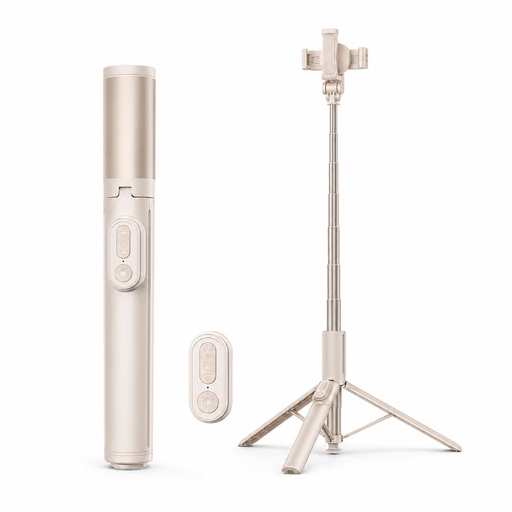
Why it suits this profile: The combination of an extendable selfie stick, tripod function and Bluetooth remote covers the basics without needing extra accessories.
The key specifications clearly state the maximum length, weight, supported smartphone size and remote-control range. This makes it easier to check the main limitations before you buy.
Maximum length of around 193 cm, weight of approximately 340 g, Bluetooth connection and support for iOS and Android, according to the product specifications.
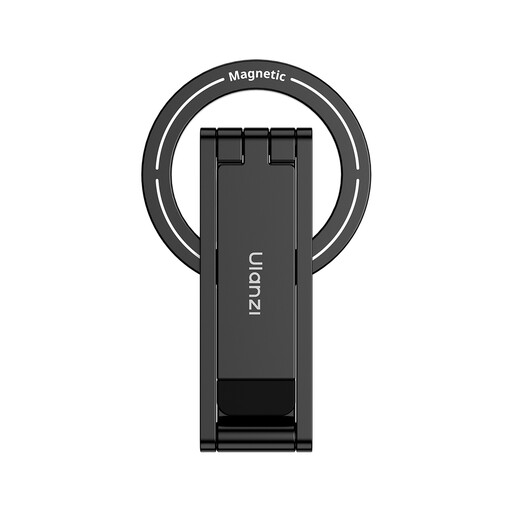
Why it suits this profile: The 3-in-1 design is aimed at anyone looking for a folding mini tripod, a grip and a magnetic smartphone mount in one portable format.
The magnetic attachment makes it especially important to check compatibility. If you’re using a smartphone that isn’t a perfect match, check which accessories you’ll need and whether the magnet will hold securely.
Folding aluminium design, 3-in-1 use and stated compatibility with several generations of iPhone and MagSafe.

Why it suits this profile: Two integrated lights and an extended reach make this a good option for anyone who regularly records videos, vlogs or shots in changing lighting conditions.
The product specifications list the tripod function, Bluetooth, range, maximum length and dual-light feature separately. Before use, you should still check that the stand is stable and the smartphone is securely attached.
Maximum length of around 193 cm, weight of approximately 340 g, Bluetooth remote control and two integrated lights, according to the product description.
Place the tripod on a firm, level surface and spread all three legs fully. Attach your smartphone in the centre and check that the clamp or magnetic connection is secure before each shot. Don’t leave the tripod unattended when fully extended, especially outdoors.
For longer videos, it’s worth doing a quick test first: connect via Bluetooth, check the framing, test the remote and then check that the tripod is stable. This helps you avoid operating errors before recording or starting a live stream.
We’ve put together a complete, regularly updated list of products that meet these strict selection criteria and fully comply with the safety regulations in force in the EU.
Switch on the remote, open your smartphone’s Bluetooth settings and select the device that appears. Once it’s paired, open the camera app. If the shutter button doesn’t respond, check that the app is compatible and that the remote’s battery is charged.
Its lifespan depends on the joints, clamp, telescopic mechanism and how well it’s maintained. Avoid forcing the joints to turn, extending the stick beyond its stated maximum length or storing it in a damp place. On magnetic models, keep the contact surface clean and undamaged.
Bluetooth remotes may need replacement button cells. Depending on its design, a fill light will also need power or a charged battery. Before buying, check which batteries or charging cables are included and whether they’ll need to be replaced separately.