
Lieferung heute & morgen

Qualitätsgarantie

Willkommens-Angebote freischalten: KOSTENLOSE Lieferung | Bis zu 80 % RABATT | Kostenlose 30-Tage-JoyPlus-Testphase
App herunterladen
A selfie stick with tripod can give you much more flexibility for selfies, group photos, livestreams and vlogs. In practice, though, models vary widely in stability, reach, remote control and smartphone compatibility. If you focus only on maximum extension or a long list of extra features, you could end up with a model that feels unstable in everyday use or isn’t suited to the way you take photos and videos.
This buying guide explains what smartphone users, travellers, families and content creators in the UK should look out for before buying.
An adjustable-height selfie stick can be handy for full-length shots and livestreams. However, the higher you extend it, the more the weight of your smartphone, wind and sideways movement can affect the structure. A lightweight model with narrow feet can tip over more easily on uneven ground.
So, check the following:
A Bluetooth selfie stick or a selfie stick with Bluetooth remote control needs to connect to your smartphone and usually runs on a battery or rechargeable battery. Depending on the model, the remote may be built into the handle or detachable. The stated range should also be realistic for the way you plan to use it.
Several models offer a range of around 10 metres, which can be useful for group photos and shots taken from further away. However, this is no substitute for positioning the tripod securely. Check that it’s stable and that your smartphone is firmly held in place before taking a photo.
Lighting, face tracking, gimbal technology and 360° rotation can all be useful, but they also add complexity. A smartphone gimbal, for example, needs to be charged and used within its stated load capacity. A simple mini tripod for your phone, on the other hand, is quicker to set up and often perfectly adequate for still photos.
The load capacity needs to be suitable for your smartphone and any accessories. For example, the Rollei Easy Creator MonkeyPod has a stated capacity of up to 2 kg. It has three flexible TPE legs that can be wrapped around suitable structures such as railings or branches. With a standard smartphone tripod, make sure all the leg sections are fully locked before attaching your device.
A higher load capacity doesn’t automatically mean a tripod will stay stable in windy conditions. For outdoor shots, look for a low centre of gravity and a wide stance.
For portrait shots on social media, a mount that can be set up in both landscape and portrait orientation is a good choice. A 360° ball head or rotating smartphone holder makes it easier to adjust the framing.
Check the usable height, not just the maximum figure. The Rollei Smartphone Traveler Tripod has a stated maximum height of 120 cm, a packed size of 39 cm and a weight of 595 g. That’s a different compromise for travel and vlogging from a floor-standing tripod that’s almost two metres tall.
A phone tripod with remote control is handy when your smartphone is already in position and you want to take a photo without touching it. If the model has built-in lights, also check the brightness settings, charging method and battery life. Dispose of button batteries at designated collection points and keep them away from young children.
Motorised models also have a battery, charging time and moving parts to consider. According to its product information, the Rollei Easy Creator Quadpod with AI features face tracking, gesture control, 360° rotation and a stated battery life of 78 minutes. These features are particularly useful for filming on your own, but they won’t be necessary for everyone.
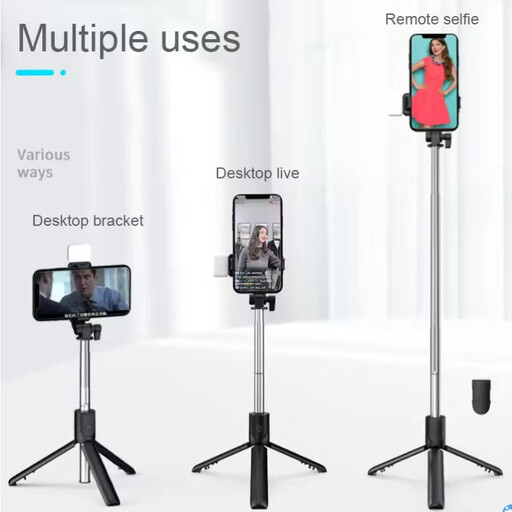
Why it suits this type of user: This model combines a selfie stick, tripod and Bluetooth functionality. It has a stated length of 100 cm and supports iOS and Android.
The remote has a stated range of less than 10 metres. Position the three tripod legs securely before taking a photo.
Bluetooth shutter, landscape and portrait orientation, and an integrated tripod function in a compact design.
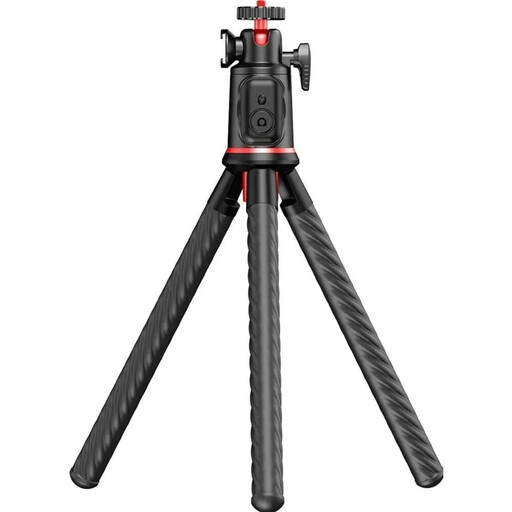
Why it suits this type of user: Flexible legs, a 360° ball head, telescopic extension and an accessory mount offer several setup options for travel and vlogging.
The three TPE legs can be adjusted to fit suitable structures. The maximum load capacity is stated as 2 kg and should not be exceeded.
Bluetooth 5.4, a height of 25 to 46 cm, a cold shoe mount for a microphone or LED light, and a detachable smartphone holder.
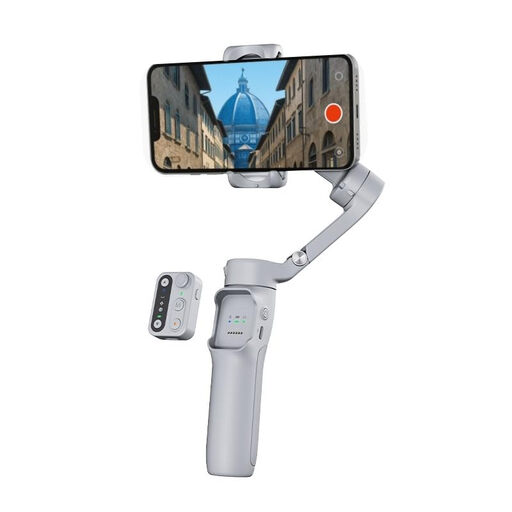
Why it suits this type of user: The electronic three-axis stabilisation is designed for regular use, making this a good choice for moving shots, travel videos and frequent vlogging.
Use it only with a correctly mounted smartphone that is within the stated load limit. According to the product information, the device is not waterproof and must be protected from moisture.
Three-axis system, detachable remote control, stated battery life of 11 hours and a foldable body.
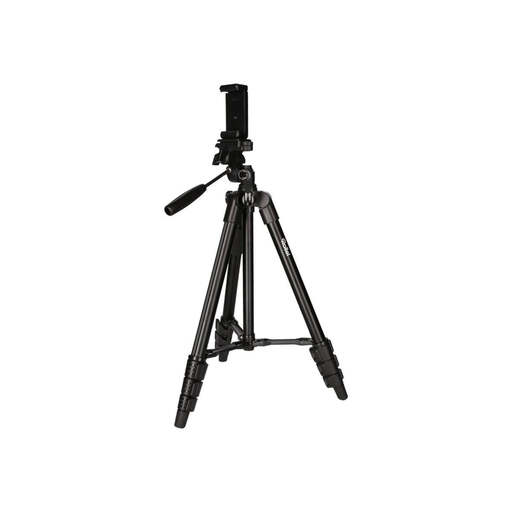
Why it suits this type of user: This standard smartphone tripod is a good option for travellers who need a set working height and a portable design.
The four aluminium sections with twist locks must be fully secured before use. The stated load capacity is 2 kg; take extra care in windy conditions.
Working height of 39 to 120 cm, weight of 595 g, built-in spirit level and Bluetooth remote with a stated range of up to 10 m.
We’ve put together a complete, regularly updated list of products that meet these strict selection criteria and the safety requirements in force in the EU.
Turn on Bluetooth on your smartphone, switch on the remote and select the device shown in your Bluetooth settings. Then open the camera app. If you have any problems, it often helps to disconnect an existing connection and pair the remote again.
It depends on the height, how the legs are positioned, the weight and the surface. The higher the extension and the lighter the tripod, the more sensitive it may be to wind. Fully spread the legs, lock all the sections and don’t leave your setup unattended in strong winds.
With basic models, you’ll usually only need to replace a button battery now and then. Gimbal and AI models also need their built-in batteries recharging. Before you buy, check the battery type, charging method and stated operating time.