
Lieferung heute & morgen

Qualitätsgarantie

Willkommens-Angebote freischalten: KOSTENLOSE Lieferung | Bis zu 80 % RABATT | Kostenlose 30-Tage-JoyPlus-Testphase
App herunterladen
A selfie stick with tripod needs to do several jobs: hold your smartphone securely, capture wider shots and support hands-free recording. In practice, however, models vary considerably in stability, phone holder, reach and Bluetooth controls.
If you focus only on maximum length or the number of extra features, you could miss important details. Three common buying mistakes are particularly easy to make:
The phone holder should accommodate the width of your smartphone and grip it evenly. If the model has a light or gimbal, its weight matters too. Product details often specify a maximum load that must not be exceeded.
Look for:
A tripod may have a load capacity of, for example, 2 kg, but the smartphone holder itself may still have a lower size or weight limit.
A traditional three-legged base is suitable for flat surfaces. Flexible tripod legs are more versatile, but need to be wrapped tightly around a suitable structure. For travel, a mini tripod that packs down small may be a good choice, while livestreams often benefit from a greater working height.
Check the:
For outdoor recording, take wind, uneven ground and passers-by into account. A long extension does not automatically make a selfie stick suitable for every setting.
A Bluetooth selfie stick with a remote lets you take photos and videos from a distance. The products featured here have a stated range of up to around 10 metres. Indoors, walls and other wireless signals can affect the practical range.
Other useful features for vlogging include:
A gimbal with AI tracking usually needs its own power supply and may be heavier than a basic selfie stick because of its motors, battery and electronics. So check the battery life, charging port and compatibility with your operating system too.
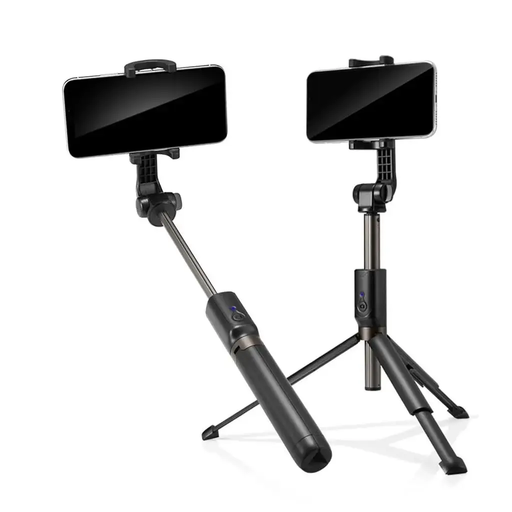
Why it suits this profile: For occasional selfies, group photos and trips, this model offers an extendable design with a Bluetooth shutter release and smartphone holder.
Bluetooth and the shutter button on the handle mean you need to rely less on the self-timer. Its compact design also makes it easy to store.
Aluminium and matt-finish plastic; according to the product details, it is Bluetooth-compatible with Android and iOS smartphones.
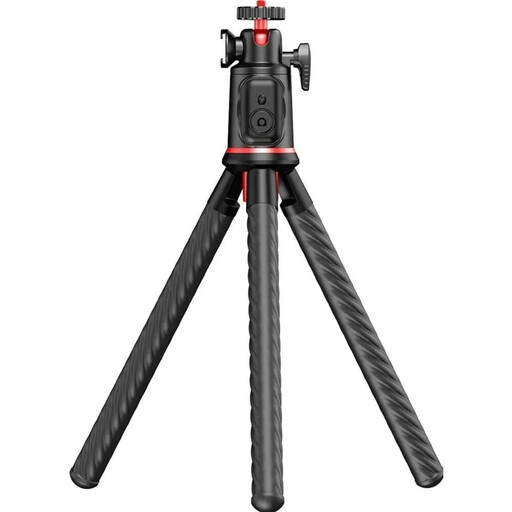
Why it suits this profile: Designed for travellers and content creators who need a range of positioning options, it combines flexible legs, a telescopic extension and a 360° ball head.
The product details specify three flexible legs, a detachable holder and a maximum load of 2 kg. Even so, make sure it is firmly attached before letting go.
360° ball head, cold shoe mount, Bluetooth 5.4 and a working height of 25 to 46 cm, according to the manufacturer.
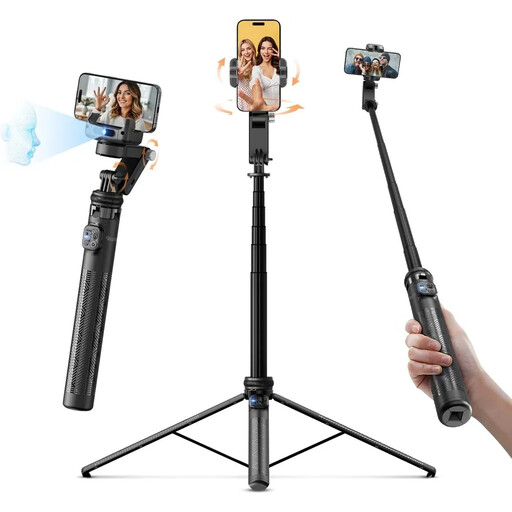
Why it suits this profile: Vloggers and livestreamers get gimbal, selfie stick and tracking features in one device, with built-in lighting.
The product details set out clear limits: a holder width of 6.5 to 9.5 cm, a tracking range of 0.5 to 5 m and 80 minutes of gimbal battery life.
3-axis stabilisation, AI face tracking, gesture control and an LED light with a colour temperature of 3000 to 6500 K, according to the product description.

Why it suits this profile: For recording in different locations, this model combines an extendable base with two built-in lights.
A maximum length of around 193 cm and a stated remote range of around 10 m make it easy to understand the product's limits.
Bluetooth connection, tripod function, dual lighting and compatibility with iOS and Android, according to the product details.
We’ve put together a complete, regularly updated list of products that meet these strict selection criteria and fully comply with the safety regulations in force in the EU.
Before each recording, make sure your smartphone is securely attached to the holder. If the stick is extended to a great height, place the base on a flat surface and don’t leave it unattended. Flexible legs must be wrapped fully around the attachment point.
If you’re using a smartphone tripod with a remote, these steps are also worth following:
Turn on Bluetooth, switch on the remote and select the device shown in your smartphone’s settings. Then open the camera app. Depending on the model, you may need an additional app; always follow the instructions for your product.
Its lifespan depends on the joints, telescopic sections, battery and load. Handling it carefully, staying within the maximum load and storing it in a dry place can help reduce wear. For gimbals, battery capacity is another important factor.
A basic Bluetooth shutter release often needs a coin-cell battery, while gimbals are charged via USB-C. You may also need to pay for replacement batteries, charging accessories or optional mounts for microphones, lights and action cameras.