Which type of mouse is right for you?

Considerate night-time gamers

If you play while someone else in the room needs peace and quiet, buttons specifically described as quiet may matter more than extra gaming features. The quiet models mentioned are mostly office or productivity mice, so check whether they have enough buttons for your game commands. CHERRY describes the GENTIX SILENT and STREAM MOUSE COMFORT as quiet models.

Gamers who use lots of mouse commands

If you want to assign frequently used tower defence commands to mouse buttons, the number and positioning of the buttons are key. Logitech G lists eleven programmable buttons for the G502 HERO; SteelSeries lists nine for the Aerox 5 Wireless. These features are no guarantee of quiet clicks.

Buyers focused on fit and connectivity

If hand size, handedness or an inconvenient cable affects your choice, make sure the specific mouse variant and connection suit your setup. Logitech recommends different Signature M650 variants depending on hand size and handedness; CHERRY describes the STREAM MOUSE COMFORT as a wireless mouse for right-handed users.

What should you look for when buying?

Quiet everyday mouse

A good fit if: Quiet is your priority and you use the keyboard for most game commands. CHERRY describes the GENTIX SILENT as a mouse with special quiet buttons.

The trade-off: According to CHERRY, the GENTIX SILENT has three buttons and no thumb buttons, so it’s worth testing how it sounds in your own room.

Gaming mouse with programmable buttons

A good fit if: You want to trigger several permitted in-game commands using your mouse. Logitech G lists eleven programmable buttons for the G502 HERO, while SteelSeries lists nine for the Aerox 5 Wireless.

The trade-off: There’s no evidence that these models have quiet clicks; also check that the buttons are easy to reach for your hand.

Compact mouse with quiet switches

A good fit if: You’re looking for a compact wireless mouse. Razer describes the Pro Click Mini’s tactile switches as quiet and lists a 2,4-GHz dongle.

The trade-off: Razer introduced it as a productivity mouse; this doesn’t prove how quiet it will be in a bedroom or whether its button layout will suit your game.

Priority What to check before buying Who is it important to?
Click noise Check the details for the specific variant; listen to the main buttons, side buttons and scroll wheel in a quiet setting. If I play while someone else in the room needs peace and quiet, I want to keep click noise to a minimum. This applies to around 36% of consumers who prioritise quiet.
Programmable buttons List the game commands you need, then check the button layout and programming options. If I want to trigger several commands easily with my mouse, the number of buttons within easy reach matters to me. This applies to around 29% of consumers whose top priority is mouse commands.
Fit Check the specific variant against your hand size, handedness and grip style. If I play for longer sessions, I want the main and side buttons to be easy to reach. This applies to around 21% of consumers who prioritise fit.
Connectivity and space Check your PC’s USB or Bluetooth connectivity, as well as the receiver, cable routing and power supply. If a cable gets in the way or there’s no suitable wireless connection available, I need a connection that works with my setup. This applies to around 14% of consumers who prioritise wireless freedom.

Pitfalls when buying a mouse for a shared bedroom

  • Assuming a ‘gaming mouse’ is a ‘quiet mouse’

    Programmable buttons and sensor specifications don’t tell you how disruptive the clicks will be in a shared room.

    Look for an explicit statement that the buttons on that specific model are quiet, and assess click noise and button requirements separately.

  • Choosing a quiet three-button mouse without checking the controls

    According to CHERRY, the GENTIX SILENT has no thumb buttons. That means you can’t assign all your preferred game commands to extra mouse buttons.

    First decide which commands you want to trigger with your mouse. Then choose between using a keyboard with a quiet mouse or opting for extra mouse buttons.

  • Assuming similarly named variants are identical

    The G502 LIGHTSPEED and G502 HERO are different versions. Logitech describes the LIGHTSPEED as wireless and the HERO as a wired model.

    Before buying, check the full model name and the specific connection type.

Key brands at a glance

CHERRY

CHERRY offers quiet everyday mice, as well as a separate XTRFY range of gaming mice.

  • According to CHERRY, the GENTIX SILENT has special quiet buttons. The manufacturer lists six quiet buttons and a right-handed design for the STREAM MOUSE COMFORT.
  • The GENTIX SILENT has three buttons and no thumb buttons. The features of quiet office mice don’t automatically apply to XTRFY models.

Logitech

According to Logitech, the Signature M650 range includes variants for different hand sizes and left-handed users; Logitech G offers gaming mice such as the G502 HERO and G305.

  • Logitech recommends the M650 for small to medium-sized hands, the M650 L for large hands and the M650 L left for left-handed users. Logitech G lists eleven programmable buttons for the G502 HERO.
  • The information available doesn’t establish that the G502 HERO or G305 has quiet clicks. Manufacturer claims about gaming features aren’t independent test results.

Razer

Razer offers the Pro Click Mini productivity mouse and the Basilisk V3 gaming mouse.

  • Razer describes the Pro Click Mini’s switches as quiet and lists a 2,4-GHz dongle. For the Basilisk V3, the manufacturer lists 10+1 programmable buttons.
  • The claim that the Pro Click Mini has quiet switches doesn’t automatically apply to the Basilisk V3; there’s no equivalent claim here for this gaming model.

SteelSeries

The Aerox 5 Wireless is a gaming mouse for buyers who want to programme several mouse buttons.

  • SteelSeries lists nine programmable buttons and a side button panel.
  • The button specifications don’t prove that the clicks are quiet or that the button layout will suit every hand.

Joybuy mice for quiet gaming and programmable buttons

This selection includes mice described as quiet for quieter gaming, as well as gaming models that prioritise extra buttons or a wireless connection.

HOFOTEK M311 silent office mouse in white and grey

HOFOTEK M311 Silent Office Mouse, 2.4G+BT

Described as a silent office mouse; the product details mention Silent Touch and quiet clicks. A good fit if keeping noise down in the room is your priority.

2.4G+BT, multiple DPI settings, an ergonomic design, compatibility with several systems and a 1xAA battery are listed in the product name.

View at Joybuy

AULA SC620 wireless gaming mouse with seven programmable buttons

AULA SC620 Wireless Gaming Mouse

If you want to assign game commands to your mouse, the product title lists seven programmable buttons.

The product title also lists Bluetooth 5.0, 2,4-GHz wireless and USB-C, a PAW3311 sensor, 12000 DPI, 67 g and a 400-mAh battery.

View at Joybuy

Logitech MX Master 3S Bluetooth Edition with Quiet Clicks

Logitech MX Master 3S Bluetooth Edition

The product description mentions Quiet Clicks and an ergonomic mouse, making this model worth considering if you’re looking for that combination.

The product name also lists Bluetooth Edition, an 8K-DPI sensor, a MagSpeed scroll wheel and multi-device connectivity.

View at Joybuy
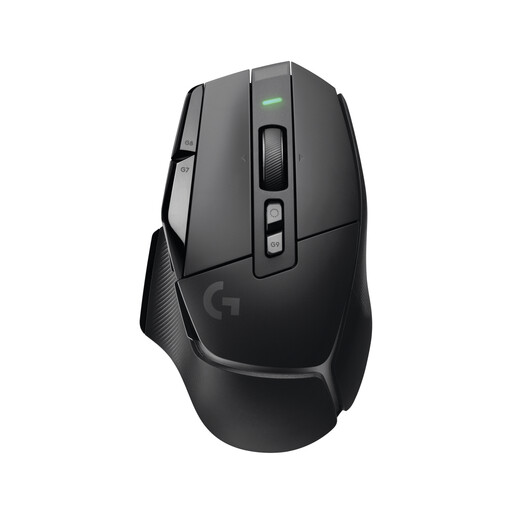
Logitech G G502 X LIGHTSPEED wireless gaming mouse

Logitech G G502 X LIGHTSPEED

Described as a wireless gaming mouse, it’s a good fit if you’d rather not use a wired connection while gaming.

The product details list a right-handed design and a dual-mode scroll wheel.

View at Joybuy

Logitech G G502 HERO gaming mouse

Logitech G G502 HERO

If you want to trigger extra game commands using your mouse, Logitech G lists eleven programmable buttons for the wired G502 HERO. This doesn’t mean its clicks are quiet.

The product details also list a dual-mode scroll wheel and an adjustable weight system.

View at Joybuy

Frequently asked questions

How do you set up a quiet wireless mouse on a PC?

First check whether the specific mouse uses Bluetooth or a USB receiver, and whether your PC supports the connection. CHERRY lists a nano USB receiver for the STREAM MOUSE COMFORT; Logitech lists Bluetooth Low Energy or Logi Bolt for the Signature M650. Then test the button assignments in the game you’re playing.

How can you avoid unexpected interruptions during a game?

Before a longer session, check the battery level of a wireless mouse and make sure you have a suitable spare battery or charging option. CHERRY lists a battery status indicator for the STREAM MOUSE COMFORT; Logitech gives a model-specific battery life for the G305 when used with one AA battery. Manufacturer figures don’t guarantee how long it will last with your usage.

What are your rights when shopping online in Germany?

For a qualifying distance purchase, the EU consumer portal generally gives you 14 days from delivery to withdraw from the contract; exceptions and rules on return postage apply. According to the EU consumer portal, the statutory guarantee for faulty goods lasts at least two years and is separate from any voluntary manufacturer’s warranty.

Can you put an old mouse in your general waste bin?

No. The German Federal Ministry for the Environment states that waste electrical equipment must be taken to an authorised collection point, such as a local recycling centre or an eligible retailer. According to the Ministry, consumers can also return used portable batteries free of charge to retailers or local collection points.