For drawing cartoon expressions at a shared desk, a small screen-free pen tablet is a good fit if you have access to a computer and need to clear the space again after drawing. If you’d like to edit details directly beneath the pen tip, consider a connected pen display; check its connections, power supply and footprint first. If you can’t rely on having a computer available, a standalone tablet with a suitable drawing app is the better choice, as long as the app and file-sharing options work for the way you draw.
Which type of device is right for you?
Artists with limited desk space
If you use a computer and need to clear the shared work surface after drawing, consider the device’s dimensions, cables and storage. Wacom describes the One by Wacom Small as a compact pen tablet that connects to a computer.
Artists who want to draw directly on screen
If you’d like to work on eyes and mouths directly beneath the pen tip, consider a connected pen display. XPPen and Huion offer these as dedicated product lines.
Artists without a dedicated computer
If a computer isn’t always available at the shared desk, you’ll need a device that runs your drawing app itself. Samsung says the Galaxy Tab S10 FE SM-X520NZAREUB comes with an S Pen.
What to consider when buying
Screen-free pen tablet
A good fit if: You have a suitable computer with a screen and want to put the device away quickly after drawing.
The trade-off: You draw on the tablet but see your artwork on a separate screen; the tablet and its cables also take up space.
Connected pen display
A good fit if: You want to edit cartoon details directly on the displayed image and can leave the display set up on the desk while you work.
The trade-off: The display doesn’t replace a computer; you’ll need to check that the connections, power supply and available space suit the specific model.
Standalone tablet with pen
A good fit if: You can’t use a computer at the shared desk or want to carry on drawing somewhere else.
The trade-off: The drawing app, pen and file-sharing options all need to suit the way you work; PC drivers won’t necessarily work on a tablet.
| What matters |
What to look for when buying |
Who it matters most to |
| Space and storage |
Compare the active drawing area with the device’s full dimensions; allow space for the pen and cables. |
If you need to clear the desk quickly after drawing, both footprint and storage matter. Around 33% of consumers put space requirements and quick storage first. |
| Working directly on the image |
Check the screen size, connections and power supply of the specific pen display against your computer and desk space. |
If you want to work on eyes or mouths directly beneath the pen tip, seeing your artwork on the drawing screen is key. Around 25% of consumers say working directly on their artwork is their top priority. |
| Drawing without a dedicated computer |
For a tablet, check that it supports your chosen drawing app and pen, and that it can export your images. |
If you can’t always use a computer at the desk, you’ll need a drawing app that runs on your tablet. Around 25% of consumers put independence from a computer first. |
| Workflow and compatibility |
Check the operating system and drivers, the keyboard shortcuts you want, what’s included and the terms of any software offers. |
If you want to set up recurring tasks or make the device work with your software, day-to-day compatibility matters. Around 17% of consumers make workflow and compatibility their main priority. |
What to watch out for at a shared desk
-
Confusing a pen display with a standalone tablet
Being able to see your artwork on screen doesn’t mean the display works without a computer. With a pen display, you’ll also need a suitable source device and power supply.
First, check whether a suitable computer is available at the shared desk. Then check the connections and what’s included with the specific display model.
-
Assuming the active drawing area is the same as the overall footprint
The stated drawing area doesn’t automatically include the casing, cables or space for the pen.
Measure the available space on the shared desk and compare it with the device’s full dimensions.
-
Assuming similarly named tablet variants are identical
The Joybuy listing for the Galaxy Tab S10 FE has X520 in its title, while the technical details give the model number SM-X210NDBAEUB. It’s therefore important to check the model code before buying.
Compare the full model code in the specific listing and confirm that the pen is included with the variant you’ve chosen.
-
Assuming bundled software will remain free indefinitely
Wacom states that software bundled with the One by Wacom Small comes with time-limited licences. Any use after that depends on the relevant licence terms.
Check which drawing programmes you actually need and what terms apply after the offer period.
Relevant brands at a glance
Wacom
The One by Wacom Small is a compact pen tablet that connects to a Mac or PC via USB.
- Wacom says no driver installation is required for Chromebook.
- The Small doesn’t have its own drawing screen; you’ll see your artwork on the connected computer screen.
XPPen
Its product range includes both screen-free pen tablets and connected pen displays.
- According to XPPen, the Deco 01 V2 has an active area of 10 × 6.25 inches and eight shortcut keys. The Artist 12 (2nd Generation) has an 11.9-inch drawing screen.
- A larger active area takes up more desk space; with a pen display, you’ll need to check that your computer has the right connections.
Huion
The Inspiroy 2 M is a pen tablet with controls, while the Kamvas 13 is a connected pen display.
- Huion says the Inspiroy 2 M has a battery-free pen and customisable controls.
- For the Kamvas 13, the specific USB-C connection must support the required video signal and power supply. Huion also specifies an additional power adapter when connecting it to an Android device.
ugee
The M908 is a screen-free pen tablet with a larger active area and built-in controls.
- ugee lists an active area of 10 × 6.25 inches, eight buttons and a scroll wheel.
- The manufacturer’s details about the active area and controls don’t, on their own, indicate drawing quality; check software and drivers separately.
Samsung
The Galaxy Tab S10 FE SM-X520NZAREUB is an example of a standalone tablet with a pen.
- Samsung says an S Pen is included with this German model.
- The app and file-sharing options need to suit the way you work; don’t assume the details for one variant apply to other Tab models without checking.
Joybuy products for drawing cartoon expressions
The products below include a reusable LCD drawing tablet and standalone Android tablets with a pen. Check whether a simple drawing surface or a tablet app with file-sharing options that suit the way you work is right for you.
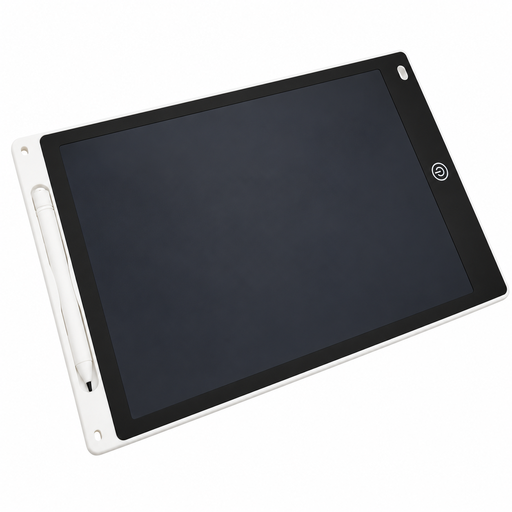 No image available
12-inch LCD drawing tablet with pen
For quick sketches at a shared desk when you want to erase your drawing afterwards and use the space again.
12 inches; drawing area 230 × 165 mm; erase button and lock switch. The description says the erase button clears the entire image. Children aged 5 and over must be supervised; the battery compartment should only be opened by an adult, and button cells must be kept away from young children.
View at Joybuy
 No image available
TECLAST ArtPad Pro 2025
A tablet option for drawing without a dedicated computer, provided your chosen drawing app runs on the device.
12.7-inch 2K display; Android 15; T-Pen supports 4096 pressure levels; 20 GB RAM (8 + 12 GB virtual); 256 GB storage.
View at Joybuy
 No image available
TECLAST ArtPad Pro with keyboard and protective case
A good option if you want to draw on a tablet without connecting it to a computer; first check that the drawing app and file-sharing options fit the way you work.
12.7-inch 2K display; Android 15; included pen supports 4096 pressure levels; 20 GB RAM (8 + 12 GB virtual); 256 GB storage. The title also says the offer includes a protective case and a Bluetooth keyboard.
View at Joybuy
Frequently asked questions
Can I draw on a screen-free pen tablet without a computer?
The PC pen tablets covered here aren’t standalone devices: Wacom describes the One by Wacom Small as a USB-connected device for Mac or PC. If there’s no computer available at the desk, consider a standalone tablet and check that your drawing app runs on it.
Is a USB-C connection enough for a pen display?
The connector shape alone doesn’t tell you everything. For certain mobile devices, Huion specifies USB 3.1 Gen 1 and DisplayPort 1.2 over USB-C for the Kamvas 13, as well as an additional power adapter. Check whether your specific connection supports a video signal and provides the required power.
What should I set up for a regular drawing spot?
Install the driver intended for your model and operating system, then check which drawing software you’re using. If your model has programmable buttons or a scroll wheel, you can often set them up for frequently used tasks, depending on the available settings.
Are bundled drawing programmes free indefinitely?
Not necessarily: Wacom says that software bundled with the One by Wacom Small comes with time-limited licences. Check the terms of the specific bundle and what applies if you want to keep using the software.
What rights apply when buying online in Germany?
The Verbraucherzentrale says that, as a general rule, relevant consumer contracts concluded at a distance come with a 14-day withdrawal period; when the period starts and any exceptions depend on the contract. In its article dated 13 August 2026, it also distinguishes statutory rights against the seller from a voluntary guarantee.


