Planners with limited desk space
If you mainly write training materials and need room beside your keyboard for a mouse or paperwork, a model without a number pad could be a good fit. This assumes you rarely enter lots of figures.


For mostly text-based work at a shared desk, a compact keyboard without a number pad can be a good choice if you enter few numbers and have a suitable connection available. DGUV Information 215-410 lists compact keyboards as an option when you enter only a small amount of numerical data or mainly use the mouse. If you regularly enter lots of figures, a number pad is useful. For switching between devices, cleaning and using a split key layout, check the approvals, manufacturer’s information and conditions for the specific model.
If you mainly write training materials and need room beside your keyboard for a mouse or paperwork, a model without a number pad could be a good fit. This assumes you rarely enter lots of figures.
If you switch between work computers while preparing materials, check which connection is available and permitted at each desk. A multi-device feature is only useful if the specific devices are compatible.
If several people use the same keyboard, make sure the cleaning rules at your workplace are compatible with the instructions for the specific model.
Start by checking the space available and whether you need a number pad, then consider the connection and layout. If the keyboard will be shared, its cleaning requirements should also suit the model and your workplace rules.
The percentages refer to the single most important priority when choosing a keyboard for this type of training planning.
| Priority | What to check when buying | Who it matters most to |
|---|---|---|
| Quiet typing and a small footprint | Check the space available, whether you need a number pad, the layout and the connection. Manufacturer claims about noise levels are not the same as measured comparisons between models. | If I mainly write text and also need room for a mouse or paperwork, I only want to go without a number pad if I rarely use one. Around 36% of consumers prioritise space and quiet typing when choosing a keyboard. |
| Connectivity and switching between devices | Check Bluetooth compatibility, the receiver, USB connection, power supply and German layout for the specific version. | If I work on materials using different work computers, the connection needs to be available and permitted at each desk. Around 29% of consumers put connectivity and switching between devices first. |
| Cleaning shared equipment | Check that the cleaning plan at your workplace is compatible with the instructions and information for the specific model. | If several people use the same keyboard, I want to be able to use a cleaning method intended for that exact model. Around 21% of consumers prioritise cleaning shared equipment. |
| Hand position during longer typing sessions | Consider the split layout, space required and potential adjustment period; try the design out beforehand if possible. | If I type for long periods, I would only consider a different key layout if it feels right and fits on my desk. Around 14% of consumers prioritise a hand position that suits them. |
A keyboard without a number pad does not have that dedicated input area. DGUV Information 215-410 describes compact keyboards as an option when you enter only a small amount of numerical data or mainly use the mouse.
Before choosing a size, consider how often you work with spreadsheets and enter blocks of figures.
If you regularly enter numbers, you may need a separate number pad or have to take more steps to enter them.
A wireless connection will only work at a shared desk if the required connection or receiver is available and you are allowed to set it up.
Check Bluetooth, the USB connection, receiver and permissions against the rules at each workstation.
Setting it up on multiple computers can take extra time.
Cleaning instructions for one keyboard do not prove that other models are suitable for the same products. CHERRY specifically relates its information about resistance to common disinfectants to the KC 1068.
Check which products are permitted and how to use them in the instructions for the exact version you have chosen.
The models mentioned here cater for different needs: a compact wired option, a full-size wireless keyboard or one designed for cleaning.
Some MX models are designed for switching between compatible devices; the ERGO K860 has a split key layout.
The wired PERIBOARD-512 B has a split key layout and a number pad; a German QWERTZ version is available to select.
The Joybuy products below range from wireless models for switching between devices to a compact wired keyboard. Above all, check the layout, connection and desk space required for your particular workstation.
 No image available
If you switch between work devices, check which connections are permitted at each workstation.
The product name lists 3-mode connectivity, 68 keys and a detachable wrist rest. The model is described as a compact wireless mechanical keyboard.
 No image available
If you also use a tablet at different workstations, check that your specific device is compatible with the products listed.
The product name lists a German QWERTZ layout, an integrated touchpad and a connection for up to three Bluetooth devices. Compatible devices include tablets and Windows PCs.
 No image available
If you need to choose a connection that works with your work computer, compare the listed connection types with the options available at your workstation.
The product name lists quiet tactile mechanical switches, Bluetooth, Logi Bolt, smart illumination and a German QWERTZ layout.
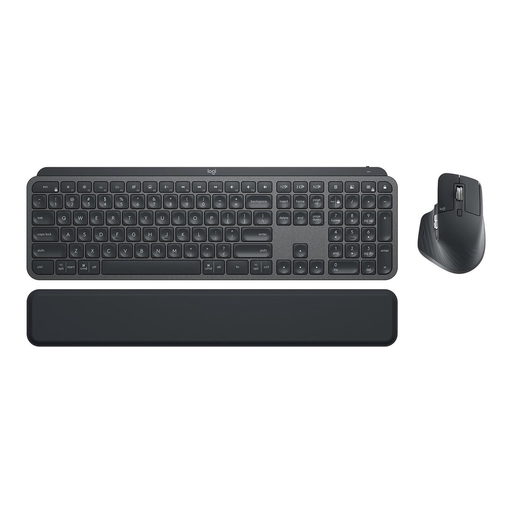 No image available
If you want to use a keyboard and mouse as a set, check that both suit your shared workstation and its connections.
The product name lists a German QWERTZ layout, Logi Bolt, Bluetooth, illumination and support for multiple devices. The keyboard is described as full-size, so it takes up more desk space than a compact design.
 No image available
If you mainly write text and have limited desk space, the TKL format could be worth considering; make sure the layout meets your actual needs.
The product name lists a wired USB model without a number pad, with CHERRY SX scissor keys and six multimedia keys. The stated layout is English (US) with a euro symbol, not German QWERTZ.
If you often enter blocks of figures, a model with a number pad is an obvious choice; if you mainly work with text, a compact keyboard can leave more room for your mouse. DGUV Information 215-410 recommends choosing according to the task.
Follow the cleaning plan at your workplace and the instructions for the specific model. Logitech recommends unplugging its wired keyboards or switching off its wireless keyboards before cleaning; this does not mean they are suitable for disinfectants. CHERRY specifically states that the KC 1068 is suitable for this.
Check that USB-A, Bluetooth or the required wireless receiver is available and can be used with each computer, and that the layout of your chosen version is right for you. Switching between multiple devices requires supported devices that have been set up; Logitech says Easy-Switch works with up to three devices.
It depends on whether you find the key layout comfortable, have enough space for it and can allow time to get used to it. Perixx notes that the PERIBOARD-512 B takes time to get used to; try the design before deciding if possible.
No. A manufacturer’s description such as “whisper-quiet” is not an independent comparison of noise levels. If noise matters at your shared desk, check the specific version and, if possible, try the keyboard under conditions similar to those at your future workstation.