Considerate creators
If you work within earshot of other people, frequent typing can be distracting. Labels such as “quiet” are manufacturer claims about a specific model, not a like-for-like measurement that can be compared across all keyboards.


For a shared desk, a compact keyboard without a number pad is a sensible starting point if you need room for a drawing mouse or graphics tablet. Choose a model described as quiet by the manufacturer only if its layout and keys also suit your needs. If you want to switch between your own computers or customise shortcuts, a multi-device or programmable model may be a better fit. In either case, consider the specific key layout, connection options and any extra set-up involved.
If you work within earshot of other people, frequent typing can be distracting. Labels such as “quiet” are manufacturer claims about a specific model, not a like-for-like measurement that can be compared across all keyboards.
You need room beside your keyboard to move a mouse or graphics tablet, and rarely use a number pad. Check which navigation and function keys your software requires.
If you often switch tools or want to use your own shortcuts, make sure the keys you need are easy to reach and can be mapped in your software. Aseprite supports customisable keyboard shortcuts; whether you use them is up to you.
Start by checking which keys your workflow needs. Then compare noise, size, connectivity and care requirements with the conditions at your workspace.
| What matters | What to check before buying | Who should pay particular attention? |
|---|---|---|
| Noise at a shared workspace | Check the manufacturer’s claims about the specific key action or switch; without comparable testing conditions, “quiet” is not a basis for ranking keyboards. | If you type frequently at a shared desk, you’ll want to keep disruption to people within earshot to a minimum. Around 28% of consumers say low noise is their top priority when choosing a keyboard. |
| Space for drawing tools | Compare the keyboard’s width and available arrow, function and modifier keys with the requirements of your software. | If you want to leave room for a drawing mouse or graphics tablet, a keyboard without a number pad could help. With a more compact layout, check that the keys you need are still easy to reach. Around 22% of consumers put free desk space first. |
| Shortcuts within easy reach | Make a note of the commands you use most often, then check the specific key layout and any available customisation options. | If you switch tools frequently while working on tilesets, your most important commands should be easy to access. Around 22% of consumers prioritise customisable shortcuts or keys that are easy to reach. |
| Switching between your own devices | Check USB connectivity, Bluetooth or receiver support, pairing permissions and what’s included with the keyboard for your workspace. | If you switch the same keyboard between your own computers, the right connection matters more than a feature you can’t use. Around 17% of consumers put switching between devices first. |
| Cleaning a shared keyboard | Follow the care instructions and workspace rules; only choose a cover if it’s confirmed to fit your specific model. | If several people use the same keyboard, you’ll want to know how to care for it in line with the model’s instructions and any applicable rules. Around 11% of consumers prioritise cleaning a shared keyboard. |
TKL and 75% layouts save space in different ways. Which keys you can reach directly depends on how you use your tileset software.
Before buying, make a note of the commands you use most often and compare them with the specific key layout.
Customising the layout may involve extra set-up.
Keyboard ranges may be available in several layout variants. The CHERRY STREAM KEYBOARD TKL we found is listed with a US layout; the Keychron K3 Max collection also includes different layouts.
Check the selected variant and key legends on the product listing, especially if you want a German layout.
Manufacturer claims alone don’t provide a reliable comparison of noise levels when testing conditions and switch variants differ.
Check the specific switch type and, where available, consult independent reviews carried out under comparable conditions.
CHERRY describes EZCLEAN as a protective cover for keyboards in the 4100 series; that doesn’t mean it will fit other models.
Only choose accessories if they’re confirmed to be compatible with your specific keyboard. Otherwise, follow its care instructions.
An ill-fitting cover could mean you need to arrange an exchange or return.
The STREAM KEYBOARD TKL is a wired keyboard without a number pad. According to the manufacturer, the STREAM KEYBOARD ULTIMATE is designed for switching between devices.
According to Logitech, the MX Keys Mini is for people looking for a compact keyboard with backlighting and programmable keys. The Ergo K860 is a different, ergonomically focused option.
According to the manufacturer, the K3 Max combines a compact layout with QMK/VIA customisation and several connection options.
The PERIBOARD-835 is a split mechanical keyboard for anyone who prefers this layout to keeping their keyboard footprint as small as possible.
The following Joybuy picks include compact wired and wireless keyboards, as well as compact models with customisable layouts. Check that the layout and keys you need suit your workflow.
 No image available
A good fit if you’re looking for a compact wireless keyboard with several connection options.
The product name specifies four connection channels, a rechargeable battery and CHERRY SX scissor switches. The listed version has a UK English QWERTY layout.
 No image available
An option for a permanent desk set-up if a wired connection and the listed US layout suit your needs.
This wired model has six multimedia hotkeys and CHERRY SX scissor switches. The version has an English US layout with a euro symbol.
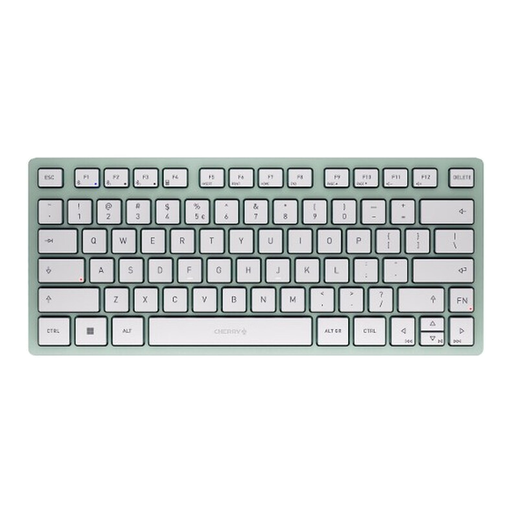 No image available
A good fit if you’re considering a compact Bluetooth model for your own devices.
The product name specifies Bluetooth, a TKL form factor and support for three devices. The listed version has a US QWERTY layout.
 No image available
An option if you’re looking for a mechanical keyboard with a German ISO layout and customisable keys.
The product name specifies tri-mode wireless connectivity, hot-swappable switches, VIA compatibility and an 8000 mAh battery.
 No image available
A good fit if you’re looking for a mechanical keyboard with a German QWERTZ layout and wireless connection options.
The product name specifies Tactile Quiet switches, Bluetooth, Logi Bolt and intelligent backlighting. Check which connection options are available and permitted at your workspace.
No. What matters is having the commands you need within easy reach and a layout that suits your workflow. Aseprite supports customisable keyboard shortcuts and tilesets in tilemaps; a mechanical keyboard isn’t a requirement.
Check the connections and permitted pairings on the computers you actually use, as well as the key layout in your software. A multi-device feature doesn’t automatically mean you’re allowed to connect the keyboard to a shared, managed computer.
Follow the care instructions for the specific model and the rules at your workspace. Protective covers are model-specific: CHERRY describes EZCLEAN as a cover for keyboards in the 4100 series.
For a consumer purchase, statutory rights against the seller are separate from a voluntary guarantee. According to the Verbraucherzentrale consumer advice centre, ordinary online purchases generally come with a 14-day right to cancel; the type of contract and any exceptions should be checked on a case-by-case basis.
If you’re asking about a workstation for employees at a workplace or a relevant teleworking workstation, the requirements for display-screen equipment under the Workplace Ordinance and the applicable ASR A6 are relevant. The Federal Institute for Occupational Safety and Health (BAuA) describes the scope of ASR; simply describing a desk as “shared” doesn’t establish an employment relationship or a general requirement to use a particular type of keyboard.