If you regularly enter figures while checking survey results, a number pad is an obvious choice. If you mostly read and comment, a compact keyboard can leave more room for your mouse and documents. An ergonomically shaped keyboard may be worth considering if hand position matters to you during longer sessions and you have space for a different key layout. Also check that the layout is German, that the connection works with the computer you use, and that you can follow the cleaning instructions for the specific model. Manufacturer claims such as ‘quiet’ are not independent noise measurements, and an ergonomic shape does not guarantee that you personally will be free from discomfort.
Which keyboard is right for you?
People who check figures
If you regularly enter or check survey figures, consider whether separate number keys justify the extra space they take up. CHERRY describes its TKL version as a keyboard without a number pad; Dell lists a number pad for the KB216.
People who need a quiet desk
If you check responses alongside other people, consider typing noise and how much room you need for your mouse and documents. CHERRY describes the keystrokes on its SX keys as quiet, but that is not a like-for-like measurement at your own desk.
People working for longer or taking turns
For longer checking sessions or when sharing a computer, hand position, getting used to the keyboard and the connections permitted at your workplace all matter. The German Federal Institute for Occupational Safety and Health explains the requirements for screen-based work within the relevant scope of ASR A6.
What should you look for when buying?
First decide whether you often enter figures or mainly read and comment. Then compare the space required, connection options, and what you need in terms of hand position and cleaning.
| Priority |
What to check before buying |
Who it matters most to |
| Number pad for entering figures |
How often you enter figures and how much desk space is available; TKL models do not have separate number keys. |
If I enter lots of figures in spreadsheets, I want to key them in directly using separate number keys. Around 26% of consumers prioritise entering figures when buying. |
| Typing noise around other people |
Try the key mechanism and, where possible, check the noise yourself under comparable conditions. Manufacturer descriptions are not measurements of noise at your desk. |
If other people work at the same desk, I want to avoid unnecessary disruption from typing. Around 21% of consumers put keeping typing noise to a minimum first. |
| Connection to your computer |
Check the available USB-A ports, permitted wireless connections, any receiver required and the switching function on the exact model variant. |
If I want to use the keyboard with one or more specific computers, I need to know that the connection will actually work with them. Around 16% of consumers prioritise connectivity or switching between devices. |
| Hand position during longer sessions |
Try split or wave-shaped key layouts and check the space required and wrist support; an unfamiliar layout may take time to get used to. |
During longer checking sessions, I want to choose a key layout that feels right for my hand position. Around 16% of consumers prioritise hand position. |
| Room for your mouse and documents |
Compare the available desk width with the dimensions of the exact model variant, and consider where your mouse and documents will go. |
If there is little room beside the keyboard, I want to be able to arrange my mouse and documents comfortably. Around 11% of consumers prioritise having free space on their desk. |
| Cleaning when the keyboard is shared |
Follow the cleaning instructions for the specific model; splash resistance does not mean that any cleaning product is suitable. |
If several people use the same keys, I want to know how to clean the keyboard in line with the manufacturer’s instructions. Around 10% of consumers prioritise ease of cleaning. |
Avoid common assumptions
-
A German shop listing does not automatically mean German QWERTZ
The CHERRY STREAM KEYBOARD TKL listed on Joybuy is described as having a US layout with a euro symbol. The wrong key layout can make typing and using familiar key positions awkward.
Before buying, check the selected model variant and the actual key labels.
An unsuitable layout may mean you have to search for another product.
-
Wireless does not automatically mean you can switch between devices
The Logitech ERGO K860 and ERGO K860 for Business differ in the receiver technology specified. CHERRY describes the STREAM KEYBOARD WIRELESS as a 2.4 GHz model with a receiver; this does not mean it can switch between multiple devices.
Check the full model variant, its connection to the computer you plan to use, and your workplace’s rules on wireless devices.
An incompatible receiver could mean extra set-up work.
-
Splash resistance does not mean it is easy to clean
On 3 November 2026, the F.A.Z. buying guide described a seam on the ERGO K860 as difficult to clean. A keyboard that is protected against splashes is not automatically suitable for use with any cleaning product or amount of liquid.
Take hard-to-reach areas into account and follow the instructions for the specific model when choosing cleaning products and methods.
Key brands at a glance
CHERRY
The STREAM range includes wired, compact and wireless keyboards.
- CHERRY describes its SX keys as quiet; this is not an independent noise measurement.
- The TKL version has no number pad. For the wireless version, check that the receiver and power supply suit your workplace.
Logitech
The ERGO K860 has a split key layout and a number pad; the MX Keys S is a different, slim wireless product range.
- Logitech says the standard ERGO K860 can switch between up to three connected devices.
- On 3 November 2026, the F.A.Z. buying guide described a seam on the ERGO K860’s wrist rest as difficult to clean. Logitech’s statements about posture are manufacturer claims, not a guarantee of individual results.
Dell
The KB216 is described as a full-size wired keyboard with a number pad for a fixed workstation.
- Dell lists USB-A and a number pad for the black German version.
- Check the exact model variant and its availability before relying on a specific offer.
Perixx
The PERIBOARD-512 B combines a split key layout with a number pad and a choice of German QWERTZ layout.
- Its split layout offers a different arrangement of keys from a conventional keyboard.
- Perixx notes that it may take time to get used to. According to the manufacturer, the model needs 485 × 236 × 44 mm of space and a USB-A port. This is not evidence that it will relieve any individual discomfort.
HP
The 480 Comfort is a wired keyboard that HP describes as suitable for people who value wipe-clean surfaces.
- HP says this model can withstand cleaning with household disinfectant wipes up to 1,000 times.
- The manufacturer’s claim does not automatically apply to other HP models or to any cleaning product.
Joybuy products at a glance
The following Joybuy picks range from wireless keyboards for switching between devices to models with a number pad. Layout and connection options vary by model, so check that both suit your workplace.
 No image available
Inateck KB01003G Bluetooth keyboard, QWERTZ
For a workstation where you want a QWERTZ keyboard that can switch between multiple devices.
The title lists Bluetooth for three devices and an ultra-slim design.
View at Joybuy
 No image available
Wireless keyboard with display and dial, QWERTZ
For a workstation where you need a choice of connection types or the option to switch between devices.
The title lists Bluetooth for up to four devices, 2.4 GHz, USB-C and a 2,000-mAh battery.
View at Joybuy
 No image available
Wireless keyboard and mouse set, QWERTZ, with number pad
For regular number entry when you need a full-size keyboard with a separate number pad.
The title lists a 2.4 GHz connection and keys described as quiet; this is not an independent noise measurement.
View at Joybuy
 No image available
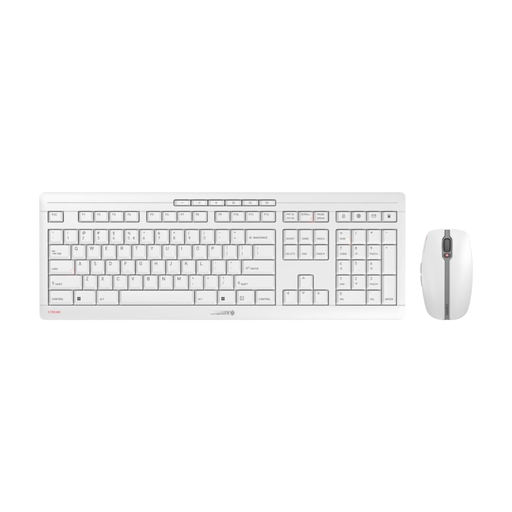
CHERRY Stream Desktop Recharge, QWERTY
For a wireless workstation where a keyboard and mouse set with a rechargeable keyboard could be a good fit.
The title lists a QWERTY layout, 2.4 GHz wireless connection, quiet scissor keys and USB-C charging. QWERTY is not the same as German QWERTZ.
View at Joybuy
 No image available
Ticktype EVO75, mechanical keyboard, ISO-DE
For a compact workstation where you need an ISO-DE layout and a choice of connection types.
The description lists Bluetooth, 2.4 GHz wireless and a USB-C cable. It is described as a compact 75% layout with 80 keys.
View at Joybuy
Frequently asked questions
Do I definitely need a number pad to check survey results?
No. A number pad is an obvious choice if you enter figures frequently; if you mainly read and comment, a TKL keyboard can leave more room for your mouse and documents. What matters is how often you actually enter figures.
How do I connect a keyboard to a shared computer?
First check the computer’s ports and the connection supported by the specific keyboard variant. Dell lists USB-A for the KB216; Logitech describes the standard ERGO K860 as connecting via Bluetooth or a USB receiver, with switching between up to three connected devices. The K860 Business version has a different receiver technology.
Can I disinfect a shared keyboard?
Follow the instructions for the specific model when choosing cleaning products and methods. HP says the 480 Comfort can withstand a certain number of cleans with household disinfectant wipes; this does not mean that any liquid is suitable or that other keyboards can be cleaned in the same way.
Who can help if the product develops a fault after purchase?
For consumer purchases from a business seller, European Union information states that you have a legal guarantee of at least two years from the date you receive the goods, with the seller responsible. This is separate from any voluntary manufacturer’s warranty. For your specific purchase, check who the seller is and what type of contract applies.


