If the monitor can stay on your shared desk, the space available and how you want to view your sources and flashcards will help you choose between a compact Full HD model and a QHD monitor with USB-C docking. If you need to clear the desk after studying, a portable monitor is an alternative – although it has a smaller screen and, depending on the model, fewer adjustment options.
Which option is right for you?
Students with limited desk space
If you need space for paper flashcards alongside your laptop and keyboard, make sure the stand and casing fit the space available. ASUS lists the portable ZenScreen MB16ACV as 15.6 inches; still, measure the space you actually have at your shared desk.
Students working with multiple sources
If you read study materials while creating digital flashcards, consider resolution, screen size and text scaling together. Dell and Lenovo list Full HD and QHD respectively for their 23.8-inch models.
Students using different laptops
If you use more than one device, check that the video inputs are suitable and, if you want one cable to carry both the picture and power, that the USB-C port is compatible. Dell, Lenovo and AOC specify different power delivery outputs for their respective models; check these against each laptop’s charging needs.
What to look for when sharing a desk
Desktop Full HD monitor
A good fit if: the screen can stay on your shared desk and one separate window for sources or flashcards is enough.
The trade-off: at the same screen size, Full HD has fewer pixels than QHD. Ports and adjustment options vary by model.
Desktop QHD monitor with USB-C docking
A good fit if: you often view sources and flashcards side by side and want to connect compatible laptops with as few cables as possible.
The trade-off: check video output, charging requirements and readable scaling on your laptop. Extra docking features aren’t essential for every study space.
Portable USB-C monitor
A good fit if: you need to clear your shared desk after studying and a smaller extra screen will do.
The trade-off: ASUS says the ZenScreen MB16ACV is 15.6 inches and has no height adjustment. Check that its USB-C features are compatible with your laptop.
| Priority |
What to check before buying |
Who should pay particular attention? |
| Space for paper flashcards |
Arrange your flashcards, keyboard and laptop as you would use them, then compare the layout with the stand and casing of the monitor you’re considering. |
If I want to lay out and annotate flashcards beside my laptop, the monitor mustn’t take up my clear working space. That’s why around 31% of consumers put space for paper flashcards first. |
| Clear viewing of sources and flashcards |
Compare Full HD (1.920 × 1.080) and QHD (2.560 × 1.440) on Dell and Lenovo models, then check text size and scaling on your laptop. |
If I want to read sources and flashcards at the same time, I need a display where text size and the amount of visible content work for me. Around 25% of consumers prioritise being able to read several text windows clearly. |
| Quickly connecting laptops |
Check video output through the specific port, the USB-C mode supported, charging requirements and the cables you’ll need. |
If several people use their own laptops, I don’t want to have to guess which ports and charging options to use each time someone switches devices. Around 25% of consumers prioritise compatible device connections and easy switching. |
| Adjusting the screen for different people |
Check the height, tilt and, where applicable, swivel adjustment on the specific model. Set the screen position and text size to suit each person. |
If people change seats or have different heights at our shared desk, I want to be able to reposition the screen. Around 19% of consumers prioritise adjustability for different users. |
Common buying mistakes
-
Assuming USB-C means any laptop will work with one cable
A USB-C port on a monitor doesn’t guarantee that every laptop can send a video signal through it or receive enough power to charge. The power delivery specifications from Dell, Lenovo and AOC apply to the models listed.
For each laptop, check video output and charging requirements, as well as the features of the compatible monitor port.
Depending on the device, you may also need another cable, an adapter or your existing laptop power supply.
-
Comparing screen size alone
The screen size doesn’t tell you how much desk space the stand and casing need. What matters is whether there’s room for your flashcards, laptop and input devices as well as the monitor.
Measure the available space with everything in its intended position, then compare it with the dimensions of the specific model.
-
Expecting a portable display to work like a height-adjustable desktop monitor
ASUS lists the ZenScreen MB16ACV as tilt-adjustable, but not height-adjustable. Bear in mind that it has a smaller screen and may need to be set up differently.
Choose a portable design primarily if being able to clear the desk matters most, and check that its intended set-up will work for you.
If the available tilt adjustment isn’t enough, you may need a separate stand.
Key brands to consider
Dell
The P2425HE and P2425DE are desktop 23.8-inch USB-C hub monitors with different resolutions.
- Dell says the P2425HE offers Full HD and up to 90 W power delivery; the P2425DE has QHD at the same screen size.
- These specifications apply to the models listed and don’t support a general claim about viewing comfort while studying.
Lenovo
The ThinkVision P24h-30 is a desktop QHD docking option for a dedicated study space.
- Lenovo lists a 23.8-inch screen, 2.560 × 1.440 pixels, multiple inputs, an adjustable stand and up to 100 W USB-C power delivery.
- Video and charging over USB-C depend on whether the laptop supports the features required.
AOC
The 24P3CV is a desktop 23.8-inch Full HD monitor with a USB-C hub.
- AOC lists USB-C with DisplayPort Alt Mode and up to 65 W power delivery for the 24P3CV.
- If your laptop needs more power to charge, check the model’s power delivery separately.
ASUS
The ZenScreen MB16ACV is a portable option for a desk you need to clear after studying.
- ASUS lists a 15.6-inch Full HD screen and USB-C with DisplayPort Alt Mode.
- ASUS doesn’t list height adjustment. The smaller screen takes up less space, but offers less display area than the desktop 23.8-inch monitors reviewed here.
Philips
The 24E1N1300AE/00 is a desktop 23.8-inch Full HD option with USB-C.
- Philips describes picture, data and power transfer over a single cable with compatible devices.
- The manufacturer’s description doesn’t guarantee universal compatibility with every laptop.
Joybuy products for your study space
The models below include desktop Full HD monitors, QHD docking monitors and portable displays. The right design for you depends on how much space is available at your shared desk and whether the screen can stay there.
 No image available
KOORUI MB24V29FS4
For a dedicated study space where you need a separate Full HD window for sources or flashcards.
24 inches; FHD; IPS; 120 Hz; HDMI and VGA; VESA 100 × 100 mm; tilt-adjustable.
View at Joybuy
 No image available
Dell P2425HE
For a desktop study space where you want to view sources and flashcards on a Full HD screen.
24 inches; FHD; IPS; USB-C; 3-year warranty.
View at Joybuy
 No image available
MSI PRO MP275QPDGDE
For a desktop study space where you want a higher resolution and docking features; check you have room for the 27-inch screen.
27 inches; WQHD; IPS; 100 Hz; USB-C with 98 W power delivery; daisy chain; KVM; built-in webcam.
View at Joybuy
 No image available
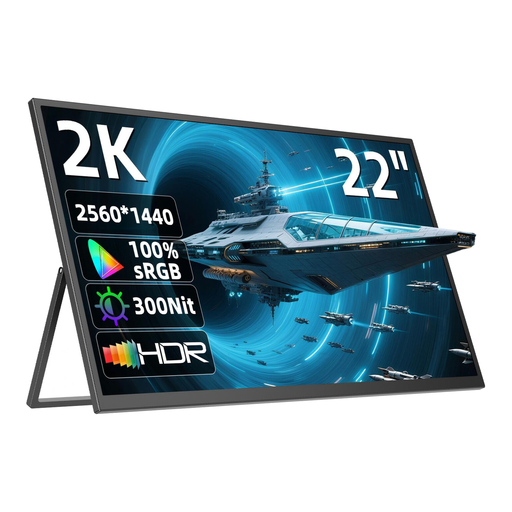
UPERFECT 22-inch 2K monitor
For a shared desk that needs to be cleared after studying, if a portable QHD display suits your set-up.
22 inches; QHD; IPS; 2.560 × 1.440 pixels; stand adjustable through 180°; USB-C; Mini-HDMI; VESA compatible.
View at Joybuy
 No image available
UPERFECT 15.6-inch monitor
For a study space where you want to put away a compact screen after each session and a Full HD second screen is enough.
15.6 inches; IPS; 1.920 × 1.080 pixels; USB-C; Mini-HDMI; built-in adjustable stand; VESA compatible.
View at Joybuy
Frequently asked questions
How should I set up my monitor for longer flashcard study sessions?
Set the text to a comfortable size and choose a viewing distance that suits the task. The German Social Accident Insurance Institution for the Wood and Metal Industry recommends at least 500 mm as a guide for screen work. Position the screen to minimise glare and reflections. These recommendations aren’t blanket legal requirements for a home study desk.
Will a USB-C monitor work with any laptop using just one cable?
No. Check whether your laptop’s USB-C port outputs a video signal, and compare its charging requirements with the power delivery specification of the monitor you’re considering. ASUS lists DisplayPort Alt Mode for the ZenScreen MB16ACV’s USB-C input.
How can I compare a monitor’s power consumption before buying?
Compare the energy label and the specific model entry in EPREL. The European Commission includes electronic displays under EU energy labelling rules; screen size alone isn’t a substitute for checking the model itself.
Is a manufacturer’s warranty the same as your statutory rights for faulty goods?
No. Under section 437 of the German Civil Code (BGB), buyers have statutory rights if goods are faulty. Under section 438 BGB, the limitation period for these claims is generally two years from delivery of the goods. The terms of a voluntary manufacturer’s warranty are separate.


