For long lists of results, a conventional mouse with a well-controlled scroll wheel is a sensible starting point, as long as its shape and handedness suit the people using it. If the mouse really will be shared, you’ll also need to consider whether it’s easy for everyone to use, how it connects to their computers and what rules you’ll follow for keeping it clean. A vertical mouse or trackball is an individual alternative, and each person should decide for themselves whether its shape or operating method suits them.
Who this choice matters to
Anyone reviewing long lists of results
If you switch between checking individual entries and quickly scrolling through lengthy survey results, it’s worth looking at how the scroll wheel works. Logitech says that its Signature M650 range offers both line-by-line and fast scrolling.
People sharing a desk
If several people use the same mouse, its ease of use, handedness and connection must suit both the users and their computers. For desk sharing, the German Social Accident Insurance (DGUV) also stresses the importance of leaving the workspace clean and tidy.
People who work at a computer for long periods
For extended screen work, a comfortable hand position and enough room to arrange your mouse and keyboard to suit you are important. The Federal Institute for Occupational Safety and Health highlights the importance of positioning; a vertical mouse or trackball is an alternative to try for yourself.
What to consider when buying
Conventional office mouse
A good fit if: you switch between individual rows and long lists while reviewing results, and can find a shape that suits your hand.
Consider: Separate size and handedness options won’t automatically suit everyone sharing the desk.
Vertical mouse
A good fit if: you’ll mainly use the mouse yourself and want to try an angled hand position.
Consider: The different grip may take some getting used to, and models may be available in separate versions for each hand.
Ambidextrous trackball
A good fit if: there’s little room to move a mouse, or people with different dominant hands need to use the same device.
Consider: Controlling the cursor with a ball feels different from using a conventional mouse.
Wired mouse
A good fit if: you use a fixed computer with an accessible USB port.
Consider: The cable limits where you can position it, and you’ll need to check that the connection works with each computer you use.
For a shared workspace, start by checking the scrolling performance, whether the mouse will genuinely be shared, how well it fits and which connections are available.
| Priority |
What to check before buying |
Who it matters to |
| Controlled scrolling |
Check the scrolling modes and wheel operation of the specific version. |
If you want to check individual responses and then move quickly through long lists, a well-controlled scroll wheel matters. Around 28% of consumers say controlled scrolling and navigation are their top priority. |
| Sharing |
Find out who will use the mouse, which dominant hands need to be catered for and what rules apply to keeping it clean. |
If several people use the same mouse, it should suit different users, and you should agree on how to keep it clean. Around 22% of consumers put suitability for shared use first. |
| Comfort during extended use |
Assess the hand position, handedness and available desk space for yourself. |
If you work at a computer for long periods, the shape should feel right for your hand. A vertical mouse or trackball needs to be tried individually. Around 22% of consumers prioritise a suitable shape for extended use. |
| Switching between computers |
Check Bluetooth support, available USB ports and any workplace IT requirements. |
If you switch between a laptop, dock or desktop computer, the connection should suit the devices you actually use. Around 17% of consumers prioritise easy set-up with different computers. |
| Quieter clicks |
Only assume clicks are quiet for the specific version on offer, and check that it’s comfortable to use too. |
If you work in a quiet, shared space, low click noise may matter to you. Around 11% of consumers say keeping noise to a minimum is their top priority. |
Common buying mistakes
-
Assuming a shared desk means a shared mouse
A desk can be shared without everyone using the same input device. A highly contoured mouse or one designed for a particular hand may not suit other users.
Before choosing a model, find out whether the same mouse will actually be shared. If users have different dominant hands, consider an ambidextrous model or personal devices.
-
Thinking of a vertical mouse as a treatment for hand discomfort
A different hand position doesn’t prove that a shape will suit everyone or relieve discomfort. For screen work, the Federal Institute for Occupational Safety and Health emphasises arranging the mouse and keyboard to suit the individual.
Assess the shape and handedness for yourself, and don’t rely on buying a product alone to address discomfort.
-
Assuming Bluetooth, wireless receivers and USB cables are interchangeable
The models described use different types of connection, which need to be compatible with the computer in question.
Before buying, check Bluetooth support, available USB ports and any requirements set by your workplace IT team.
If the required connection isn’t available at your workplace, you may need to carry out extra set-up, or you may not be able to use the mouse at all.
-
Assuming similarly named versions are identical
Logitech lists the M650 L and M650 L Left as separate size and handedness options. A similar model name alone doesn’t tell you whether the mouse will suit its intended user.
On the product details page, check the full model and version name, as well as the handedness.
Relevant brands at a glance
Logitech
According to Logitech, the Signature M650 range combines SmartWheel and quiet clicks with separate size and handedness options. The compact MX Anywhere 3S is designed for use on different surfaces.
- Its documented scrolling features may be useful when switching between individual lines and long lists.
- The M650 L and M650 L Left are different versions; a compact mouse won’t automatically suit every hand.
CHERRY
The MW 4500 and MW 4500 LEFT are separate vertical models with a 45° angle.
- CHERRY lists thumb buttons and three resolution settings of up to 1200 dpi.
- The angled shape is a personal choice; the LEFT version doesn’t make the standard MW 4500 ambidextrous.
Kensington
The Orbit Wireless is a trackball with a scroll ring. You control it without moving the device like a conventional mouse.
- Kensington lists four DPI settings, wireless and Bluetooth connectivity, and a detachable wrist rest.
- Controlling the ball feels different from using a mouse; check that it suits the people sharing the desk.
Trust
The wired Verto is a USB alternative with a vertical 60° shape.
- Trust lists plug-and-play set-up and a 1,5 m cable.
- The cable affects where you can position it, and the vertical shape should be assessed individually if it’s going to be shared.
Joybuy products for a shared desk
This selection includes mice for scrolling through long lists, switching between computers and trying a vertical design. Choose a shape, handedness and connection to suit the people and devices in your workspace.
 No image available
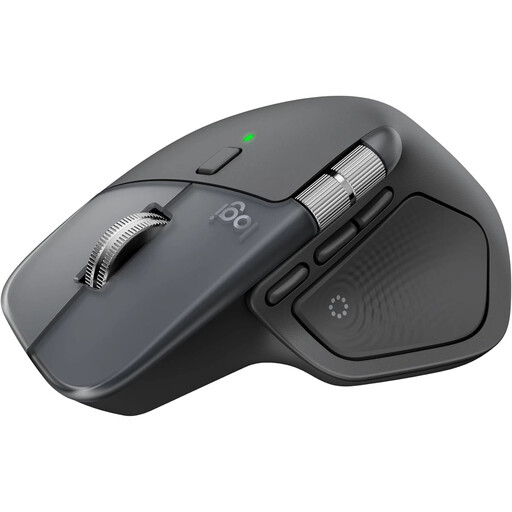
Logitech MX Master 4
For long lists of results and switching between computers, provided the shape and controls suit your hand.
The product description lists a MagSpeed scroll wheel for fast, precise scrolling, quiet clicks and Bluetooth connectivity for switching between up to three devices.
USB-C charging cable not included, according to the product description.
View at Joybuy
 No image available
Wireless vertical mouse with 6 buttons
A vertical alternative if you’d like to try a different hand position and use extra navigation buttons.
The product title lists a 2,4-GHz connection and three DPI settings from 800 to 1600. The product description lists six buttons and a 4-way scroll wheel.
View at Joybuy
 No image available
Vertical wireless mouse with USB-C charging
For people who want to try a vertical shape and wireless connection; the fit should be assessed individually.
The product title lists Bluetooth and 2,4-GHz dual connectivity, as well as USB-C charging. The product description lists six programmable buttons.
Three DPI settings: 800, 1200 and 1600.
View at Joybuy
 No image available
HOFOTEK M308 2.4G Silent Office Mouse
An office mouse for workspaces where quiet clicks matter; also check that its shape suits the people using it.
The product description lists Silent-Touch clicks, several adjustable DPI settings and a 2,4-GHz connection with a USB receiver.
The description calls the mouse compact and lightweight.
View at Joybuy
 No image available
Logitech MX Vertical
A vertical alternative for people who want to try a different hand position; the angle should feel comfortable for your hand.
The product description lists a 57° angle and a sensor of up to 4000 DPI.
Bluetooth or USB receiver, connection to up to three devices and a rechargeable battery, according to the product description.
View at Joybuy
Frequently asked questions
Does everyone have to use the same mouse at a shared desk?
No. First, find out whether you’re sharing just the desk or the input device as well. The German Social Accident Insurance (DGUV) recommends setting clear rules for cleanliness and tidiness in shared workspaces.
How do I set up a mouse for the next person?
Before using it, check the workspace arrangement and the connection options available on the computer. For the Logitech M650, Logitech lists Bluetooth Low Energy and a Logi Bolt USB receiver. The right option depends on the device and any IT requirements.
What should I know about cleaning and care?
If several people use the same mouse, agree on how to keep it clean. Follow the instructions for the specific model when choosing suitable cleaning products and methods.


