If you often need to clear your desk and already have a suitable monitor, a Mini PC is a space-saving option. Check its ports and configuration to make sure it suits your needs. An all-in-one combines the screen and computer, while a small tower or Small Form Factor PC may appeal if expansion slots are important to you. If you share the computer too, personal user accounts and regular backups are essential. Also check the operating system, writing software and exactly what’s included.
Who is this writing set-up for?
Writers with limited desk space
If you share a desk, your computer should take up as little room as possible alongside an existing screen. The dimensions and ports of the specific Mini PC matter. Apple lists the Mac mini’s footprint as 12,7 × 12,7 cm, while Lenovo describes the ThinkCentre Neo 50q Gen 5 as a Tiny PC.
Writers using a shared computer
If several people use the same computer, personal user accounts and regular backups of your text files are important. The Federal Office for Information Security (BSI) highlights the risks to systems and data when computers are shared.
Writers with existing accessories
If you want to keep using your monitor, keyboard and mouse, check that the ports and operating system are compatible with your devices and writing software. Also check what’s included with the specific configuration: Lenovo says the variant reviewed here doesn’t come with a keyboard or mouse.
What should you look for when buying?
First decide what matters most to you: clear desk space, protecting your writing, using accessories you already own or having a quiet place to write. The proportions below refer to consumers choosing a desktop PC for this type of writing set-up.
Mini PC
A good choice if: You already have a suitable monitor and want the computer to take up as little desk space as possible.
Things to consider: Ports, operating system, specifications and included accessories vary by model and configuration.
All-in-one PC
A good choice if: You don’t have a monitor yet and want the screen and computer in one device.
Things to consider: Check the footprint of the whole device, how adjustable the screen is, its ports and repair options.
Small tower or Small Form Factor PC
A good choice if: You have space beside or under your desk and expansion slots are important.
Things to consider: The case takes up space of its own, so check which slots are available on the specific model.
| Priority |
What to check when buying |
Who is it important for? |
| Clear desk space |
Case dimensions, where it can be placed or whether it supports mounting, and the monitor ports you need. |
If I want to keep as much space as possible for my screen and writing materials at a shared desk, the size of the computer matters. Consumers who prioritise clear desk space are likely to account for around 31 %. |
| Protecting your manuscript |
Check whether personal user accounts are supported and how to back up and restore text files regularly. |
If other people use the PC too, I want to keep my drafts separate and be able to recover them if data is lost. Around 25 % of consumers are likely to prioritise protecting their manuscripts above all else. |
| Accessories and overall cost |
Check that the video output matches your monitor input, and look at the operating system, writing software and whether a keyboard and mouse are included. |
If I want to keep using devices I already own, the computer should fit my writing set-up without incompatible ports or missing accessories. Around 25 % of consumers are likely to prioritise accessories and a complete set-up above all else. |
| A quiet writing environment |
Check whether the exact configuration on offer is fanless; only compare noise measurements taken under similar conditions. |
If I write at a shared desk for long periods, I want to keep distracting noise to a minimum. An estimated 19 % of consumers prioritise a quiet environment above all else when buying. |
Common buying mistakes
-
Thinking only about the computer, not the complete writing set-up
A Mini PC doesn’t automatically include a monitor, keyboard or mouse. The ThinkCentre Neo 50q Gen 5 configuration reviewed here doesn’t include a keyboard or mouse.
Make a note of the accessories you already own, then check that the ports and included items match the specific configuration.
-
Confusing a shared account with a backup of your manuscript
The Federal Office for Information Security recommends separate user accounts with appropriate permissions on shared computers. You’ll also need a backup if you want to restore your drafts after data loss.
Set up personal accounts and regularly check that you can actually restore a backup.
-
Assuming fanless means completely silent
MSI describes the Cubi N ADL S variant as fanless. This isn’t a noise measurement for the entire writing set-up.
Check the full model name and only compare measurements taken under similar conditions.
-
Keeping an older Windows PC without checking support
Microsoft ended regular support for Windows 10 on 14 October 2025. Microsoft outlines separate options for continuing to use it.
Before deciding, check which system is installed and what upgrade path is supported for the exact device on offer.
A guide to relevant brands
Apple
The Mac mini is a compact macOS option if the writing software you need runs on macOS.
- Apple lists the Mac mini’s footprint as 12,7 × 12,7 cm and says it has external display ports.
- Remember to factor in a screen and input devices when planning your writing set-up, and check that your software is compatible.
Lenovo
The ThinkCentre Neo 50q Gen 5 is a compact Windows desktop option for use with a suitable monitor.
- The configuration reviewed comes with Windows 11 Home, 24 GB RAM and a 512-GB SSD.
- This configuration doesn’t include a keyboard or mouse; other variants may have different specifications.
HP
The Pro 400 G9 models reviewed offer compact Windows options in Mini and Small Form Factor designs.
- HP lists PCIe slots for the Pro SFF 400 G9 model reviewed, while a Pro Mini 400 G9 listing specifies 16 GB RAM and a 512-GB SSD.
- Specifications and expansion options don’t necessarily apply to other HP models or configurations.
MSI
The Cubi N ADL S series is a Mini PC range for writers looking specifically for a fanless design.
- MSI describes the S variant as fanless and says it supports VESA mounting.
- This is the manufacturer’s description, not a measured noise level. Check the full model name and specifications of the specific version on sale.
GEEKOM
The A5 Pro 2026 Edition is a compact Windows alternative if you need expandable storage and want to run other programmes alongside your writing software.
- For the Ryzen 5 7530U variant, the manufacturer lists 16 GB RAM, a 1-TB SSD and Windows 11 Pro, as well as expandable storage.
- These specifications apply to this variant; check the details of the configuration you’re considering. The manufacturer’s noise claims aren’t independent measurements.
Joybuy product options for a compact writing set-up
The Mini PCs below are options for a space-saving writing set-up. Check that the ports, operating system and specifications suit your existing monitor and writing software.
 No image available
SOYO Y5Pro Mini PC, Intel Core i5-8250U/8350U
A compact desktop option if you’re looking for a Mini PC for a small writing space.
Windows 11, 8 GB DDR4, 256 GB SATA SSD, Wi-Fi 5 and Bluetooth 5.2.
View at Joybuy
 No image available
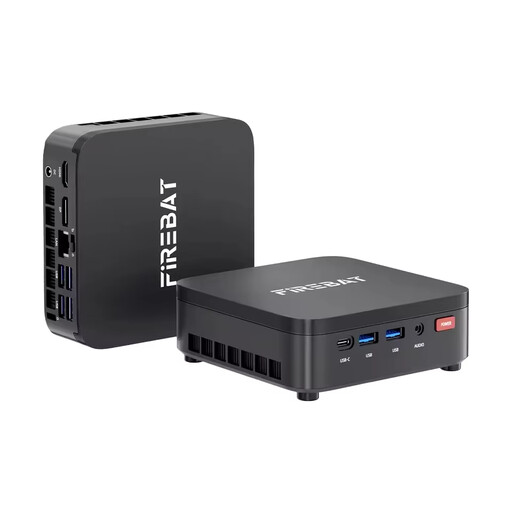
FIREBAT R3 Mini PC, AMD Ryzen 3 4300U
A Mini PC option to consider if you want a device with Windows 11 Pro for your writing set-up.
16 GB LPDDR4 RAM, 512 GB M.2 SATA SSD, Wi-Fi 6 and Bluetooth 5.2.
View at Joybuy
 No image available
ACEMAGIC AK1PLUS Mini PC, Intel Celeron N5095
A compact computer option if you need HDMI 2.0 to connect your monitor.
16 GB LPDDR4X RAM, 256 GB M.2-2280 SATA SSD, HDMI 2.0 and Windows 11 Pro.
View at Joybuy
 No image available
Apple Mac mini M6, 32 GB, 512 GB SSD
A compact macOS option if your writing software is compatible with macOS and you have a suitable screen.
Apple M6, 12-core CPU, 12-core GPU, 32 GB unified memory and 512 GB SSD. Apple lists the Mac mini’s footprint as 12,7 × 12,7 cm.
View at Joybuy
 No image available
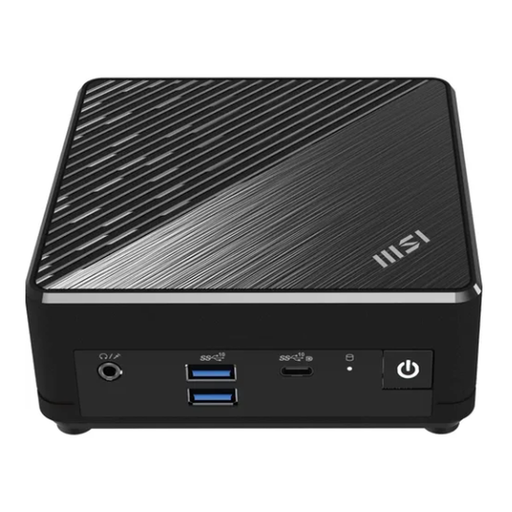
MSI Cubi N ADL S-217DE, N200, 8 GB/256 GB SSD
A compact Windows option if you’re considering a variant from the Cubi N ADL S series.
Windows 11 Pro, 8 GB RAM and 256 GB SSD. MSI describes the S variant as fanless; this isn’t a measured noise level.
View at Joybuy
Frequently asked questions
Does everyone writing at the desk need to use the same user account?
No. The Federal Office for Information Security recommends separate user accounts with appropriate permissions on shared computers. Back up your manuscript regularly too, as having your own account doesn’t replace a backup.
What do I need to use a Mini PC with my existing monitor?
Check that the video output on the specific computer matches the input on your monitor. Also check whether a keyboard and mouse are included; neither comes with the Lenovo configuration reviewed here.
Can I still use an older PC with Windows 10 for writing?
Regular support for Windows 10 ended on 14 October 2025. Microsoft lists Windows 11 and, in some circumstances, Extended Security Updates as options. Check the status and requirements for the specific device on offer.
Is a fanless Mini PC completely silent at a shared desk?
No. A fanless design doesn’t prove that the entire writing set-up is silent. MSI describes the Cubi N ADL S variant as fanless; for noise comparisons, look for measurements taken under similar conditions.


