People who check spreadsheets
If you need to check lots of columns, responses or rules side by side, look for a clear workspace and a scaling setting that suits you.


For cleaning up data across multiple columns and working in several windows at once, an adjustable 27-inch QHD monitor is a sensible starting point. A smaller model may be enough if desk space is limited, while 4K is worth considering for a sharper picture. At a shared desk, it’s also important to be able to adjust the position easily and have connections that suit the computers people actually use. USB-C alone doesn’t guarantee video output or enough power for charging.
If you need to check lots of columns, responses or rules side by side, look for a clear workspace and a scaling setting that suits you.
When several people use the same screen, it’s important to be able to adjust its position easily and have connections that suit the computers being used.
A monitor with docking features can make it easier to connect your screen and peripherals. Lenovo lists USB-C docking for the ThinkVision T27h-30; compatibility with each laptop is still essential.
Start with a screen that everyone can read comfortably and adjust to suit their needs. Then check the laptop connections, what’s included and the energy consumption of the specific model.
| Consideration | What to check | Who it matters most to |
|---|---|---|
| Readable spreadsheets and multiple windows | Screen size, native resolution and readability at the scaling setting you actually use. | If I want to check responses and data-cleaning rules side by side, the text needs to remain readable at my chosen scaling setting. Around 36% of consumers prioritise a spreadsheet workspace that’s easy to use. |
| Adjustability at a shared desk | The stand supplied, height and tilt adjustment, and how much desk space it takes up. | If several people use the screen, I want to adjust its position without a complicated set-up. Adjustability is the top priority for around 29% of consumers. |
| Connections for different computers | Video output over USB-C or Thunderbolt, the power required for charging and the necessary peripheral connections. | I want to make it as easy as possible to connect different laptops, so I check each device’s video output and charging requirements. Around 21% of consumers prioritise switching between connections. |
| Energy consumption and accessories | The EU energy label for the specific model, what’s included and any cables or mount you may need. | If the monitor is used frequently, I want to compare its energy rating and the accessories I’ll need in advance. Around 14% of consumers prioritise running costs and features. |
Whether a laptop can output video depends on the capabilities of that particular port. Power delivery is a separate feature.
Check the video output and power specifications for each laptop you use, using the computer and monitor data sheets.
Depending on the connections available, you may need extra cables, adapters or a separate laptop charger.
What’s included can vary between versions of the same model range. A screen supplied without a stand can’t be adjusted using an included stand.
Check the exact version and what’s included before deciding how to mount the monitor at a shared desk.
If no stand is included, you may need a suitable mount.
How much content fits on screen while remaining readable also depends on scaling and font size.
Check how your spreadsheets look at a setting you can read comfortably before choosing between QHD and 4K.
The Pro models P2725DE and P2725QE offer USB-C hubs for different resolution needs.
The ThinkVision T27h-30 combines QHD with USB-C docking for shared desks where compatible laptops are swapped in and out.
The Business Monitor 27B2U4601/00 is a 27-inch model with QHD and USB-C.
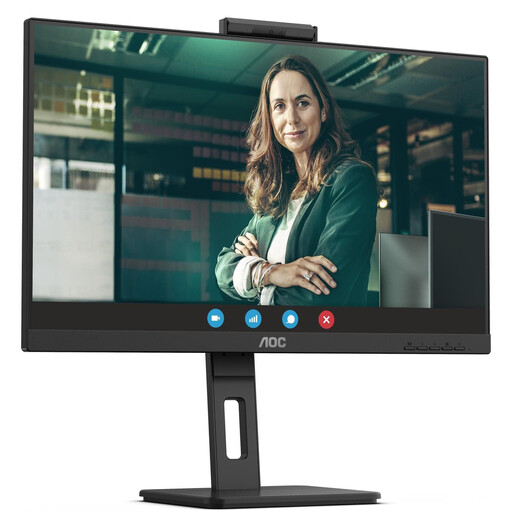
The Series 5 Pro 527pm combines QHD and USB-C with video conferencing features for workstations where meetings are also held.
The FlexScan EV2740S is a 27-inch 4K office monitor with USB-C.
This selection includes 27-inch QHD and 4K monitors for working with spreadsheets. Depending on the model, pay particular attention to stand adjustment and compatibility with the laptops you use.
 No image available
An option for a shared desk where several people need to adjust the screen position.
USB-C with up to 90 W Power Delivery is listed; check that the video output and charging power suit the laptop in question.
 No image available
A 4K option if you want sharper detail for spreadsheet work and the scaling remains readable for everyone using it.
USB-C with 90 W Power Delivery and a height-adjustable stand are listed.
 No image available
A QHD option for spreadsheets and multiple windows, provided the text remains easy to read at your chosen scaling setting.
USB-C with up to 90 W Power Delivery and a stand with height, swivel, tilt and pivot adjustment are listed.
 No image available
A QHD option for clear spreadsheet views at a shared desk.
Specifications list 155 mm of height adjustment, as well as tilt, swivel and pivot. Connections include HDMI, DisplayPort and a USB hub.
 No image available
A QHD option for a shared desk if USB-C suits the laptops you use.
USB-C with up to 90 W Power Delivery, four USB 3.0 ports and a height-adjustable stand with tilt and pivot are listed.
No. For each laptop, check whether the USB-C port in question can output video via DisplayPort Alt Mode or Thunderbolt. If you also want to charge it using the same cable, compare the laptop’s power requirements with the monitor’s stated power delivery.
Start by choosing a suitable resolution and a scaling setting you can read comfortably. You can extend the display across your laptop and monitor and arrange their positions; then adjust the screen for each person using it.
Compare the information on the EU energy label or in the EPREL listing for the specific models. For a meaningful comparison, use the same assumptions for usage time and other conditions.
No. For consumer purchases, the Verbraucherzentrale explains that you have statutory rights against the seller if a product is faulty within two years of receipt; a warranty is an additional voluntary service subject to its own terms. For business purchases, check the specific contract terms.
Where employees use the desk as a computer workstation in a workplace or as a regulated teleworking workstation, ASR A6, issued by the Committee for Workplaces, sets out requirements under the Workplace Ordinance for its design. Its scope does not make it a blanket requirement for every kind of private use. Sharing a desk does not, by itself, mean that a specific monitor resolution is required or that a particular model makes the entire workstation compliant.