If your voice is the main focus and you can stay close to the microphone, a forward-facing microphone is a good fit; still, check the sound from the actual position where you’ll be speaking. For several voices around a table, a switchable tabletop microphone can capture everyone together, while separate, editable voices call for suitable individual recording channels. A wider pickup area may also capture more noise from the shared room.
Which setup is right for you?
Storytellers with one main voice
If you’ll be doing most of the talking, it’s important to stay close to the microphone and position it towards where you’ll be speaking. It may still pick up noise from other people at the desk. RØDE describes the PodMic USB as offering USB-C and XLR connections.
Storytelling sessions with several voices
If several people will be speaking around the table, decide whether a single shared recording will do or whether you’d like to edit each voice separately. CHERRY lists cardioid and omnidirectional polar patterns for the UM 6.0 ADVANCED; Zoom describes the H2essential as recording two separate tracks using its front and rear microphones.
Storytellers without a fixed computer setup
If you want to record without relying on a computer, a recorder with built-in storage could suit your needs. Zoom says the H2essential records to an SD card; positioning it at the table is still important.
What should you look for when buying?
Close-talk directional microphone
A good fit if: one person is the main speaker in a fixed position and can speak close to the microphone.
The trade-off: voices from people outside the pickup direction may not be captured as clearly.
Switchable tabletop microphone
A good fit if: several people will speak without passing a microphone around and a shared recording is enough.
The trade-off: A wider pickup area may also capture background noise from the room, and it won’t automatically create separate tracks.
Standalone recorder
A good fit if: you want to record without a computer permanently connected, or try out different recording directions at the table.
The trade-off: If you want dedicated microphones for individual speakers, you’ll need to plan for suitable microphones and inputs.
| Buying criterion |
What to check before buying |
Who is it important for? |
| Clear main voice |
Check the pickup direction, how close you can position the microphone, its mount and the sound in a test recording made from the intended position. |
If you’ll be doing most of the talking at a shared desk, you’ll want your voice to come through clearly despite other conversations. Around 36 % of consumers prioritise a clear individual voice. |
| Several voices around the table |
Check the seating arrangement, pickup pattern and whether a single shared file will do or if you’ll need separate tracks and inputs. |
If everyone should have an equal say, you’ll need to decide whether a shared recording is enough or if you want to edit each voice individually. Around 29 % of consumers prioritise a group recording around the table. |
| Computer setup |
Check which connections your computer needs, as well as the headphone socket, mute function and what’s included with the exact model variant. |
If you want to get started on your computer without extra setup, make sure the connections suit your equipment. Around 21 % of consumers prioritise an easy computer connection. |
| Recording without a computer |
Check the storage medium, power supply and recording direction; listen to a test recording made from the intended seating positions. |
If there’s no dedicated computer at your recording location, you’ll need a standalone way to record and a way to transfer the files afterwards. Around 14 % of consumers prioritise recording without a computer. |
Common buying mistakes
-
Assuming an omnidirectional pattern will automatically give you a clear group recording
An omnidirectional pattern picks up sound from every direction, not just the voices in your storytelling session. Noise from other people or from the shared desk may end up in the recording too.
Test the omnidirectional mode at the intended table, with the people who’ll actually be there and the kinds of background noise you’d normally expect.
Finding the right position and editing the recording afterwards may take extra time.
-
Choosing a directional microphone for one person when everyone should have an equal say
A forward-facing microphone is designed to pick up the voice of the person speaking from its main position. It may not capture other people as clearly, and a single microphone won’t automatically give you separate tracks.
First decide whether a shared recording will do or whether you want to edit each voice separately. Then check which microphones and inputs you’ll need.
Separate recordings may require additional microphones, inputs and mounts.
-
Assuming similarly named models are the same
Different model names can refer to products with different connections or specifications. The Shure MV6 is not the same as the MV7+; the same applies to the RØDE NT-USB Mini and PodMic USB.
Before buying, compare the full model name, connections and variant.
Brands to consider
CHERRY
The UM 6.0 ADVANCED is worth considering if you want to switch between focusing on one main voice and recording everyone around the table together.
- CHERRY lists switchable cardioid and omnidirectional polar patterns, plus USB, a desk stand and a headphone socket.
- In omnidirectional mode, it picks up sound from all directions, not just the voices you want to record.
RØDE
The PodMic USB is designed for close-up speaking and, according to the manufacturer, offers USB-C and XLR connections.
- RØDE also lists headphone monitoring and a built-in pop filter.
- A single microphone aimed at the main speaker isn’t a complete solution for a group with several speaking positions.
Zoom
The H2essential and H4essential offer different approaches to recording: built-in microphones or additional external inputs.
- Zoom describes the H2essential as offering selectable recording directions and SD card recording; the H4essential has two XLR/TRS inputs.
- You’ll need to plan for external microphones and suitable connections separately with the H4essential. With both recorders, positioning in relation to the seating arrangement matters.
Shure
The MV7+ is an option for a fixed speaking position if you want USB-C, XLR and headphone monitoring from the microphone.
- Shure lists these connections and an Auto Level mode.
- The manufacturer’s claims about noise cancellation don’t mean that background noise at a shared desk will disappear. Also check what’s included with the specific stand version.
Logitech
The Logitech Yeti is a USB tabletop microphone with several pickup patterns and controls on the device.
- Logitech lists switchable patterns, a gain control and a headphone output.
- According to the product page, software features require G HUB. A wide pickup area doesn’t mean individual voices will be on separate tracks.
Joybuy products for desk recording
The products below include switchable USB tabletop microphones, standalone recorders and microphones for close-up speaking.
 No image available
JBL Quantum Stream Studio
Its selectable pickup patterns may suit you if you want to record one voice or several voices around the table, depending on the session.
USB-C connection; four pickup patterns, including cardioid and omnidirectional; mute and direct monitoring are listed.
An omnidirectional pattern may also pick up noise from other directions. Check the recording from the actual position where you’ll be speaking.
View at Joybuy
 No image available
Rexsun 64GB Portable Digital Voice Recorder
This recorder may suit you if you want to record without a computer at your recording location and transfer the files afterwards.
64 GB TF card; two omnidirectional microphones; USB-C for transferring files to a computer are listed.
The microphones pick up sound from every direction, so noise at a shared desk may also end up in the recording.
View at Joybuy
 No image available
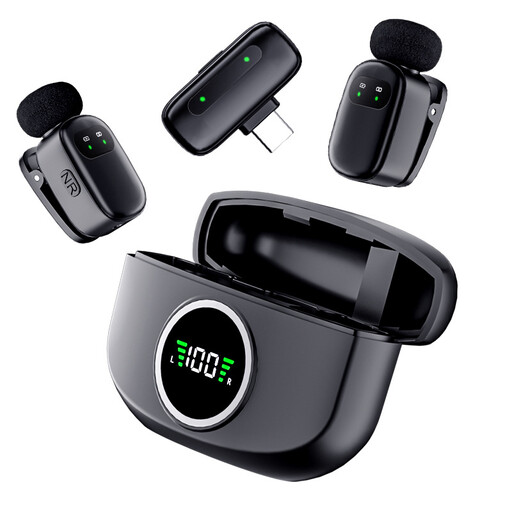
The Verbex K21 Dual Microphone
This set may be suitable for recording two people speaking; check that the specific connection works with your recording device.
The product name lists two wireless mini microphones and a Type-C connection.
View at Joybuy
 No image available
FIFINE K688CTW
This microphone with a boom arm may suit you if one person will be speaking close to it from a fixed position at the desk.
Dynamic microphone with USB-C and XLR; boom arm and headphone socket are listed.
Its unidirectional pickup is designed for one main speaking position. An XLR cable isn’t included, according to the listed contents.
View at Joybuy
 No image available
FIFINE AM8
This microphone may suit a fixed speaking position at your computer, with one person as the main speaker.
Dynamic USB-C/XLR microphone with mute, headphone socket and desk stand.
Its unidirectional pickup may not capture spontaneous comments from outside the speaking direction as clearly. The description says an XLR cable and boom arm aren’t included.
View at Joybuy
Frequently asked questions
Is one microphone enough for everyone at the table?
For a shared recording, a suitably positioned tabletop microphone with an omnidirectional pattern may be enough. If you want to edit voices separately, check which separate recording channels are actually available; a single omnidirectional mode won’t create individual tracks.
How should I set up the microphone before the storytelling session?
Aim a cardioid microphone at the main speaker; choose an all-round pickup pattern only if you want to capture voices from several directions. Make a short test recording from the intended seating positions and listen out for speech, keyboard noise and room sound.
What extra items should I check before buying?
Check whether the exact variant includes a mount, suitable cables and headphones, or an interface if you’ll be using XLR. The FIFINE K688CTW doesn’t include an XLR cable, according to the listed contents; the FIFINE AM8 description says that an XLR cable and boom arm aren’t included.
Can I record other conversations at a shared desk?
Section 201 of the German Criminal Code (StGB) prohibits recording another person’s non-public speech without authorisation. Before recording, clarify whose voices will be captured and whether you’re authorised to record them; a shared workplace doesn’t give you blanket permission to record. The circumstances of each individual case matter.


