People who enter lots of time values
If you regularly enter numbers and times, check whether a separate number pad would make your work easier. CHERRY lists one for the KC 1000; the TKL version does without it.


If you regularly enter times and numbers in tide tables, first check whether you need a separate number pad and the right keyboard layout. At a shared desk, you’ll also need to agree on cleaning and how the keyboard connects. A compact keyboard saves space but often leaves out the number pad, while a wireless model that connects to multiple devices is only useful if you actually switch between devices.
If you regularly enter numbers and times, check whether a separate number pad would make your work easier. CHERRY lists one for the KC 1000; the TKL version does without it.
If you share a keyboard with others, agree how it will be cleaned and whether devices will be personal or shared. The German Social Accident Insurance outlines both options for desk-sharing.
If you work with several devices at the same desk, compare a simple wired connection with wireless pairing. Logitech says the Signature Slim K950 can pair with three devices.
| Consideration | What to check before buying | Who will find this most important? |
|---|---|---|
| Entering numbers and times | Check whether the specific version has a separate number pad and the right keyboard layout. | If I regularly enter values from tables, direct access to numbers matters more to me than a shorter keyboard; around 28% of consumers put number entry first. |
| Cleaning shared devices | Check the cleaning policy and confirm which cleaning methods are approved for the specific model and its membrane. | If several people use the same keyboard, I want to know who cleans it and which method is suitable; around 22% of consumers prioritise how shared input devices are handled. |
| Typing noise | Don’t treat manufacturers’ claims as comparable noise measurements. | If typing could disturb others at a shared desk, the actual noise level matters to me; around 22% of consumers put minimising disruption first. |
| Connection and switching between devices | Check for an available USB-A port or an approved Bluetooth or receiver connection. | If I actually switch between several devices at my desk, I want to keep working without the hassle of unplugging and reconnecting; around 17% of consumers prioritise switching between devices. |
| Desk space | Compare the keyboard’s width and whether you need a separate number pad with the space available. | If I need more room for documents and a mouse, I’m more likely to do without a number pad; around 11% of consumers put available desk space first. |
Splash resistance doesn’t mean a keyboard is waterproof or suitable for a particular wipe-disinfection method. The documented membrane versions differ across the Active Key AK-C8100 series.
Before buying, check the approvals for the exact model and fitted membrane, and make sure the cleaning method follows your current cleaning policy.
Using an unsuitable cleaning method could mean the keyboard needs repairing or replacing.
According to the manufacturer, the CHERRY STREAM KEYBOARD TKL doesn’t have a number pad. If you enter numbers frequently, this will change how you work and you may need a separate input device.
Check the full model name and key layout against the details for the specific version.
A Joybuy product page for the CHERRY KC 6000 SLIM explicitly specifies a US layout. The language of the product page therefore doesn’t confirm the key layout.
Before buying, confirm the layout or product number for the specific version.
The KC 1000 is a full-size wired option; the STREAM KEYBOARD TKL saves space but doesn’t have a number pad.
The Signature Slim K950 is designed for switching between devices; the Signature K650 has a different focus, with an integrated palm rest.
The Dell KB216 is a full-size wired option with a number pad.
The CK-400 is a wired QWERTZ keyboard with scissor switches and backlighting.
The AK-C8100 series is worth considering if you need documented approval for wipe disinfection.
The product options below are mostly full-size keyboards for entering numbers; some models also offer wireless connections. Check that the layout and connection suit your shared desk.
 No image available
The separate number pad makes this a wired option for frequent number entry.
Full-size; plug and play according to the product name. Check that the QWERTY layout matches the key layout you need.
 No image available
A full-size wired option with a German layout for entering data in tables at a shared desk.
Mechanical keyboard with CHERRY MX2A Red switches and RGB backlighting.
 No image available
The German layout is useful for entering data at a shared desk if you’re looking for a full-size wired keyboard.
MX2A Brown switches; detachable USB-A cable according to the product description. For cleaning, it recommends using a dry cloth after unplugging the keyboard.
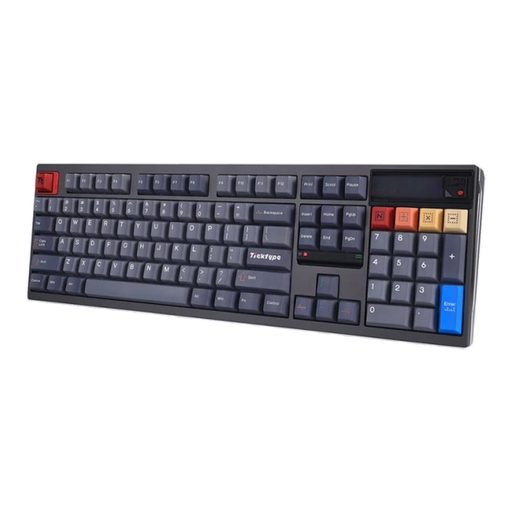 No image available
The full-size version has a number pad; check the US layout carefully if you need a German key layout.
USB-C wired mode, Bluetooth and 2.4 GHz wireless; 8000 mAh according to the product name.
 No image available
A full-size wired option with a number pad and German layout for entering numbers.
USB plug and play; 104 keys according to the product description. Described as splash-resistant, not waterproof.
No. If you regularly enter times and numbers, compare a full-size keyboard with a number pad against a compact version. CHERRY highlights the difference in size between the KC 1000 and the STREAM KEYBOARD TKL; this doesn’t mean one is universally faster for data entry.
Follow the care instructions for the specific model and the agreed cleaning policy. Logitech recommends unplugging a wired keyboard before cleaning and switching off a wireless one. The German Social Accident Insurance also lists personal input devices or cleaning shared work equipment as options for organised desk-sharing.
Check whether Bluetooth or a suitable USB port for the receiver is available on the device you’ll be using, and whether you’re allowed to use it. According to the manufacturer, the Logitech Signature K650 supports Bluetooth Low Energy or a Logi Bolt receiver.
Yes, if the workstation is for employees covered by the Workplace Ordinance. The Ordinance and the detailed technical rule ASR A6 must be taken into account when setting up the workstation. This doesn’t mean every shared desk must have a particular brand or a keyboard that can be clinically disinfected.
If a product is faulty, you have statutory rights against the seller; these are separate from any additional guarantee. For online consumer purchases, you generally have a 14-day right to cancel. The consumer advice centre explains these rights; if you’re buying for a business, check the contract terms separately.