If quiet clicks and a straightforward set-up matter at a shared desk, an ambidextrous wired mouse is an obvious option. Logitech says the M110 Silent works without additional software, while CHERRY describes the GENTIX SILENT as having quiet buttons. For longer working sessions, hand size and handedness matter too. A scroll wheel or customisable buttons may be more useful for lengthy files, while wireless mice can involve extra pairing and power considerations when you switch between your own devices.
Which mouse suits which user?
Quiet transcription work
If you mark up and correct text within earshot of others, quiet clicks may matter more than extra features. Logitech and CHERRY describe models designed to be quiet; each noise claim applies only to the specific model mentioned.
Longer sessions and a comfortable fit
If you work for long stretches, consider your hand size and handedness, and how the mouse feels to hold. Logitech says the Lift is designed for small to medium-sized hands, and a separate left-handed version is available.
Long files and switching between devices
If you often navigate lengthy transcripts or switch between your own devices, scrolling, button customisation and connectivity are all important factors. Logitech, CHERRY and Kensington offer different features across their respective models.
What to look for when buying
First, work out what matters most at your shared desk: quiet operation, a comfortable shape or easy navigation. Then weigh up connection types and extra features based on how you actually work.
| Priority |
What to check before buying |
Who it matters most to |
| Quiet clicks |
Check the noise claim for the specific model and whether it uses a wired or wireless connection. |
If you don’t want to disturb others at the desk with repeated highlighting and editing, quiet clicks will be a priority. Around 29% of consumers would put quiet operation at the top of their buying priorities. |
| Fit and handedness |
Consider your hand size, whether you need a right- or left-handed version, and the space available for your hand and arm. |
For longer sessions, you’ll want a shape that suits your hand and handedness, rather than having to adapt to the mouse. Around 29% of consumers would make fit their main buying priority. |
| Navigating long texts |
Check the scrolling method and which buttons you need; if software features are involved, make sure you can use them on your work computer. |
If you often search through long transcripts or use the same commands repeatedly, the right scrolling system is essential. Around 21% of consumers would choose navigation as their top priority. |
| Connectivity and desk space |
Check for a USB connection or Bluetooth compatibility, the power supply and how much room you need to move the mouse. |
If you switch between your own devices or work in a small space, the connection needs to suit your routine. Around 21% of consumers would put desk space or switching between devices first. |
The German Federal Institute for Occupational Safety and Health recommends arranging your mouse and keyboard flexibly, with enough room for your hand and arm. Choosing a mouse with a suitable shape doesn’t remove the need to adjust your workstation.
Avoiding common buying pitfalls
-
Assuming similarly named models have the same features
The GENTIX SILENT is the wired version, which CHERRY describes as having quiet buttons; the GENTIX BT focuses on connecting to multiple devices via Bluetooth. Likewise, don’t assume the Lift and Lift for Business are the same without checking the full model name.
Check the model name, connection type, handedness and what’s included before relying on a particular feature.
-
Expecting a vertical shape to improve your health
A mouse shape may or may not feel right for you. A manufacturer’s description of its shape doesn’t prove that it treats or prevents discomfort for everyone.
Check the handedness options and how it feels to hold, and position your mouse and keyboard so there’s enough room for your hand and arm.
-
Planning to customise features without checking your work computer
Logitech says the MX Master 3S Bluetooth Edition can be customised using its Logi Options+ software. Whether you can use it on your work computer is therefore an important part of your buying decision.
Before you buy, check which commands you need for your transcription software and whether you’re allowed to install the required software on your computer.
Key brands at a glance
Logitech
The models mentioned cover straightforward wired use, a vertical shape and customisable features for longer documents.
- Logitech describes the M110 Silent as a wired mouse that works without additional software. An editorial review by F.A.Z. Kaufkompass also named it its preferred model among the wired PC mice tested.
- Logitech says the Lift is designed for small to medium-sized hands; a separate left-handed version is available.
- Information about customisation on the MX Master 3S Bluetooth Edition applies to that model and its use with Logi Options+; it shouldn’t be assumed to apply to other Logitech mice.
CHERRY
The GENTIX SILENT and GENTIX BT meet different needs: quiet buttons with a wired connection, or Bluetooth connectivity for multiple devices.
- CHERRY describes the GENTIX SILENT as having quiet buttons and a 1.8 m USB cable.
- CHERRY says the GENTIX BT can pair with up to three devices.
- The noise claim for the GENTIX SILENT doesn’t confirm that the GENTIX BT has the same feature.
Perixx
The PERIMICE-513L adds a wired vertical mouse specifically designed for left-handed users to the range of options.
- Perixx lists USB-A, six buttons and two adjustable DPI settings for this model.
- Its left-handed shape may not be suitable for a shared desk where people with different dominant hands use the same mouse.
- A vertical shape is a personal fit preference, not proof of a health benefit.
Kensington
The wireless Expert Mouse is a trackball that lets you control the cursor without moving a conventional mouse.
- Kensington lists a scroll ring, four customisable buttons and ambidextrous use.
- Compatibility depends on whether you use Bluetooth or a receiver; consider whether the grip and trackball controls feel right for you.
Joybuy mice for transcription work
The Joybuy mice below cover quiet clicks, long documents and different grip and connectivity needs for transcription work.
 No image available
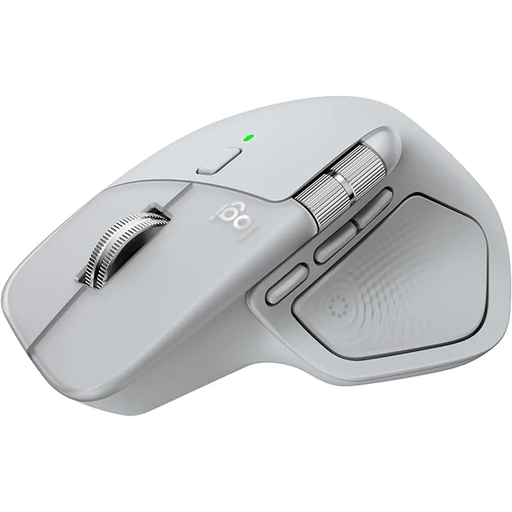
Logitech MX Master 4 wireless mouse, Light Grey
MagSpeed scrolling and customisable buttons are worth considering for long transcripts.
The product name lists Bluetooth, USB-C charging and haptic feedback. Logi Options+ is required to customise all the features.
Joybuy
 No image available
Vertical wireless mouse with USB-C charging
A vertical shape may be worth considering if you’d like to try a different grip; check that it fits your hand.
The product name lists Bluetooth and 2.4 GHz connectivity, plus three DPI settings: 800, 1200 and 1600.
Joybuy
 No image available
KINSI ergonomic vertical wireless mouse
If you’re considering a vertical shape and customisable buttons, check how it feels to hold and whether it has the features you need for your work.
The product name lists a 2.4 GHz USB connection, five buttons, rechargeable operation and adjustable DPI from 800 to 4800.
Joybuy
 No image available
HOFOTEK M308 Silent Office Mouse
If click noise could disturb others nearby, the advertised silent button feature may be worth considering.
The product name lists a 2.4 GHz connection and several adjustable DPI settings.
Joybuy
 No image available
HOFOTEK M311 2.4G+BT Silent Office Mouse
If you’re looking for a mouse described as quiet and switch between your own devices, check its clicking noise and connectivity.
The product name lists 2.4 GHz and Bluetooth connectivity, plus a 1xAA battery. The product description says it can pair with up to three devices.
Joybuy
Frequently asked questions
Can I use a wireless mouse straight away at any shared workstation?
No, you can’t tell from the device name alone. Check whether the computer has Bluetooth or the right receiver and connection available. CHERRY says the GENTIX BT can pair with up to three devices; according to Logitech, the wired M110 Silent needs a compatible USB port.
How should I set up my mouse for longer transcription sessions?
Choose a shape that suits your hand, and position the mouse and keyboard with enough room for your hand and arm. The German Federal Institute for Occupational Safety and Health recommends a flexible layout; choosing a particular mouse shape doesn’t replace setting up your workstation properly.
What should I consider if several people use the same mouse?
Check whether you’re sharing the mouse as well as the desk, and agree on how to keep it clean and where to store it. The German Social Accident Insurance (DGUV) identifies mice and keyboards as shared work equipment that needs particular attention to hygiene, and recommends clear rules for cleanliness and tidiness.
Does German law require a particular mouse or DPI setting for transcription work?
ASR A6 doesn’t establish a general requirement to buy a particular mouse shape or DPI setting. The German Federal Institute for Occupational Safety and Health sets out requirements for display screen workstations within the scope of the regulation; whether a particular shared workstation is covered depends on how it is actually used.


