Who will be using the camera?

Flatmates around the table

When several people are sitting together in person, you need a shared view of everyone and audio that picks up the whole table – not just one seat. Logitech describes the BCC950 as a conference system for small rooms with up to four participants.

One person in a shared-flat bedroom

If you’re joining from your computer on your own, you’ll want to adjust the audio, framing and visible background to suit your space. Logitech lists different fields of view and a privacy shutter for the Brio 500; AnkerWork also describes several software-selectable fields of view for the PowerConf C200.

The person presenting the design

When presenting a digital design, colleagues joining remotely need to be able to read the content. Zoom describes sharing applications or screen content separately from the camera image, so check the sharing options in your meeting software.

What should you look for when buying?

Webcam for an individual desk

A good fit if: One person is hosting the call at their computer and sharing the design digitally.

Worth considering: A short microphone range doesn’t mean audio will be clear across the whole group table. Logitech lists a range of up to 1.22 m for the Brio 500, and notes that RightSight has software requirements.

Small-group setup with a speakerphone

A good fit if: Several people are speaking together on the call from the same table and need to be in shot.

Worth considering: Logitech describes the BCC950 as suitable for small rooms with 1–4 people, with a microphone range of up to 2.5 m. This manufacturer’s figure is no substitute for testing the audio with your planned seating arrangement.

Camera with adjustable framing or presentation view

A good fit if: You want to switch between a closer view of people and a view that shows more of the scene.

Worth considering: AnkerWork lists adjustable fields of view for the PowerConf C200; Jabra describes Picture-in-Picture for the PanaCast 20. For a digital design, direct document sharing is still the right thing to check.

What you need What to check before buying Who is it important to?
Get everyone around the table in shot Number of people, seating distance and camera position; check whether the specific model has a speakerphone. When we’re sitting together around the shared-flat table, I need picture and sound for several people; around 25% of consumers put group coverage first.
Make speech easy to understand Speaking distance and the position of the microphone and speaker; test the audio with the meeting software you plan to use. When there’s background noise in the flat or people speak from different distances, I want everyone to be easy to hear; around 25% of consumers prioritise speech clarity.
Control what’s visible behind you Check the field of view and physical privacy cover; view the camera preview from the actual seat you’ll be using. When I’m on a call in my room, I want to limit how much of my private space is visible; around 25% of consumers focus primarily on controlling the camera framing.
Show the design clearly Check whether your meeting software lets you share the document or application window; test paper from the camera position you plan to use. I want colleagues joining remotely to be able to read the design, rather than relying on the camera image; around 25% of consumers put showing the design first.

Common buying and usage mistakes

  • Expecting an individual-desk webcam to provide room-wide audio

    A webcam designed for use at close range may not pick up the whole shared-flat table. Higher resolution tells you nothing about how well it records several people speaking.

    First decide whether one person or several people will be speaking through the same device, then test the audio from the seats you plan to use.

  • Simply holding the digital design up to the camera

    The camera image of the person speaking isn’t the same as sharing the design digitally, which lets colleagues joining remotely read the content.

    Test document or application sharing. If you want to show paper notes, check the framing and camera position as well.

  • Choosing a wide field of view without checking the shared-flat background

    A wider shot can show more of your living space. A privacy shutter only protects the lens when it’s closed.

    Check the preview, choose the narrowest usable framing and close the cover after your call.

Key brands to consider

Logitech

The Brio 500 is described as a webcam for an individual desk; the BCC950 is a separate speakerphone solution for small groups.

  • Logitech lists several fields of view and a privacy shutter for the Brio 500. RightSight has software and platform requirements to consider.
  • The BCC950 is described as suitable for 1–4 people. Its features and audio specifications don’t apply to the Brio 500.

AnkerWork

The PowerConf C200 is described as a webcam for an individual desk, with an adjustable field of view.

  • Anker lists 2K resolution, two microphones, fields of view of 65°/78°/95° and a lens cover.
  • Manufacturer claims about noise cancellation and low-light performance don’t show how the camera will work in your particular shared flat.

Jabra

The PanaCast 20 is described as a personal camera with zoom and Picture-in-Picture features.

  • Jabra’s data sheet lists 4K, three microphones and an integrated privacy cover.
  • Its personal design doesn’t mean the camera can replace a speakerphone for a group.

Trust

The Taxon QHD is described as a webcam for your desk with autofocus and a privacy cover.

  • Trust lists 1440p, two microphones and a built-in privacy cover.
  • A description of a wide view doesn’t confirm a specific microphone range at a shared-flat table.

OBSBOT

The Tiny 2 Lite is an option for anyone considering a pan-and-tilt camera with tracking.

  • The specifications list a 2-axis gimbal and two built-in microphones.
  • Tracking can capture a wider area in a shared home. Also check the system requirements for additional features.

Webcams for individual desks at Joybuy

This Joybuy selection includes webcams for video calls at an individual desk. If several people will be speaking together around a table, also check that the audio setup is designed for that distance.

Full HD 1080P Webcam with Microphone

Full HD 1080P Webcam with Microphone

For video calls on a PC or laptop when you want built-in audio recording and a physical privacy cover.

1080p; USB connection; 120° wide-angle lens; built-in microphone; physical camera cover.

View at Joybuy

Razer Kiyo V2 X Full HD Webcam 1080p, 60 FPS, Black

Razer Kiyo V2 X

For video calls on a PC when autofocus and a coverable lens are among the features you’re looking for.

1080p at 60 FPS; 80° field of view; autofocus; built-in microphone; lens privacy cover.

View at Joybuy

AOC Webcam for PC with Microphone, 4K Webcam Privacy Cover, 99° FOV

AOC 4K Webcam with Microphone

For video conferences on your computer when you want a wide field of view and a sliding lens cover.

4K; 99° field of view; built-in microphone; sliding lens cover.

View at Joybuy

AOC 4K PRO Webcam with Sony IMX363 Sensor, PDAF Autofocus, Dual Microphone, 75° Viewing Angle

AOC 4K PRO Webcam

For meetings on a PC when autofocus and a lens cover are among your selection criteria.

Sony IMX363 sensor; PDAF autofocus; two microphones; 75° field of view; USB-A/USB-C.

View at Joybuy
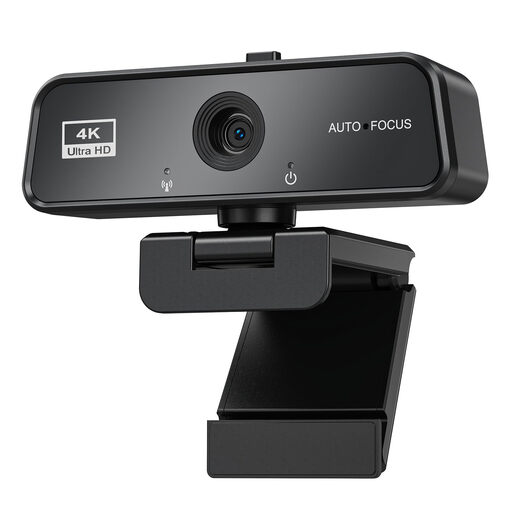
maxineer 4K Webcam for PC with Autofocus, Microphone, Privacy Cover, USB 3.0

maxineer 4K Webcam

For video calls on your computer when you want a cover and autofocus; compatible systems include Windows and Mac.

3840×2160 at 30 FPS; USB 3.0; autofocus; built-in microphone; sliding cover; automatic light correction.

View at Joybuy

Frequently asked questions

Will a 4K camera automatically make a digital design easier to read?

No. For digital content, first check the document or application-sharing options in your meeting software. Zoom describes these separately from the camera image; some sharing options may be restricted by account settings.

What should I test before my first call from the shared-flat table?

Set up the camera in the position you plan to use, check the preview and test the audio from every seat you expect people to use. Also check the connection and operating system: Logitech lists USB-C for the Brio 500, along with requirements for Logi Tune and RightSight.

Who should I contact about a fault after buying in Germany?

For a consumer purchase, the seller is generally responsible for statutory rights relating to faulty goods, not the camera manufacturer. The Verbraucherzentrale states that the usual period is two years from delivery; a voluntary guarantee is separate.

Can I simply record a work meeting in a shared flat?

Joining a meeting or buying a camera doesn’t give you blanket permission to make a recording. In its guidance dated 23 October 2020, the Data Protection Conference explains that additional consent may generally be required where there is no specific need to document the meeting. Before recording, clarify the specific work-related purpose and the lawful basis for doing so.