What to look for when buying
Start by deciding on your delivery format and preview requirements. Then compare timeline space and desk setup, before checking connections, controls and ongoing costs.
| Priority |
What to check before buying |
Who it matters most to |
| Consistent colour assessment |
Choose a delivery format and the right SDR mode. Check the calibration method and any equipment required for the specific model. BenQ lists Rec.709 coverage for the PD2706U; manufacturer specifications are no substitute for measuring the individual unit you buy. |
If several people assess colour for the same delivery target, a repeatable setup process matters. Around 28% of consumers put reliable colour assessment first. |
| Space for the timeline and tools |
Compare the aspect ratio, horizontal and vertical resolution, and your window layout. ASUS lists 3440 × 1440 pixels in a 21:9 format for the PA348CGV; also measure the available desk width. |
If you want tracks and panels to remain visible at the same time, the layout at your particular workstation is crucial. Around 22% of consumers prioritise space for the timeline and tools. |
| Checking detail in the preview |
Check the native resolution and scaling in your editing software. ASUS lists 3840 × 2160 pixels for the PA279CRV; Dell lists 2560 × 1440 pixels for the P2725D. A QHD resolution won’t show a UHD image pixel for pixel. |
If you want to assess detail in 4K footage, look at the native resolution and the usable preview size. Around 22% of consumers prioritise detail in the preview. |
| Switching computers and desk setup |
Check the video output, cable and required charging power for each computer. If you share a keyboard and mouse, check for a KVM function. ASUS lists USB-C Power Delivery at 96 W for the PA279CRV; make sure that’s suitable for your laptop. |
If several people or computers use the same workstation, the connections and switching should fit your workflow. Around 17% of consumers consider switching computers their main priority. |
| Purchase, running costs and support |
Compare the EU energy label for the specific model and check whether your planned calibration process requires extra equipment. Distinguish between statutory consumer rights and the manufacturer’s voluntary warranty. |
If you’re weighing up ongoing costs and support terms as well as the purchase price, check these points before choosing. Around 11% of consumers put total costs first. |
Joybuy monitors for a shared editing workstation
These Joybuy monitor options range from wide ultrawide displays to UHD, QHD and Full HD models. Some also list features for using multiple computers or video sources.
 No image available
INNOCN 40C1U, 40-inch 5K ultrawide monitor
If you need to see lots of tracks and tools side by side, check that the wide format will fit the space available on your desk.
The listed resolution is 5120 × 2160 pixels at 21:9. The product title also mentions IPS, 100 Hz, USB-C with 65 W Power Delivery, and PIP and PBP. According to the product description, the monitor is 944.1 mm wide with its stand.
View at Joybuy
 No image available
INNOCN CB27U1, 27-inch 4K UHD monitor
For a UHD preview, the listed native resolution of 3840 × 2160 pixels is important. Also check how large the preview remains in your editing software.
The product title lists an IPS panel, 120 Hz, HDR500, PIP and PBP, plus USB-C with 90 W Power Delivery.
View at Joybuy
 No image available
KTC M27P6, 27-inch 4K Mini LED monitor
If two computers need to share the same peripherals, check that the listed KVM function suits the way you switch between them.
The product title lists 4K at 160 Hz or Full HD at 320 Hz, USB-C at 65 W, KVM, and tilt, swivel and height adjustment. Check which mode is right for your editing software and preview.
View at Joybuy
 No image available
MSI PRO MP275QPDGDE, 27-inch WQHD docking monitor
This model could suit you if QHD is enough for your editing setup and you need KVM switching at your shared workstation.
The product title lists an IPS panel, 100 Hz, USB-C with 98 W Power Delivery, daisy chaining, KVM and a built-in webcam. Its native QHD resolution will not show UHD footage pixel for pixel.
View at Joybuy
 No image available
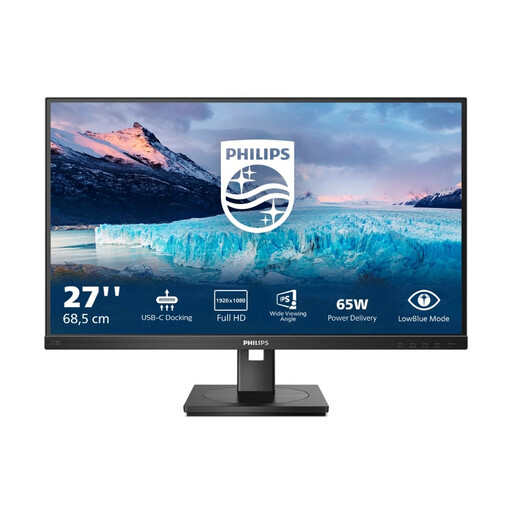
Philips 273S1, 27-inch Full HD USB-C docking monitor
If organisation and connectivity are your main priorities at the editing workstation, check whether Full HD is enough for your preview.
The product title lists 1920 × 1080 pixels, 75 Hz, USB-C at 65 W, RJ45 and a USB hub. The resolution will not show UHD footage pixel for pixel.
View at Joybuy
Frequently asked questions about monitors for video editing
Do we need a particularly wide colour gamut for SDR project films?
No, not just because you’re editing films. First decide on your delivery format and check for a suitable mode: BenQ lists Rec.709 coverage for the PD2706U, while EIZO describes adjustable Rec.709 modes. A coverage claim is no substitute for setup or any calibration that may be needed.
How can we keep colour settings consistent when different people are editing?
Record the chosen output mode and settings for everyone who uses the monitor. EIZO describes hardware calibration with ColorNavigator for the CS2740 and explains that calibration targets can be saved in the colour modes. Check which measuring device is needed for the process on your chosen model.
Is USB-C all we need to connect a laptop, display and peripherals?
No. A USB-C port alone doesn’t guarantee that: video transmission, hub connectivity and charging power all need to be compatible with your laptop and cable. If two computers need to share a keyboard and mouse, specifically check for a KVM function and how it works.
How can we check a monitor’s energy consumption in Germany?
In the EU, an energy label is required for covered electronic displays, including computer monitors. The European Commission describes the efficiency scale from A to G. Compare the label for the specific model and check the figures for SDR and, where applicable, HDR.
Do the 14-day cancellation period and two-year legal guarantee also apply if we buy as a club?
These consumer rights don’t automatically apply to purchases made by a club. Your Europe, the European Union’s information portal, explains that consumers who buy online from a trader generally have a 14-day right of withdrawal and a minimum two-year legal guarantee. Before buying, check whether the contract is made in the name of an individual as a consumer or in the club’s name. A voluntary manufacturer’s warranty is separate.


