What should you consider when buying?
First, find out how your software links to files and how you’ll back up your catalogue and source files. Then choose a display size and device format to suit where you work.
| Priority |
What to check before buying |
Who is this important to? |
| Preserving file paths |
Check that your cataloguing software supports the operating system, and test whether file links still open after changing computer or storage location. |
If I want to keep source files in their existing locations, I need to be able to access them after switching computers. Around 31% of consumers put file links first. |
| Backing up the catalogue and files |
Work out how much storage your collection needs and check that you can connect your chosen backup medium. Test whether you can restore an entry and its source file. |
If you want to avoid losing your catalogue and sheet music files if a device fails, you need a way to back up both. This is the main priority for around 25% of consumers. |
| Reading sheet music comfortably |
Compare the display size and resolution of the specific configuration, and check that a typical sheet music page is easy to read alongside a catalogue entry, without distracting reflections. |
If I often check sheet music pages and metadata side by side, usable screen space matters most to me. Around 25% of consumers put screen space first. |
| Working in different locations |
Check the format, weight and ports you need on the configuration on offer. Don’t assume advertised maximum battery life figures are a guarantee of what you’ll get during your working day. |
If you carry your laptop between shelves and workspaces, you’ll need to balance screen space against portability. Around 19% of consumers give mobility the greatest weight. |
Joybuy products for cataloguing
These Windows laptops offer different display sizes for reviewing sheet music and catalogue data. Before buying, check that the operating system and specific file links work with your workflow.
 No image available
ASUS Zenbook S16 UM5606GA-SS335W
The 16-inch format is worth considering if you’d like more screen space for reviewing sheet music and catalogue data.
16-inch, WQXGA OLED, Ryzen AI 9 465, 32 GB RAM, 1 TB SSD and Windows 11 Home. The product name indicates that it doesn’t include a power adapter.
View at Joybuy
 No image available
Lenovo ThinkBook 16 G9 AHP 21UT
The 16-inch format could suit you if you mainly review sheet music alongside catalogue data at a fixed workspace.
16-inch, WUXGA, AMD Ryzen 5 220 at 3.2 GHz, Radeon 740M, 32 GB RAM, 1 TB NVMe SSD and Windows 11 Pro.
View at Joybuy
 No image available
HP OmniBook Ultra 14-kd0072ngx
The 14-inch format is a good option if you need to carry your laptop between workspaces.
14-inch, 3K OLED touchscreen, Intel Core Ultra 7 356H, 16 GB RAM, 1 TB SSD and Windows 11 Home.
View at Joybuy
 No image available
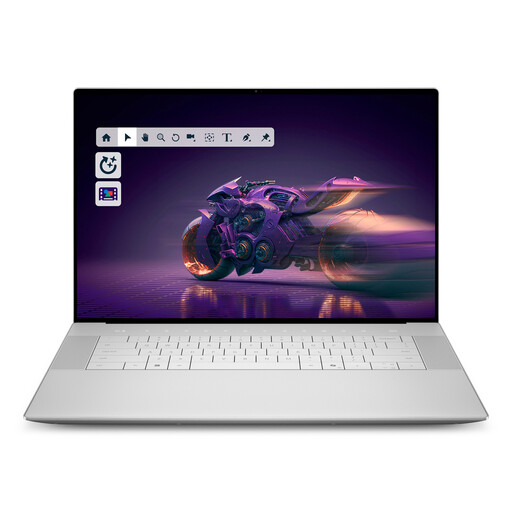
Dell 16 Premium DA16250 8N5N4
The 16.3-inch format is an option for reviewing sheet music alongside catalogue data at a fixed workspace.
16.3-inch OLED touchscreen, Intel Core Ultra 9-285H, 32 GB RAM, 1 TB SSD, RTX5070 and Windows 11 Pro.
View at Joybuy
 No image available
Dell Pro 14 Essential PV14255 Copilot+ PC
The 14-inch format is an option if you regularly take your device to different workspaces.
14-inch, Full HD+ with 1920 × 1200 pixels, AMD Ryzen AI 7 350, 16 GB RAM, 1 TB SSD, Wi-Fi 6E and Windows 11 Pro.
View at Joybuy
Frequently asked questions
Do I need to import source files into Zotero to link them to an entry?
No. Zotero distinguishes between stored and linked attachments. With linked files, the original file stays in its existing location. Check which option best suits your catalogue workflow.
How can I access linked files on a second computer?
Zotero doesn’t sync linked files themselves, so you’ll need to make them available separately. Files within a set base directory can be referenced using relative paths. Set up access on the second computer and test it with an attachment.
Is syncing the catalogue enough to back up my data?
No, not without checking the files separately. Zotero distinguishes between data and file syncing, and linked files aren’t transferred when you sync catalogue data. Back up your catalogue and source files, then test that you can restore both using an entry.
What should I check about the included equipment and additional storage options before buying?
Check the operating system, power adapter, backup medium and storage method for your files. HP lists FreeDOS for the A23HLEA#ABD configuration; Dell doesn’t list a power adapter as included with the Pro 16 configuration described. These details apply to the specific configurations mentioned, so check what’s included with the exact offer you’re considering.
Can I simply digitise printed sheet music to create linked source files?
Not in every case. Section 53(4) of the German Copyright Act (UrhG) restricts the reproduction of graphic representations of musical works. Section 60e(1) of the UrhG allows certain publicly accessible, non-commercial libraries to make copies from their collections for purposes including cataloguing. You’ll need to check whether the conditions and any other rights apply in your specific case before digitising. Simply cataloguing existing files doesn’t grant permission to make new copies. The authoritative versions are the official legislation published on “Gesetze im Internet” by the Federal Ministry of Justice and the Federal Office of Justice.


