What to consider when choosing
Start with the entries you repeat most often, then check the layout, connection and typing position for your workspace.
| What you need |
What to look for when buying |
Who will find this most important |
| Recurring field sequences and commands |
Check whether your cataloguing software supports shortcuts or macros, and test a sequence on a test record first. |
If I edit the same fields for lots of items, I don’t want to repeat the same steps every time. That’s why around 31 % of consumers put field sequences and commands first. |
| Lots of numbers and measurements |
Look for a number pad and the right German key layout; try entering decimal values in your application. |
Easy-to-reach number keys are particularly useful for frequent measurements, quantities or inventory numbers. Around 25 % of consumers prioritise number entry. |
| Hand position during longer sessions |
Assess the split layout, key reach and adjustment period on the specific setup. A particular design isn’t proof of a health benefit. |
If I’m cataloguing at my desk for a long time, I want a keyboard layout that suits my hand position. Around 19 % of consumers focus first on hand position. |
| Quiet typing |
Listen to the keys if you can. CHERRY describes the STREAM KEYBOARD as quiet, but this manufacturer’s claim isn’t a like-for-like noise test. |
When I’m typing around other people, I want to keep distracting noise to a minimum. Around 13 % of consumers put quiet typing first. |
| Switching between computers |
Check the connection type and operating system for each device. Features such as Smart Actions or QMK/VIA depend on the software and the specific keyboard model. |
If I catalogue on several computers, I need a connection that works with each device. Around 12 % of consumers prioritise switching between devices. |
Joybuy product selection
The Joybuy selection below ranges from full-size QWERTZ models with a number pad to compact and mechanical keyboards. For each listing, check the layout, connection and any features supported by your cataloguing software.
 Image unavailable
Wireless QWERTZ keyboard with LCD display and rotary dial
The QWERTZ layout and numeric keypad are useful for typing in German and entering numbers frequently.
The product name lists 4× Bluetooth, 2.4 GHz wireless and USB-C, a 2000-mAh battery and backlighting.
View at Joybuy
 Image unavailable
QWERTZ keyboard and mouse set with detachable wrist rest
For typing in German and entering lots of numbers, the product description lists a QWERTZ layout and a numeric keypad.
The title lists 2.4 GHz USB, quiet keys and a detachable wrist rest; the description says it can connect to up to four devices.
Windows and Mac are listed as compatible systems.
View at Joybuy
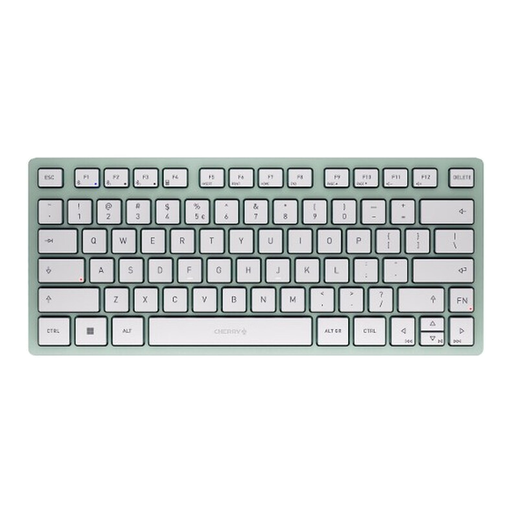 Image unavailable
CHERRY KW 7100 Mini Bluetooth keyboard, Agave Green
The compact TKL format may suit a smaller workspace; check whether you can manage without a number pad when entering data.
The product description lists CHERRY SX scissor switches and the ability to switch between up to three Bluetooth devices.
The listed layout is US QWERTY. Before buying, check that it suits the way you type in German.
View at Joybuy
 Image unavailable
Ticktype DP104 Custom Tri-Mode, Powder White, Thocky Linear Switches
The product description lists programmable keys and macros for customisable workflows; check that they work with your cataloguing software.
This model is described as a full-size keyboard with 108 keys and a hot-swap layout. It has a US layout and an 8000-mAh battery.
View at Joybuy
Image unavailable
Ticktype DP104 Custom Tri-Mode, Powder White, Silent Tactile Switches
The product description lists programmable keys and macros; before using them, test whether the sequence you want works in your collection software.
This model is described as a full-size keyboard with 108 keys and silent tactile switches. It has a US layout.
View at Joybuy
Frequently asked questions
Will a programmable keyboard create custom fields for my collection?
No. The fields and their layout are part of the application you use. museum-digital describes a customisable object editing page for musdb; keyboard actions need to match the actual data-entry process in your software.
How do I get started with shortcuts for recurring entries?
First, test the shortcuts already available in your application on a record. If you use Excel, Microsoft Support notes that its documented keyboard shortcuts are based on the US layout and may differ on other layouts. Then try a custom key sequence you’ve set up yourself.
How should I clean a keyboard after handling collection items?
Logitech recommends switching off or disconnecting its peripherals before cleaning and using as little liquid as possible. Don’t assume this manufacturer’s advice applies to other models without checking.
What are my rights if the keyboard is faulty?
If you buy as a consumer from a business seller, the European Union’s consumer information states that you’re generally entitled to a legal guarantee of at least two years from receiving the goods. This is separate from any additional manufacturer’s warranty; the same rules don’t apply in the same way to purchases from private individuals.
Are the requirements for a keyboard at a museum workplace different from those at home?
The ASR A6 from the Federal Institute for Occupational Safety and Health covers screen-based workstations in workplaces and teleworking workstations within its scope; it explicitly excludes private screen use outside a teleworking workstation. Whether it applies to your particular workplace depends on the circumstances. It doesn’t mean there’s a blanket requirement to buy a particular keyboard.


