If your PC game displays 21:9 correctly, including its instruments and menus, and you have enough space and graphics performance, a 34-inch ultrawide with a resolution of 3440 × 1440 is a good option for a wider view. Xiaomi Germany and ViewSonic Germany offer this format in selected models. If your game support, desk space or PC performance is limited, a 16:9 monitor is worth considering instead. For long sessions, also check the actual headphone connection and, for OLED, how static content and the model’s warranty conditions are handled.
Which monitor options are right for you?
For panoramic pilots
If you want a wider field of view on your PC, check whether your game displays 21:9 correctly, including its instruments and menus. Your desk space and graphics performance also need to suit the monitor; TÜV SÜD lists screen size, viewing distance and PC performance as important factors when choosing.
For players focused on instruments
If you often read maps, menus or fixed cockpit displays, look for a suitable resolution and seating position, and consider static elements that remain on screen for long periods. For OLED, check the protection features and warranty conditions for the specific model.
For headphone users with limited space
If the monitor needs to fit into your existing setup and accommodate headphones, measure the available space and check the exact audio connection listed in the manual. A line-out is not automatically a suitable headphone output, as Dell explains for certain monitors.
What should you look for when choosing?
First, check whether your specific game displays the format you want correctly. Then compare readability, monitor size and graphics performance with your seating position and PC. Check the headphone connection separately in the model’s manual.
| What matters |
What to check before buying |
Who it matters most to |
| Wide field of view and game format |
Check the aspect ratio, native resolution and support for 21:9 in the specific PC game. |
I want to see more of the surroundings in a compatible PC ship simulation, with the instruments and menus displayed correctly too. Around 36% of consumers put a wider field of view first. |
| Readability and static displays |
Compare the resolution, seating position and panel type, as well as the protection features and warranty conditions for the specific model. |
If I often read fixed instruments or maps, clear visuals and how long-displayed content is handled matter to me. Around 29% of consumers prioritise instrument readability. |
| Space and PC performance |
Check the dimensions, including the stand, your viewing distance, and the resolution and frame rate your system can achieve. |
If desk space is limited or my PC has its limits, the monitor needs to fit my setup without me planning for a resolution or frame rate I can’t use. Around 21% of consumers prioritise space and computer performance. |
| Headphone connection |
Check your headphone type, the connection label and the monitor manual. If necessary, select the appropriate audio output on your PC. |
If I want to connect headphones directly to the monitor, I need a suitable output, not just any line-out. Around 14% of consumers put the headphone connection first. |
Which buying decisions could prove to be a mistake?
-
Assuming an ultrawide screen guarantees a wider field of view
A 21:9 monitor won’t automatically expand your game’s field of view or arrange its instruments and menus correctly.
Check how it looks in the specific PC game, and keep 16:9 in mind as an alternative.
-
Assuming every 3.5 mm line-out is a headphone output
Dell notes that certain monitor line-outs are not designed for headphones and may cause connection problems.
Check the model manual to tell the line-out apart from a headphone output. If needed, check the audio connection on your PC.
-
Choosing a monitor for ship simulation based on the highest frame rate alone
You can only make use of a high monitor refresh rate if the connected system can deliver the corresponding frame rates.
Consider resolution, instrument readability, space and your PC’s performance before prioritising refresh rate.
-
Overlooking static instruments when choosing OLED
ASUS describes static, high-contrast images displayed for long periods as a potential cause of burn-in on OLED displays.
Compare panel types and check the protection features and warranty conditions for the specific OLED model.
Which brands and model ranges are worth comparing?
The details below apply to the specific model ranges and manufacturer data sheets mentioned. Before choosing, check the exact model variant, connections and conditions for the stated refresh rate.
Xiaomi
The G34WQi is a 34-inch ultrawide option for a compatible PC game.
- Xiaomi Germany lists a 21:9 aspect ratio, 3440 × 1440 resolution and a maximum refresh rate of 180 Hz for the G34WQi. The data sheet also lists an audio connection and a DP cable.
- The G34WQi and G34WQi 2026 are separate model names, so don’t mix up their specifications. Check the manual to see whether the audio connection on the specific model is suitable for headphones.
ViewSonic
The VX3418C-2K is a 34-inch ultrawide model for a PC setup that can display 21:9 correctly.
- ViewSonic Germany lists a 3440 × 1440 resolution, 1500R curvature and 180 Hz refresh rate, as well as HDMI and DisplayPort.
- The 1 ms MPRT figure is not directly comparable with response times measured using other methods.
MSI
The MPG 322URXDE QD-OLED is a flat 16:9 option if you’re after 4K detail rather than extra ultrawide screen space.
- MSI Germany lists a 3840 × 2160 resolution and 240 Hz refresh rate for this model. You’ll need a suitable source to achieve the stated refresh rate.
- For OLED and long sessions with static content, check the protection features and warranty conditions for the specific model.
LG
The UltraGear 45GX950A-B is a large-format 21:9 OLED option. Check its space requirements and PC demands before buying.
- LG lists a refresh rate of up to 165 Hz in the 5120 × 2160 mode, and a separate operating mode for WFHD with a refresh rate of up to 330 Hz.
- The refresh rate for the second mode does not also apply at 5120 × 2160. Check which mode suits your game and PC.
Dell Alienware
The AW3425DW combines a 34-inch QD-OLED ultrawide format with a high stated refresh rate.
- Dell Germany lists a 3440 × 1440 resolution and 240 Hz refresh rate for this model.
- Dell notes that a monitor line-out is not automatically suitable as a headphone output. The manual for the specific model is the one to check.
Joybuy monitors for ship simulation
The Joybuy models below include 34-inch ultrawide monitors in 21:9 format, as well as 16:9 models with WQHD or 4K resolution. Whether an ultrawide gives you a wider field of view or correctly positioned instruments in a cargo ship game depends on the specific game.
 No image available
CRUA CR340QA-H 34-inch WQHD gaming monitor
An option for you if your PC game displays 21:9 correctly and you have room for a 34-inch ultrawide monitor.
21:9, 3440 × 1440, 165 Hz and 1 ms MPRT.
1500R curvature; 75 × 75 mm VESA wall mounting.
Joybuy
 No image available
GIGABYTE G27Q26 27-inch QHD gaming monitor
A 16:9 WQHD option if you don’t need the extra screen space of an ultrawide.
27 inches and 2560 × 1440.
260 Hz, up to 275 Hz in OC mode; 1 ms GTG.
Joybuy
 No image available
INNOCN E34A1R 34-inch curved gaming monitor
The 21:9 format is worth considering if your game supports a wider display and the monitor fits on your desk.
3440 × 1440, 200 Hz and 1500R curvature.
The product name lists FreeSync, PIP and PBP, as well as a height-adjustable stand.
Joybuy
 No image available
Xiaomi G34WQi 34-inch ultrawide gaming monitor
An option for a compatible PC game if you’re looking for a 34-inch display in a wider format.
21:9, 3440 × 1440 and 180 Hz.
Check the manual to see whether the audio connection on the specific model is suitable for headphones.
Joybuy
 No image available
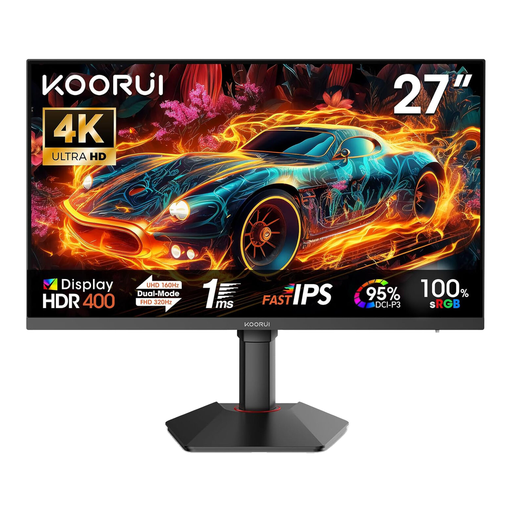
KOORUI G2741L 27-inch dual-mode gaming monitor
A 16:9 option if you’d like to choose between 4K and FHD modes.
27 inches; 3840 × 2160 at 160 Hz or FHD at 320 Hz.
The product name lists Fast IPS, 1 ms, two HDMI 2.1 ports and DP 1.4.
Joybuy
Frequently asked questions
Does my ship game need to support 21:9?
Yes, if you want to make use of the extra width in the game. Check the resolution, field of view, and how instruments and menus are displayed in the specific PC game; a 21:9 monitor alone doesn’t guarantee compatibility.
Can I simply plug my headphones into the monitor?
Only if the connection and headphones are suitable for the specific model. Dell notes that certain monitor line-outs are not designed for headphones. Check the manual and, if needed, use the connection on your computer and select the appropriate audio output there.
What should I consider during long OLED sessions?
ASUS describes static, high-contrast elements displayed for long periods as a potential cause of burn-in, and explains the protection features on its own OLED monitors. Check the features and warranty conditions for the model you’re actually choosing, rather than assuming the same details apply to other brands.
How do I compare monitor energy consumption?
For electronic displays covered by the scheme, compare the EU energy label and the relevant product data sheet. The European Commission describes the label’s scale as running from A to G. Your usage and electricity tariff also affect your ongoing energy costs.
Which labels and rights apply when buying online in Germany?
The EU energy label applies to electronic displays covered by the scheme. According to the Verbraucherzentrale, online consumer purchases in Germany generally come with a 14-day right to cancel from the date you receive the goods; check the scope and any exceptions. The statutory guarantee is separate from a voluntary warranty.


