Players without a fixed surface
If you sit side-on and would rather hold your controller than position a larger device on a table or your lap, a fightpad could suit the way you play.


Start by choosing a controller you can comfortably hold or rest in your actual seating position. A fightpad stays in your hands, while a leverless controller or arcade stick needs a suitable surface to rest on. Then check platform compatibility, cable routing and the rules of the specific tournament. None of these controller types, on its own, improves your viewing angle.
If you sit side-on and would rather hold your controller than position a larger device on a table or your lap, a fightpad could suit the way you play.
If you prefer directional buttons, you’ll need a place to rest the controller where you can reach the buttons and cable from your side-on seat.
If you want to stick with your usual lever inputs, check that the case and cable will fit comfortably in the space available at your tournament seat.
First, check how you can hold or rest the controller in your actual seating position. Then compare the input method, platform compatibility and tournament rules.
| Priority | What to check before buying | Who is this important for? |
|---|---|---|
| Positioning at your seat | Check whether the controller will sit on your lap or a table, whether there’s room for both forearms, and how the cable will run from your seating position. | If I sit side-on, I need to hold the pad in my hands or rest the larger device securely. This is the main priority for around 40% of shoppers. |
| Platform and tournament rules | Check the exact model variant, tournament platform, game version and permitted device configuration. | If your main concern is making sure the controller works with the tournament platform and complies with the event rules, check both before buying. This is a priority for around 30% of shoppers. |
| Familiar input method | Try your usual gameplay inputs on a pad, directional buttons or a lever. With a leverless controller, check the button layout too. | If I want to keep using the inputs I know or deliberately learn a new setup, the layout matters. The input method is the main priority for around 20% of shoppers. |
| Transport and cables | Check how the cable is secured, the overall size for transport and whether replacement parts are available. | If you regularly set up and pack away your controller, pay particular attention to the cable and replaceable parts. Transport and maintenance are the top priorities for around 10% of shoppers. |
Compatibility depends on the exact model variant, platform and game. You may need a different variant if your tournament system isn’t supported.
Before buying, check the model number against the console and game version you’ll be using.
Rules vary between events. Evo rules prohibit hardware-assisted macros and rapid-fire; the Capcom Pro Tour 2026 rules apply to its own competitions.
Check the rules for your specific tournament and test the permitted configuration before your match.
Your hands, forearms and cable need space too. A controller that fits won’t solve the separate problem of an awkward viewing angle.
Recreate your side-on seating position and check that the surface, arm position and cable route work at the tournament venue.
The details here relate to the Fighting Commander OCTA and Fighting Stick α.
The Pro KO is a leverless controller for players who want to customise their button layout.
The Kitsune is a low-profile leverless controller for PS5 and PC.
The Arcade Controller is a leverless option for players using Windows or a supported Switch version.
These options range from a leverless controller to conventional gamepads for selected platforms. Before buying, check the stated compatibility against the tournament system.
 No image available
This all-button leverless design is for players who prefer to use individual buttons for directional inputs.
The product name lists Bluetooth, 2.4 GHz and wired connections, as well as hot-swappable Fast Trigger switches.
 No image available
This gamepad could suit you if you prefer holding a conventional controller. Check that the layout works for your fighting game inputs.
The product name lists compatibility with Switch and PC, as well as a turbo function. Evo prohibits hardware-assisted rapid-fire in the competitions covered by its rules. Check the rules for your tournament.
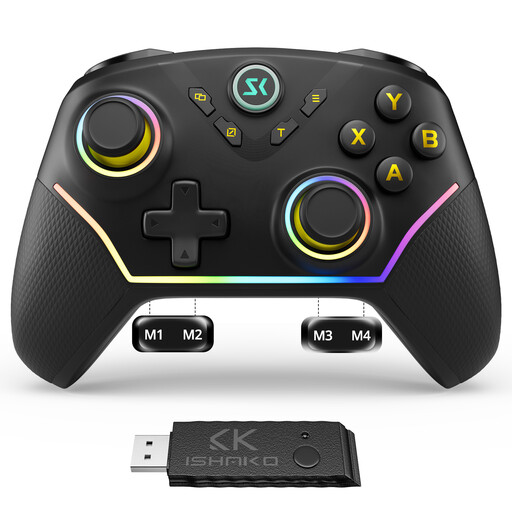 No image available
This model could suit you as a conventional gamepad if you prefer sticks to a leverless button layout.
The product name lists PC/Windows and Nintendo Switch, four back buttons, plus Hall effect sticks and triggers. Evo prohibits hardware-assisted macros in the competitions covered by its rules; check your configuration and the rules for your tournament.
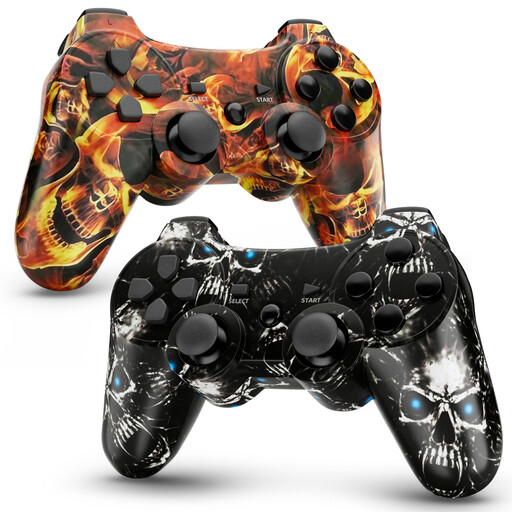 No image available
This two-pack is an option if you’re looking for a conventional gamepad for one of the listed platforms.
The product name lists PS3 and PC (Windows), a 450-mAh battery, dual vibration and 6-axis motion control.
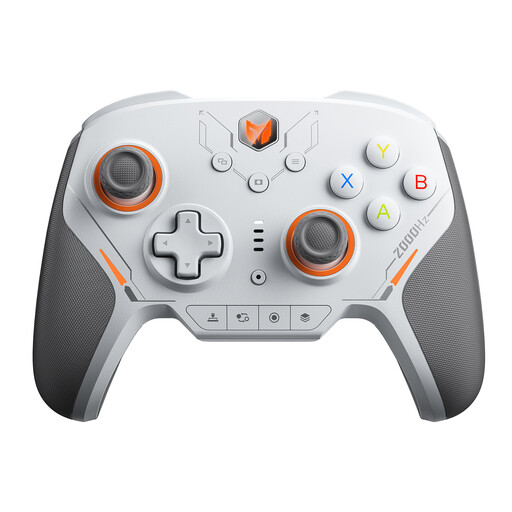 No image available
This gamepad could suit you if you prefer a controller you can hold rather than a leverless or lever-operated design.
The product name lists PC, Switch, iOS and Android, as well as 16 mechanical micro-switches.
Compare the console and game version used in the specific competition with the exact controller variant. 8BitDo lists Windows and Switch for the Arcade Controller; HORI lists PS5, PS4 and Windows for the Fighting Commander OCTA.
No. It depends on the competition and the device configuration. Evo rules prohibit, among other things, hardware-assisted macros and rapid-fire; the Capcom Pro Tour 2026 rules apply to the competitions they cover. Check the requirements for your tournament.
Test the tournament lock on your specific controller before play begins. According to the 8BitDo manual, the Arcade Controller’s lock disables the Start and Home buttons, among others. Under Evo rules, accidentally pausing can cost you the round and possibly the game; other events have their own rules.
If the product is faulty, you can contact the seller under your statutory consumer rights. These are separate from any voluntary manufacturer’s guarantee. The Verbraucherzentrale states that newly purchased goods are covered by a two-year statutory warranty period; the first remedy may be a repair or replacement.
Consumers generally have a right to cancel a distance-selling contract, subject to statutory conditions and exceptions. The federal portal describes a 14-day period. Check whether your purchase is covered; this right to cancel is separate from claims relating to faulty goods.