
Lieferung heute & morgen

Qualitätsgarantie

Willkommens-Angebote freischalten: KOSTENLOSE Lieferung | Bis zu 80 % RABATT | Kostenlose 30-Tage-JoyPlus-Testphase
App herunterladen
The constant clicking of a computer mouse in an open-plan office or a quiet home office can quickly become a strain—not just for you, but for your colleagues and family as well. A silent mouse promises a solution, but the market is flooded with models whose promises don't always hold up in practice. As your Joybuy Product Recommendation Officer, I'll help you avoid the common pitfalls and find a mouse that truly fits your workflow.
Many buyers focus exclusively on the promise of "quiet clicks" and overlook critical flaws that compromise productivity and comfort. Pay attention to these three points to avoid a poor investment.
To make the right choice, you should focus on objective and verifiable features. These three parameters are essential for productive and disruption-free use.
Look for specific data on noise reduction. Some manufacturers, like Logitech, state a noise reduction of over 90% for their "SilentTouch" technology compared to standard mice. Such quantifiable figures are a more reliable indicator of truly silent clicks than general marketing claims. The click feel should remain precise without feeling mushy.
A good ergonomic mouse is adapted to your hand size and grip style. Important aspects include:
The type of connection determines how flexibly you can use your mouse.
Based on these criteria, we have identified several models that are particularly well-suited for specific user groups.

Why This Fits Their Persona: This model is a straightforward solution for users seeking a reliable and quiet mouse for a fixed workstation, without needing to invest in expensive extra features.
The wired USB connection completely eliminates the pitfall of unstable wireless links. Its "Silent Click" design focuses on the core requirement—quiet operation—without compromising on reliability.
Plug-and-play with no driver installation required; Adjustable DPI levels (1000/1200/1600) for flexible cursor speed.
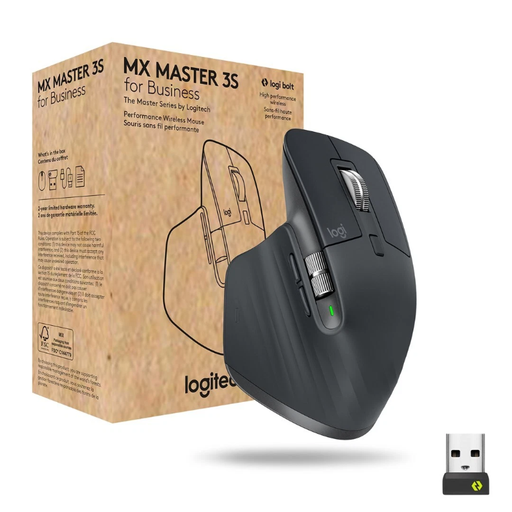
Why This Fits Their Persona: For professionals who spend many hours at the computer daily and switch between multiple devices, this model offers the pinnacle of ergonomics, precision, and efficiency.
It bypasses the ergonomics trap with its right-hand-optimized shape and thumb rest. The "Quiet Click" technology noticeably reduces noise, while dual connectivity (Bluetooth/Logi Bolt) ensures a stable connection.
MagSpeed scroll wheel for fast and precise scrolling; 8000 DPI sensor that tracks even on glass; Seamlessly switch between up to three devices.
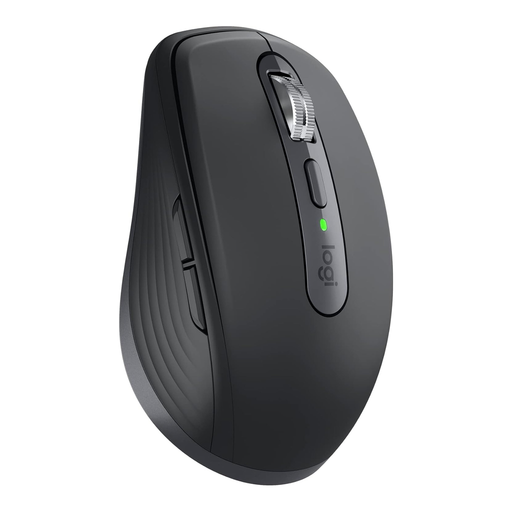
Why This Fits Their Persona: Its compact size and low weight make it the ideal companion for anyone who frequently works on the go and needs a powerful yet portable mouse.
Despite its compact form, it offers good ergonomics. The Darkfield sensor, which works on almost any surface (even glass), solves the problem of unsuitable work surfaces on the move. The quiet clicks ensure discretion in public areas.
Compact and lightweight (99g); Tracks on virtually any surface; Long battery life and fast charging via USB-C.
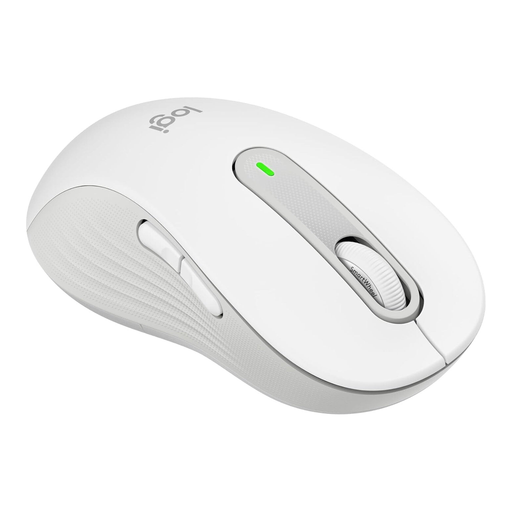
Why This Fits Their Persona: This model was specifically designed for left-handed users, solving the common problem of symmetrical or right-handed mice being uncomfortable over long periods.
It directly addresses the ergonomics trap with a contoured shape for the left hand. The SilentTouch technology provides quiet clicks, while dual connectivity (Bluetooth/Logi Bolt) ensures flexibility and a stable connection.
Specific ergonomic design for left-handers; SmartWheel for precise or high-speed scrolling; Very long battery life of up to 24 months.
We have compiled a complete, continuously updated list of products that fully meet these strict selection criteria and all relevant safety standards.
Battery life varies greatly depending on the model and usage. Basic models powered by a single AA battery, such as the Logitech Signature M650, often offer a battery life of 12 to 24 months. High-performance models with a built-in rechargeable battery, like the Logitech MX Master 3S, last up to 70 days on a full charge, according to the manufacturer, and can be quickly recharged via USB-C.
Not necessarily. Most silent mice use an optical sensor that works well on most common surfaces like desks or mouse pads. However, they can struggle on tricky surfaces like glass or high-gloss polished tables. For such use cases, models with a specialized sensor, like Logitech's "Darkfield" sensor, are required, as they are designed for precise tracking on virtually any surface.
That depends on your workspace. A wired mouse is ideal for a fixed desk, as it offers maximum reliability without battery changes or connection dropouts. A wireless mouse offers more flexibility, a clutter-free desk, and is the better choice for mobile work or frequently changing workstations. Modern wireless technologies like 2.4 GHz with a USB receiver are very stable today and are perfectly sufficient for most office applications.