
Lieferung heute & morgen

Qualitätsgarantie

Willkommens-Angebote freischalten: KOSTENLOSE Lieferung | Bis zu 80 % RABATT | Kostenlose 30-Tage-JoyPlus-Testphase
App herunterladen
A silent mouse can make all the difference in a home office, library or shared office. However, “silent” does not automatically mean completely noiseless. The term often refers only to the left and right mouse buttons, while the scroll wheel or middle-click may still be audible.
As a Joybuy Product Recommendation Officer, I have therefore assessed the most important product specifications according to their practical benefits. This makes it easier to choose a suitable quiet computer mouse without relying solely on marketing claims.
With many models, the main buttons have been acoustically dampened, but not every control. For example, the RAPOO N1600 is specified as having a middle-click that is not silent. Scrolling can also produce audible noise depending on the pressure and speed used.
If you are looking for a mouse for quiet workplaces, you should therefore check the following specifically:
A mouse with adjustable DPI allows you to customise the pointer sensitivity. Moderate settings are usually sufficient for word processing, spreadsheets and web browsing. A very high maximum resolution is mainly relevant for certain gaming or multi-monitor setups.
The maximum DPI figure is not the only important factor. You should also consider:
A wireless mouse gives you greater freedom of movement, but it requires batteries or a rechargeable battery. A USB receiver can also be lost or occupy an available USB-A port. Bluetooth is convenient for compatible laptops, while a 2.4 GHz receiver is often used with desktop PCs and older devices.
A wired mouse does not require a battery and is ready to use straight away. However, the cable can get in the way when carrying it around or using it on a small desk.
A silent mouse should provide as much specific information as possible about noise reduction. The term “silent” does not always describe the complete noise profile. For workplaces shared with other people, noise-reduced main buttons are particularly important. If you frequently open files or web pages with a middle-click, you should also consider the noise level of the scroll wheel and middle button.
Most models in this selection use an optical sensor. It works reliably on many matt, flat surfaces. Glass, mirror-like surfaces and highly reflective materials can affect tracking.
For everyday tasks, around 1,000 to 1,600 DPI is often sufficient. Models for more demanding gaming offer considerably higher values and additional adjustments. DPI should suit your screen size, viewing distance and personal control preferences – not simply the advertised figure.
An ergonomic mouse must suit your hand size and preferred grip. A symmetrical, ambidextrous mouse is suitable for left- and right-handed users, but it does not always offer the same thumb rest as a specially shaped right-handed model.
Pay attention to:
A low weight can be comfortable during long working sessions. However, some users prefer a slightly heavier housing because it sits more securely on the desk.
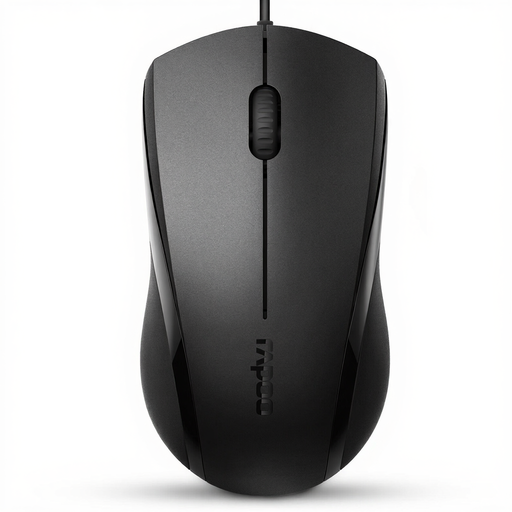
Why this product suits the profile: This wired USB mouse is designed for office work, studying and web browsing. Plug-and-play functionality, three buttons and a symmetrical shape keep setup simple and focused on the essentials.
The product details explicitly state that it has a wired connection, three buttons and noise-reduced main buttons. According to the manufacturer, the middle-click is not silent.
Optical sensor, USB plug-and-play, two DPI settings listed in the product details – 1,000 and 1,600 DPI – plus a symmetrical housing.
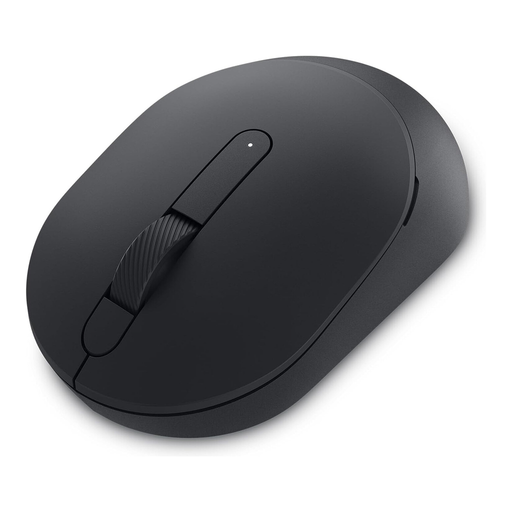
Why this product suits the profile: This model combines quiet operation with Bluetooth and 2.4 GHz wireless connectivity. It is suitable for users who switch between several devices and need a slim mouse for the office or home office.
The connection methods are clearly specified. The adjustable DPI resolution of up to 4,020 DPI is also stated, rather than simply promoting a high maximum figure.
Bluetooth and 2.4 GHz connectivity, an AA rechargeable battery or AA battery with a stated runtime of up to 36 months, plus a weight of 67 g according to the product details.
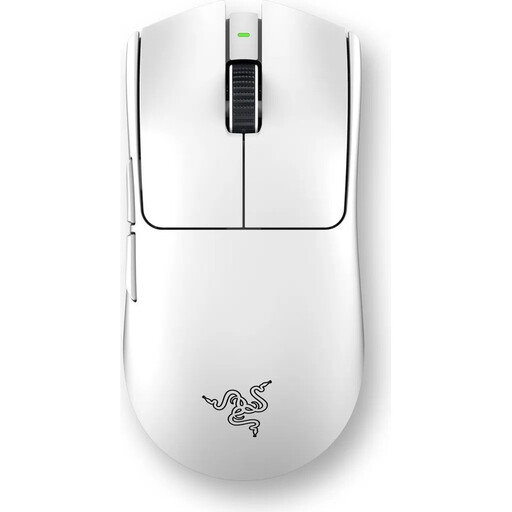
Why this product suits the profile: For gaming users, additional buttons, polling rate, weight and battery operation matter more than a basic office feature set.
The features are described using specific figures: six programmable buttons, adjustable DPI up to 35,000 and USB-C charging. For purely office-based work, however, these features may go beyond what you actually need.
Low weight of around 54 to 55 g according to the product details, optical Gen-3 switches, 2.4 GHz wireless connectivity and a stated battery life of up to 95 hours.
We have put together a complete, regularly updated list of products that fully meet these strict selection criteria and the safety regulations applicable in the EU.
For a fixed workstation, a USB mouse is straightforward: plug it in, use it and never worry about changing a battery. For example, the Logitech B110 is described as having a wired connection, optical sensor, symmetrical shape and plug-and-play functionality. A cable length of around 1.8 metres may be sufficient for a desktop PC.
A wireless option is better suited to laptop users, changing workspaces and tidy desks. Before buying, check whether Bluetooth or a USB-A receiver is required. Devices with USB-C ports only may also require an adapter.
No. The term usually refers to noise-reduced buttons. The scroll wheel, middle button and placing the mouse down can still produce noise. The relevant manufacturer information should therefore be checked for each individual control.
For documents, emails and web browsing, around 1,000 to 1,600 DPI is often sufficient. A higher setting may be useful with large or multiple monitors. What matters is that the sensitivity can be adjusted comfortably.
The lifespan depends on the switches, cable, battery, surface and intensity of use. With wireless models, battery life is also important. Careful handling, a dry environment and unplugging the USB connector rather than pulling the cable can help extend its practical service life.