First, measure the available width on your rig and the distance from your eyes to the screen in your usual driving position. A single 16:9 monitor is a space-saving, straightforward option; 21:9 gives you a wider picture on one panel, but needs more room and suitable support from your game and PC. 32:9 and triple-screen setups are worth considering if your rig, mounting system and PC are up to the task.
Which format suits you?
Drivers with a compact rig
If you have limited space to either side, check the monitor’s actual width, your viewing distance and how it will be mounted. iRacing Support recommends measuring the shortest distance between your eyes and the screen in your usual seated position.
Drivers who want a wider view
If you want to keep a closer eye on traffic and corners, compare an ultrawide panel with a triple-screen setup. As well as the space available, the key considerations are whether your racing game supports it and how much effort setup will take.
Drivers taking on long night stints
If how dark scenes look matters to you, factor care guidance and warranty terms into your decision too. With OLED, in particular, consider how long static images will remain on screen.
What should you look for when buying?
Single 16:9 monitor
A good fit if: space to either side is limited in your cockpit, or you want to start with one screen.
The trade-off: You get less horizontal screen space than with wider formats.
Single 21:9 monitor
A good fit if: you want a wider picture on one panel and the format works with your rig, game and PC.
The trade-off: The panel takes up more room, and the higher resolution may also demand more processing power.
Single 32:9 monitor
A good fit if: you want a particularly wide view on a single panel and have enough space.
The trade-off: An extra-wide panel isn’t automatically a space-saving option; your game and PC need to support the format.
Triple-screen setup
A good fit if: a wider view takes priority and you have the space and time for mounting and setup.
The trade-off: Three screens take more effort to mount and set up than a single panel.
When you’re spending long stints racing virtually in a compact cockpit, your choice also depends on whether space, peripheral vision, frame rate or panel care matters most to you. iRacing Support explains that measuring your viewing distance and screen width is the starting point for setting your field of view.
| Priority |
What to look for when buying |
Who it matters most to |
| Space and mounting |
Measure the available width and viewing distance; check the specific model’s external dimensions and VESA pattern against your mount. |
In a compact cockpit, the screen and mount need to fit in your usual driving position. Around 36% of consumers prioritise space and mounting. |
| Peripheral vision |
Measure the screen width and viewing distance; check whether your racing game supports your preferred format or multiple displays. |
If I want to keep a closer eye on traffic and corners, I weigh up the extra screen space against the room it takes up. Around 29% of consumers prioritise peripheral vision. |
| Frame rate and resolution |
Check that your PC and settings support the maximum refresh rate at your chosen resolution using the connection you’ll actually use. |
If smooth visuals are your priority, your PC and connection need to support the frame rate you want at your chosen resolution. Around 21% of consumers prioritise this. |
| Picture quality and care |
For OLED, read the care guidance and warranty terms for the specific model; to compare power consumption, check the energy labels of similar models. |
For long stints, including in dark scenes, I want to consider picture quality alongside how to handle static images. Around 14% of consumers prioritise picture quality and care. |
Avoid common buying mistakes
-
Choosing based on screen size alone
The diagonal measurement alone won’t tell you whether the monitor, including its stand or mount, will fit in your cockpit. Viewing distance also affects your field-of-view settings.
Measure your rig and seating position, then check the dimensions and VESA pattern against the details for the specific model and your mount.
-
Comparing the highest Hz rating or “1 ms” in isolation
The frame rate you can achieve may vary depending on the connection. A response time quoted as MPRT isn’t directly comparable with figures measured using other methods.
Check the resolution and frame rate supported by the connection you actually plan to use. Only compare response time figures if they use the same measurement method.
-
Planning a triple-screen setup by screen size alone
Side monitors need room and require setup. For iRacing, the setup guide asks for screen width, viewing distance and angles; other racing games may have their own menus and requirements.
Allow for the full footprint, mounts and cables, and check the setup process for the racing game you’ll be playing.
-
Assuming an OLED manufacturer’s warranty covers everything
LG warns that burn-in may occur if static images remain unchanged on screen for a long time. A voluntary manufacturer’s warranty is also different from your statutory rights.
Read the care guidance and warranty terms for the specific model, and check which conditions apply to the way you’ll use it.
Relevant brands and model examples
Dell / Alienware
The examples documented here include a 27-inch QHD monitor and a 34-inch ultrawide for different space requirements.
- For the G2725D at QHD, Dell quotes up to 180 Hz via DisplayPort and up to 144 Hz via HDMI.
- Dell lists the G2725D as unavailable in its German shop. For the AW3426DWM, Dell specifies a 34-inch screen, 3440 × 1440 resolution and 240 Hz.
Xiaomi
The G34WQi is a documented example of a single 34-inch ultrawide with a 21:9 aspect ratio.
- Xiaomi specifies 3440 × 1440 resolution, up to 180 Hz, a width of 811,3 mm with the stand and VESA 75 × 75 mm.
- The quoted 1 ms response time is specified as MPRT. Details for the separately listed “G34WQi 2026” variant don’t automatically apply to this model.
Samsung
The Odyssey G9 G91F is an example of a single 49-inch display with a 32:9 aspect ratio.
- Samsung specifies a 144 Hz refresh rate for model LS49FG916EUXEN.
- Before choosing a 32:9 panel, check that you have enough space and that your racing game and PC support it.
LG
The UltraGear 34GS95QE-W is a specific example of a 34-inch OLED ultrawide monitor.
- LG specifies 3440 × 1440 resolution, 240 Hz and 800R for this model.
- LG marks this model as no longer available in its German shop and warns in general that burn-in may occur if static images remain unchanged on screen for a long time.
MSI
The MAG 345CQR is another documented example of a 34-inch 21:9 monitor with a VA panel.
- For this model at 3440 × 1440, MSI specifies up to 180 Hz via DisplayPort and up to 100 Hz via HDMI.
- MSI notes that specifications and availability may vary by country, so this doesn’t confirm that a specific version is available in Germany.
Gaming monitors at Joybuy
The models below include single 16:9 and 21:9 monitors for compact rigs. Before choosing, measure the available space and check that your connection and PC can handle the stated resolutions and refresh rates.
 No image available
ASUS ROG Strix WOLED XG27AQWMG, 27-inch WQHD
The 27-inch 16:9 format is worth considering if you’re looking for a single monitor for a compact rig.
Specified in the product title: 2560 × 1440, 280 Hz, DisplayPort 1.4 DSC, HDMI 2.1 and USB hub.
View at Joybuy
 No image available
CRUA CR320C-H, curved 32-inch gaming monitor
A curved 32-inch monitor could be a good fit if you’re looking for a single panel and have checked its external dimensions against your cockpit.
Specified in the product title: 165 Hz, 1500R, FreeSync and wall-mountable design.
View at Joybuy
 No image available
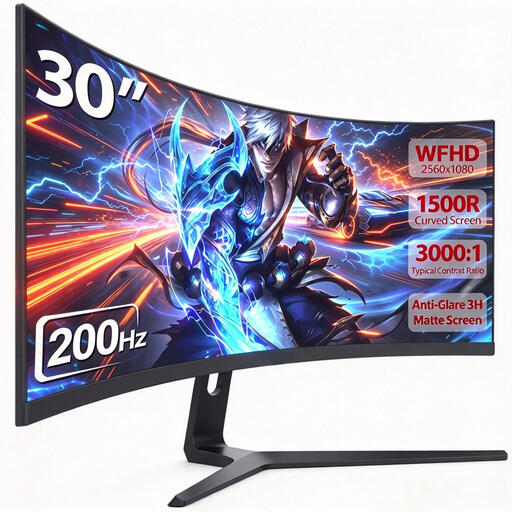
CRUA 30-inch ultrawide gaming monitor, 21:9
This single 21:9 panel is an option if you want more horizontal screen space and have room for an ultrawide.
Specified in the product title: 2560 × 1080, 200 Hz, 1500R and VESA 100 × 100 mm.
View at Joybuy
 No image available
Gawfolk GF340C-H, curved 34-inch UWQHD monitor
The 34-inch 21:9 format is worth considering if a single ultrawide panel will fit your rig.
Specified in the product title: 3440 × 1440, 165 Hz, 1500R and VESA 75 × 75 mm.
View at Joybuy
 No image available
Xiaomi G34WQi, 34-inch ultrawide gaming monitor
This 21:9 panel is an option if you want a wider picture on a single monitor and have room for it.
Xiaomi specifies 3440 × 1440 resolution and up to 180 Hz for the G34WQi. The manufacturer’s 1 ms figure refers to MPRT; the width with the stand is 811,3 mm.
View at Joybuy
Frequently asked questions
How do I set up my monitor for my virtual cockpit?
In your usual driving position, measure the shortest distance from your eyes to the screen surface, as well as the screen width. In iRacing, you can enter these figures in the display settings; with three monitors, you’ll also need to enter their angles. Other racing games have their own menus.
Do I need a particular surround mode for three monitors?
For iRacing, the official setup guide covers both a window spanning all three screens and a combined full-screen display. This doesn’t indicate whether other racing games support the same options.
What should I bear in mind when using OLED for long stints?
LG warns that static images left unchanged for a long time may leave visible marks on OLED monitors. Read the care guidance and warranty terms for the specific model; a voluntary manufacturer’s warranty is different from your statutory rights.
How do I compare monitor power consumption?
Compare the EU energy-label details for specific models, and factor in how long you plan to use the monitor and your electricity tariff. The European Commission specifies an A to G efficiency scale for electronic displays, along with additional information on HDR operation.
What rights do I have in Germany if my monitor is faulty?
Your statutory rights are against the seller; a warranty is an additional, voluntary service. According to the Verbraucherzentrale, a right to repair has also been in force since 31 July 2026, and monitors are among the product groups covered. You’ll need to check separately whether the requirements apply in your particular case.


