What should you look for when buying?
Start with your viewing distance, available rig space and how your sim displays its image. Screen size and maximum refresh rate only tell you so much without considering these factors.
| What to consider |
What to check before buying |
Who should pay particular attention |
| Field of view and format |
Measure the distance from your eyes in your driving position and compare 16:9, 21:9, 32:9 or three displays with the space available and your sim’s settings. |
If I want to adjust the view from my fixed racing position, I compare the format with my viewing distance. Around 33% of consumers put finding the right field of view first. |
| Space and mounting |
Compare the housing and stand dimensions, as well as the VESA pattern, with your rig and planned mount. |
With a narrow rig, the display, stand or mount must fit in the available space. Around 25% of consumers prioritise space and mounting. |
| Display performance through your connection |
Check the resolution and refresh rate for the input and operating mode you plan to use, and consider the frame rate in your own sim too. |
If a smooth image matters to me, I want to know what my PC can output through the connection I’ll actually use. Around 25% of consumers put usable display performance first. |
| Use and care |
Check the EU energy label for the specific model and read the care instructions if you’re considering an OLED monitor. |
If you drive long stints and want to factor in care and energy information, check these points before choosing. Around 17% of consumers prioritise use and care. |
Joybuy monitors for single-screen setups
These Joybuy monitors cover single-screen 16:9, 21:9 and 32:9 setups. Check that each model’s resolution and refresh rate suit your sim and connection, and that it fits in the space available on your rig.
 No image available
Z-Edge AGEX QHD gaming monitor, 27 inches, 144 Hz, white
A compact single-monitor option if you’re looking for a 27-inch QHD model with an adjustable-height stand.
The product title lists 144 Hz, 1 ms MPRT, Fast IPS, FreeSync and HDR10, as well as DP and HDMI connections.
View on Joybuy
 No image available
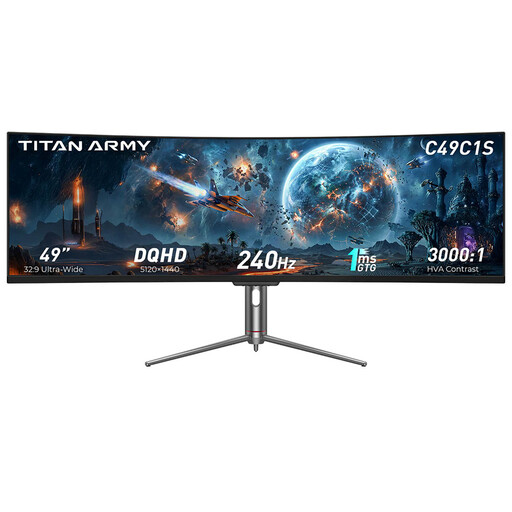
TITAN ARMY C49C1S, 49 inches, 32:9, 240 Hz
A wide single-monitor option if your rig has room for a 49-inch display in 32:9 format.
The product title lists HVA, DQHD, 240 Hz and 1800R curvature.
View on Joybuy
 No image available
CRUA CR340QA-H, 34 inches, 21:9, 165 Hz
A 21:9 single-monitor option if you want a wider, more continuous view than a smaller 16:9 display can offer.
The product title lists 3440 × 1440, 1500R curvature and 1 ms MPRT. It also states that the model is compatible with 75 × 75 mm VESA mounts.
View on Joybuy
 No image available
GIGABYTE G27Q26, 27 inches, QHD, 260 Hz
A 27-inch single-monitor option if you’re looking for a QHD model with an adjustable-height stand.
The product title lists 2560 × 1440, SuperSpeed IPS and 1 ms GTG. The refresh rate is listed as 260 Hz, rising to 275 Hz in overclocked mode.
View on Joybuy
 No image available
CRUA 49 inches DQHD, 32:9, 165 Hz
A 49-inch single-monitor option in 32:9 format, for rigs with enough room for a wide display.
The product title lists 5120 × 1440, 165 Hz, 1500R curvature, HDMI 2.1, DisplayPort 1.4 and VESA mounting. If you’re wall-mounting it, make sure the mount is suitable for the monitor’s dimensions and weight.
View on Joybuy
Frequently asked questions
How do I set up three monitors for iRacing from my racing seat?
iRacing describes both a windowed view across three monitors and a single display combined by the graphics card. To calculate your field of view, you’ll need to enter details including the distance from your eyes to the centre monitor. These instructions are for iRacing and don’t automatically apply to every racing sim.
Do three displays need to be identical for AMD Eyefinity?
According to the iRacing guide for AMD Eyefinity, all three displays need to have the same resolution. It recommends using the same make and model, but doesn’t require it. iRacing doesn’t recommend using three displays of different sizes.
What does Pixel Refresh mean on the Dell AW3423DWF?
For the AW3423DWF and AW3423DW, Dell describes a reminder after four hours of use; according to Dell, Pixel Refresh takes around seven minutes. This is a manufacturer specification for these models, not a general requirement to interrupt use on all OLED monitors.
What are my rights if my monitor is faulty?
When you buy a new monitor from a trader in the EU, you generally have a legal guarantee of at least two years from the date you receive the goods. Your Europe, the European Union’s information portal, distinguishes these statutory rights from any additional manufacturer’s warranty on offer. Before buying, check who the seller is and what terms apply to any voluntary warranty.
Do gaming monitors in Germany have an energy label?
Yes. The European Commission includes computer monitors in the rules for electronic displays and describes an energy label from A to G. Check the label for the specific model; this doesn’t mean you have to choose a particular efficiency class.


