Which setup is right for you?

Cockpit drivers with room for an ultrawide

If you want to judge corner entry and the surroundings in your virtual cockpit more clearly, the screen width and viewing distance need to suit your rig. Whether the format helps also depends on how the game displays it. Caseking and iRacing Support highlight the rig, seating position and game as important factors.

Drivers short on space or PC performance

You want a clear view of the track while balancing desk space, resolution and the frame rate your PC can achieve in your chosen game. iRacing Support recommends measuring the distance from your eyes to the screen in your normal driving position.

Planning a triple-screen rig

If you want to mount three displays, you’ll need to plan for the game settings, connections, resolutions and screen angles. iRacing Support outlines specific configuration options and recommends using matching resolutions; using the same brand or model is recommended, but not required.

What to consider when buying

A single 16:9 monitor

A good fit if: Space or PC performance is limited, or you prefer a straightforward single-monitor setup. Measure your viewing distance and set the field of view appropriately in a compatible game.

Trade-off: You’ll have less screen space to either side than with a wider or multi-screen setup. A larger screen doesn’t replace a suitable seating position.

A 21:9 or 32:9 ultrawide

A good fit if: Your game displays the format well and you want to see more of the virtual cockpit from a suitable viewing distance, without mounting three displays.

Trade-off: The screen’s width and resolution demand space and graphics performance. A monitor’s stated maximum refresh rate doesn’t guarantee the game will reach that frame rate. OLED models also come with care guidance and terms specific to the exact model.

Three monitors connected to a PC

A good fit if: You prioritise screen space to either side and have enough room, connections and mounting options, and your game supports a multi-screen setup.

Trade-off: Three displays need more space and configuration. For iRacing, Support describes using windowed mode or configuring full-screen mode through the graphics card.

Priority What to check before buying Who it matters most to
Field of view and seating position Viewing distance, available width and whether the game supports the format. If I want to judge corner entry and the track to either side from my actual driving position, field of view is crucial. Around 36 % of consumers put field of view and seating position first.
Smooth motion The frame rate and resolution your PC and game can actually achieve through the chosen input. If I want to follow sequences of corners clearly, the frame rate my PC manages in the game matters more to me than the monitor’s Hz rating alone. Around 29 % of consumers prioritise smooth motion.
Triple-screen setup Space, mounting, connections and the settings required in the game. If I want to build a triple-screen rig, I need to be able to set up all three displays, their connections and their angles in the game. Around 21 % of consumers put a multi-screen setup first.
Care and ongoing costs Care guidance, the warranty terms for the exact model and any mounting requirements. If I’m considering OLED or a more extensive setup, I want to assess care requirements and any extra mounting work in advance. Around 14 % of consumers see care and ongoing costs as their main concern.

Common buying mistakes

  • Confusing the maximum Hz rating with the frame rate you can achieve

    The monitor doesn’t generate the images that your PC and game need to produce.

    Compare the resolution, input used and your PC’s performance in the specific game, rather than focusing only on the maximum Hz rating.

  • Choosing a wide monitor based on screen size alone

    Viewing distance, screen width and position relative to the steering wheel all affect how the track looks from the cockpit.

    Measure your available space and viewing distance before ordering, and check the dimensions of the exact model.

    An unsuitable setup may mean you need extra mounting equipment or have to rearrange your rig.

  • Planning a triple-screen setup as if it were a single monitor

    iRacing describes specific display, angle and resolution settings for a multi-screen setup.

    Allow space for mounting and connections for all three displays. For iRacing, Support recommends matching resolutions; the same brand or model isn’t essential.

  • Assuming OLED care features eliminate all risk of burn-in

    Manufacturers describe ways to reduce the risk, not risk-free use. Warranty terms apply only within their stated scope.

    Check the care guidance and warranty terms for the exact model before buying.

Key brands at a glance

Samsung

The Odyssey OLED G9 G93SC is a 49-inch 32:9 option for buyers considering an extra-wide single monitor.

  • For model LS49CG934SUXEN, Samsung lists QD-OLED, 240 Hz and an 1800R curvature.
  • The screen width and system requirements need to suit your rig and game; the manufacturer’s specifications don’t prove a learning advantage.

LG

The UltraGear 34GX90SA-W is a 34-inch OLED option for a wide single-screen view, without the need for a 49-inch display.

  • LG lists a resolution of 3440 × 1440 pixels and a refresh rate of 240 Hz for this model.
  • LG’s support page gives warranty information for the 34GX90SA-W.AEU variant. Check the terms for the device you’re actually buying.

MSI

The MPG 341CQPX QD-OLED is a 34-inch QD-OLED option with a high stated refresh rate.

  • For this model, MSI lists a resolution of 3440 × 1440 pixels, a refresh rate of 240 Hz and OLED Care 2.0.
  • According to MSI, OLED Care 2.0 reduces the risk of burn-in; it doesn’t eliminate it.

Gigabyte

The G34WQC2 is a 34-inch ultrawide option with a VA panel rather than OLED.

  • For this model, Gigabyte lists a resolution of 3440 × 1440 pixels, a maximum refresh rate of 200 Hz, two HDMI 2.0 and two DisplayPort 1.4 inputs, and VESA 100 × 100 mm mounting.
  • Gigabyte notes that actual performance may depend on your system configuration.

ASUS

The ROG Swift OLED PG34WCDM is another 34-inch option for buyers considering a sharply curved ultrawide display.

  • For this model, ASUS lists 800R, a resolution of 3440 × 1440 pixels, a refresh rate of 240 Hz and OLED care settings.
  • The cooling system described by ASUS is designed to reduce the risk of burn-in; it doesn’t guarantee that burn-in won’t occur.

Joybuy products for an ultrawide setup

These models are for buyers considering a single ultrawide display rather than a triple-screen rig for street circuit training.

Gawfolk GF340C-H Curved Gaming Monitor, 34-inch, UWQHD, 165 Hz

Gawfolk GF340C-H Curved Gaming Monitor, 34-inch, UWQHD, 165 Hz

May suit you if your game supports 21:9 and your PC can deliver your chosen resolution at the frame rate you want.

34 inches, 3440 × 1440 pixels, 1500R, 165 Hz, VA panel, DisplayPort and VESA 75 × 75 mm.

View at Joybuy

CRUA CR340QA-H 34-inch WQHD gaming monitor, 1500R, 165 Hz

CRUA CR340QA-H 34-inch WQHD gaming monitor, 1500R, 165 Hz

An option for a wide single-screen view, as long as your game and PC support the 21:9 format and your chosen resolution.

3440 × 1440 pixels, 1500R, 165 Hz, 1 ms MPRT and VESA wall mounting, 75 × 75 mm.

View at Joybuy

INNOCN E34A1R 34-inch curved gaming monitor, UWQHD, 200 Hz

INNOCN E34A1R 34-inch curved gaming monitor, UWQHD, 200 Hz

Could be worth considering as a single ultrawide display if the available space, viewing distance and game support suit your setup.

3440 × 1440 pixels, VA panel, 1500R, 200 Hz, FreeSync, 1 ms, PIP and PBP, plus a height-adjustable stand.

View at Joybuy
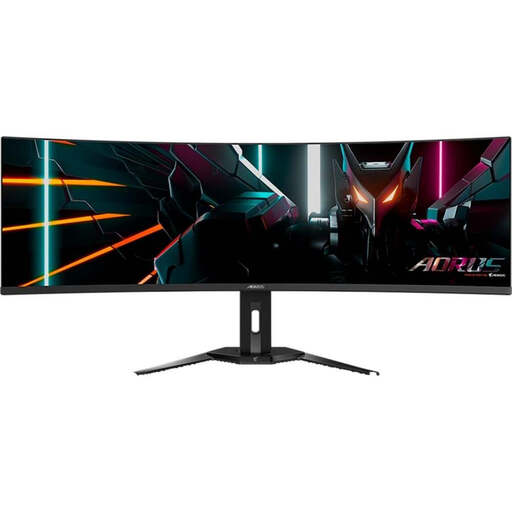
Gigabyte AORUS CO49DQ curved OLED monitor, 49-inch, DQHD, 144 Hz

Gigabyte AORUS CO49DQ curved OLED monitor, 49-inch, DQHD, 144 Hz

Before choosing this 49-inch 32:9 display, check that its size, your viewing distance and game support suit your setup.

OLED, 5120 × 1440 pixels, 1800R and 144 Hz.

Follow the care guidance for this OLED model; care features don’t eliminate the risk of burn-in.

View at Joybuy

ASUS TUF Gaming VG34VQ3B 34-inch UWQHD curved monitor, 180 Hz

ASUS TUF Gaming VG34VQ3B 34-inch UWQHD curved monitor, 180 Hz

A wide single-monitor option if your PC can achieve your chosen resolution and frame rate in the game you play.

3440 × 1440 pixels, 1500R, 180 Hz, 1 ms MPRT, FreeSync, ELMB, DisplayHDR 400, VA panel and 21:9.

View at Joybuy

Frequently asked questions

How do I set the field of view after setting up my rig?

In your normal driving position, measure the shortest distance from your eyes to the screen. In iRacing, you also enter the screen width and, for three monitors, their angles; you can then calculate the field of view there. For other games, use their own settings.

Do all three monitors have to be the same model for iRacing?

No, according to iRacing Support, they don’t. Support recommends matching resolutions and says using the same brand or model is advisable. Also check the size, connections and whether the specific combination can be mounted.

Who should I contact if my monitor is faulty?

If you buy from a trader, you have statutory consumer rights against the seller. According to consumer information from the European Union, the minimum period is two years from receipt of the goods. Any additional manufacturer’s warranty is separate and subject to its own terms.

Can I put my old monitor in the household rubbish?

No. The German Environment Agency explains that old electrical equipment must be collected separately from unsorted household waste. Check with your local council for suitable collection points; returns to retailers are subject to specific conditions.