For long virtual racing stints, start by checking your viewing distance, how much side-on visibility you want and whether your racing game supports your setup – not just screen size or refresh rate. A single 16:9 monitor keeps your setup and graphics workload manageable, while an ultrawide gives you more screen width on one display. Three monitors are worth considering if your game, PC outputs, mount and available space can accommodate the extra setup work.
Which setup suits you?
Drivers who prioritise side-on visibility
If you mainly want a better view of the areas beside the cockpit from a permanent PC rig, the key factors are in-game support, monitor angle and the space available for your setup. iRacing Support recommends taking your seating position and eye distance into account. For multiple monitors, you should also measure the width and angles.
Drivers looking for a wide display
If you’d rather set up a single wide monitor, check your viewing distance, how the racing game displays the format and the dimensions of your rig. Samsung Germany describes the Odyssey G9 G91F as a 49-inch model with a 32:9 aspect ratio; Dell Germany lists the AW3426DWM as a 34-inch ultrawide.
Drivers with limited space or PC headroom
If you want to keep your setup and graphics workload manageable, a single monitor could be a good starting point. Viewing distance and field-of-view settings still matter. MSI Germany lists a resolution of 2560 × 1440 pixels and a refresh rate of 180 Hz for the MAG 274QRFWDE.
What to consider when buying
Single 16:9 monitor
A good fit if: you want to get started with limited space or PC performance and position the monitor in front of your rig.
The trade-off: You get less screen space to the sides than with a wider display or additional screens. Viewing distance and field-of-view settings remain important.
Single ultrawide monitor
A good fit if: you want more width and the game displays the format well, without having to align three separate screens.
The trade-off: Check that the monitor’s width, resolution and desired refresh rate work with your rig, game and PC.
Three monitors on a PC rig
A good fit if: side-on visibility is especially important to you, and your game, PC outputs, space and mount can accommodate the setup. iRacing describes a triple-monitor setup, and Assetto Corsa EVO lists triple-screen support.
The trade-off: You’ll need to mount the displays and adjust their distance, bezel width and angles in the game. For the setup it describes, iRacing requires the same resolution on each display and recommends using the same models, but does not require it.
For a permanent sim racing rig in Germany, your main buying decisions depend on what matters most to you: field of view, a wide single-screen setup, space and PC headroom, or day-to-day use.
| Consideration |
What to check before buying |
Who it matters most to |
| Side-on visibility and cockpit view |
Measure the distance from your eyes and the visible screen width in your normal driving position. With three monitors, also check the angles and in-game settings. |
If a side-on cockpit view matters more to you than a simple setup, consider game support, viewing distance and angles together. Consumers who prioritise side-on visibility account for roughly 43%. |
| More width without a triple-monitor mount |
Check the monitor width against your rig, and make sure the aspect ratio, resolution and connection work with your game and PC. |
If you want a wide display but only want to align one screen, aspect ratio and available space are especially important. Consumers who prioritise a wide single monitor account for roughly 29%. |
| Space and PC performance |
Check the space on your rig and your PC outputs. Take the frame rate in your chosen game at your preferred resolution into account. |
If room or PC headroom limits your choice, your setup should work with both. Don’t choose a monitor based only on its listed refresh rate. Consumers who prioritise space or the PC performance they can achieve account for roughly 14%. |
| Care and day-to-day use |
For OLED, read the care instructions and warranty terms for the specific model. To compare energy information, check the device’s EU energy label. |
If you’ll use your monitor for a long time and are considering care and running costs, model-specific guidance and information matter. Consumers who prioritise care and day-to-day use account for roughly 14%. |
Common misconceptions
-
The biggest screen automatically gives you the right field of view
A larger display on its own won’t give you the cockpit view you want if your viewing distance and in-game settings don’t suit your driving position.
In your usual seating position, measure the distance from your eyes to the screen and check the field-of-view settings in your game. iRacing Support explains how to take this measurement for your seating position.
-
Planning for three displays is all you need for a triple-screen setup
You need to position all three monitors correctly, both physically and in the software. The setup described by iRacing uses the same resolution on all three displays. Using the same models is recommended, but not required.
Remember to plan for the mount, cables, suitable PC outputs and configuration in the game you actually play.
A multi-screen setup may require an additional mount, cables and suitable connections.
-
The monitor’s refresh rate guarantees your in-game frame rate
The listed refresh rate is a feature of the monitor, not the frame rate your PC will achieve in a racing game at your chosen resolution.
Check that your target resolution works with your PC and the required connection, and take the frame rate in your game into account.
-
All OLED monitors come with a burn-in warranty
LG explains that images displayed unchanged for a long time can leave marks on an OLED display. Warranty terms can vary from one model to another. Statutory rights and a manufacturer’s voluntary warranty are not the same thing.
Read the care instructions and warranty terms for the model you’re considering, and distinguish between claims against the seller and those against the manufacturer.
Brands and model examples
Samsung
The Odyssey G9 G91F is an example of a single 49-inch monitor with a 32:9 aspect ratio.
- Samsung Germany lists Dual QHD and 144 Hz for model LS49FG916EUXEN.
- Make sure its considerable width fits your rig. The manufacturer’s stated refresh rate doesn’t tell you what frame rate your game will achieve.
Dell Alienware
The AW3426DWM is an example of a single 34-inch ultrawide.
- Dell Germany lists 240 Hz and a 1 ms GtG response time in Extreme mode for this model.
- These specifications apply to this model and don’t indicate the actual frame rate you’ll get in your game.
MSI
The MAG 274QRFWDE is an example of a single 16:9 WQHD monitor.
- MSI Germany lists a resolution of 2560 × 1440 pixels and a refresh rate of 180 Hz for this model.
- For three displays, you’ll also need to check that the monitors, PC outputs, mounts and in-game settings are all suitable. The model specifications don’t confirm that your entire PC is compatible with a triple-screen setup.
LG
The UltraGear 45GX950A-B is an example of a large OLED ultrawide with two specified resolution and refresh-rate modes.
- LG Germany lists up to 165 Hz at 5K2K or 330 Hz at WFHD for this model.
- LG notes that displaying unchanged images for a long time may cause burn-in. Check the care instructions and warranty terms for the specific device.
Joybuy monitors for sim racing
This selection from Joybuy includes single gaming monitors from 27 to 49 inches, including WQHD, UWQHD, 4K and wide ultrawide models.
 No image available
TCL 32X3A 32-inch OLED monitor
This model could suit you as a single gaming monitor if you’re looking for a 32-inch display with OLED and 4K specifications.
4K UHD, 3840 × 2160 pixels, OLED+, 240 Hz or 480 Hz in FHD mode. Resolution and refresh rate depend on the operating mode.
View at Joybuy
 No image available
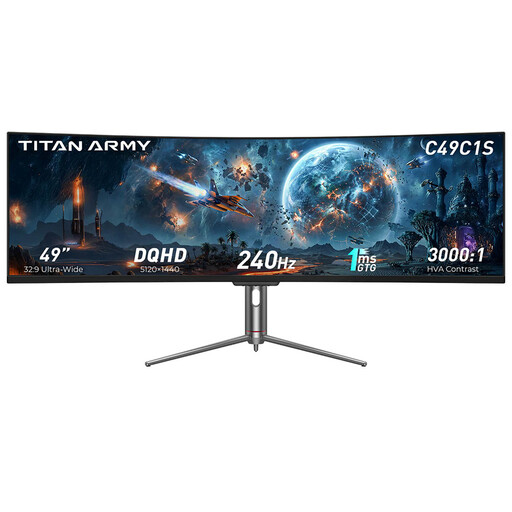
TITAN ARMY C49C1S 49-inch ultrawide gaming monitor
This single 32:9 display is an option if you want one wide, continuous screen instead of three monitors that need aligning separately, and you have enough space on your rig.
DQHD, 32:9, 240 Hz, R1800 and HVA.
View at Joybuy
 No image available
Gawfolk GF340C-H 34-inch curved gaming monitor
This single ultrawide display could suit you if you want a wider format and its 34-inch dimensions fit your rig.
UWQHD at 3440 × 1440 pixels, 21:9, 165 Hz, 1500R curvature and VA panel. DisplayPort and VESA 75 × 75 mm are listed.
View at Joybuy
 No image available
MSI MAG 272QPDE QD-OLED X24 27-inch QHD gaming monitor
As a single 27-inch monitor, this model offers a more compact option if you’re looking for a QHD display with QD-OLED.
2560 × 1440 pixels, 240 Hz, 0.03 ms, Adaptive-Sync and USB-C.
View at Joybuy
 No image available
CRUA CR340QA-H 34-inch WQHD gaming monitor
This 21:9 display is an ultrawide option if you want more width on a single monitor and have room for a 34-inch model.
3440 × 1440 pixels, 165 Hz, 1500R curvature and 1 ms MPRT. VESA 75 × 75 mm is listed.
View at Joybuy
Frequently asked questions
How do you set the field of view for a racing stint?
Measure the distance from your eyes to the screen in your normal driving position. With three monitors, you’ll also need to account for the visible width, including the bezels, and the angles of the side monitors. Enter these measurements in the relevant settings of a supported game. iRacing Support describes these measurement steps.
Do you need three identical monitors for iRacing?
No. For the triple-monitor setup described by iRacing, all displays should have the same resolution. Using the same make and model is recommended, but not required.
What should you bear in mind when using an OLED monitor for long stints?
LG explains that images displayed unchanged for a long time may cause burn-in. Before buying, read the care instructions and warranty terms for the specific model. LG’s general guidance doesn’t set identical terms for OLED monitors from other manufacturers.
Where can you compare energy consumption, and what rights do you have if there’s a fault?
Electronic displays are covered by EU energy labelling rules, so compare the energy label for the specific model. When buying from a business seller in the EU, statutory rights for faulty goods are separate from a manufacturer’s voluntary warranty. The European Union’s Your Europe information states that, as a general rule, you have at least two years of statutory rights for faulty goods from the date you receive them.


