What should you look for when buying?
In the iRacing example, field-of-view settings and how rain behaves depend on your configuration and the simulated track conditions. Monitor specifications alone don’t prove that you’ll learn more effectively.
| Priority |
What to check before buying |
Who is it important for? |
| Field of view and space on your rig |
Measure your seating distance and the available width; check the aspect ratio, resolution, curvature and field-of-view settings in your game. |
If I want to see corner entries and the area alongside my car, the screen needs to suit my seating distance and rig. That’s why around 33% of consumers put field of view first. |
| Smooth motion |
Compare the refresh rate, variable refresh rate and supported connection modes; check the frame rates you can achieve in your game. |
If I want to assess steering and braking movements smoothly, I focus on what my PC and game can actually output. Around 27% of consumers prioritise motion performance for this reason. |
| How rainy scenes look |
View the same rainy scene using your own game and graphics settings; check the panel, HDR specifications and reflections under the lighting in your gaming room. |
If I want to assess puddles, spray and the track surface in wet conditions, what matters is how they look in my game. Around 20% of consumers make the rain visuals their main priority. |
| Long-term use and care |
For OLED, check the care and warranty terms for the specific model; compare the EU energy label for each monitor. |
If my racing HUD stays in the same place for long sessions, I also want to consider care and warranty cover. Around 20% of consumers put these points first. |
Monitors for wide single-screen setups
This selection includes individual 21:9 and 32:9 gaming monitors for a sim racing rig. Before buying, check that your game, PC and connection support the resolution and frame rate you want, and that the display will suit your seating position.
 No image available
CRUA CR340QA-H, 34-inch ultrawide monitor
For a single rig with room for a 34-inch screen and a wider view.
21:9, 3440 × 1440, 165 Hz, 1500R, 1 ms MPRT; VESA 75 × 75 mm.
View at Joybuy
 No image available
CRUA, 49-inch Dual QHD gaming monitor
For a wide rig, if a single 49-inch screen suits your seating position.
32:9, 5120 × 1440, 165 Hz, 1500R, AMD FreeSync and HDR. Allow plenty of space; if wall-mounting, make sure the mount can support the monitor’s size and weight.
View at Joybuy
 No image available
INNOCN E34A1R, 34-inch ultrawide monitor
For a rig with room for a 34-inch ultrawide display in front of your seat.
21:9, 3440 × 1440, VA panel, 200 Hz, 1500R and FreeSync. The frame rate you can actually achieve also depends on your game and PC.
View at Joybuy
 No image available
Xiaomi G34WQi, 34-inch ultrawide monitor
For a single rig, if you have space for a 34-inch 21:9 display.
3440 × 1440, 180 Hz, 1500R, HDR10 and FreeSync. The frame rate you can achieve in-game also depends on your PC and connection.
View at Joybuy
 No image available
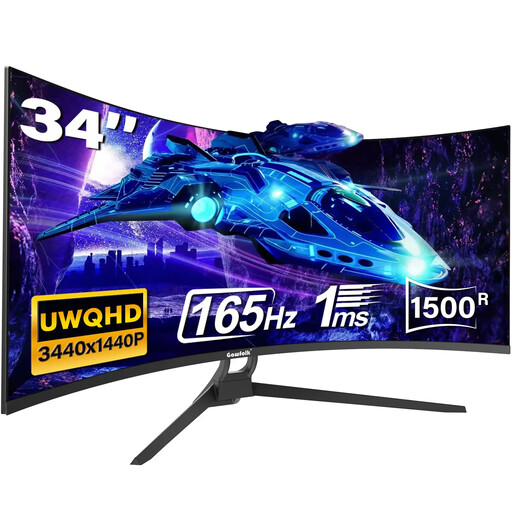
Gawfolk, 34-inch UWQHD curved monitor
For a single-screen rig, if a 34-inch ultrawide monitor fits your available space.
21:9, UWQHD, 1500R, 165 Hz, HDR10 and 1 ms MPRT; HDMI 2.1, DP 1.4 and VESA 75 × 75 mm. Check that your PC and game can deliver the frame rate you want.
View at Joybuy
Frequently asked questions
Will a wide monitor automatically show the right racing line in the rain?
No. In the iRacing example, wet conditions and rubber build-up affect grip, and the normal racing line can be particularly slippery in the rain. A monitor displays the simulation, but it can’t replace suitable seating and field-of-view settings or practice in the game you use.
How do I set up the field of view?
First, measure your usual seating position and the distance from your eyes to the screen. For iRacing, the provider explains how to set the field of view using screen dimensions and distance; with three monitors, you also need to account for factors such as bezel widths and angles. Don’t apply these steps to other games without checking first.
What should I bear in mind during long sessions with an OLED monitor?
Check the care instructions and warranty terms for the specific model, and avoid leaving unchanged images on screen for unnecessarily long periods. LG says burn-in can leave lasting marks from static images; this statement doesn’t establish the warranty terms for other brands or models.
What are the rules in Germany on energy labelling and old monitors?
The European Commission includes computer monitors among the electronic displays that require an energy efficiency label; compare the label for the specific device. The German Environment Agency advises that old electrical and electronic equipment must not be put in household waste.
Does a manufacturer’s warranty replace my rights against the seller?
No. According to EU consumer information, covered purchases of goods in the EU come with a minimum two-year legal guarantee. A voluntary manufacturer’s warranty may offer additional benefits, but it must not reduce these rights. If you’re concerned about OLED damage, also check the terms of the specific warranty.


