What should you look for when buying?
Start by comparing the space available and the supported aspect ratio, then look at the refresh rate you can achieve and the features that matter to you day to day.
| Your priority |
What to check before buying |
Who is it important to? |
| Usable field of view |
Measure the screen width and distance from your eyes in your driving position; check game support and FOV settings. |
If you want to follow corners and braking points on one screen, the perspective needs to suit your setup. Around 36% of consumers put field of view first. |
| Motion handling |
Check the refresh rate at native resolution for each input, as well as the frame rate your computer and game can achieve. |
If you want to follow fast sequences of corners clearly, the refresh rate your connection actually supports matters. Around 29% of consumers prioritise motion handling. |
| Space and graphics performance |
Consider the dimensions of the monitor and stand, the distance from your steering wheel, and how well your computer performs at native resolution. |
If your cockpit or desk is short on space, the screen width needs to suit your setup. Around 21% of consumers pay particular attention to space requirements or graphics performance. |
| Panel and running costs |
Compare the panel type and model-specific care and warranty terms; check the energy label and EPREL entry for the exact model number. |
If panel characteristics and energy consumption matter to you, check the details for the specific model. Around 14% of consumers put these criteria first. |
iRacing uses the distance from your eyes and the screen width to calculate the FOV for a single monitor. When comparing specific models, check the inputs too: Dell Germany states that the G2725D supports up to 180 Hz at QHD over DisplayPort and up to 144 Hz over HDMI. The maximum stated refresh rate alone doesn’t tell you what frame rate your own system can achieve.
Joybuy products
This selection includes single monitors in 16:9 QHD, 21:9 UWQHD and 32:9 DQHD formats. Before buying, check that your available space, computer and racing game are suited to the format.
 No image available
CRUA 49-inch DQHD gaming monitor
An option if your setup can accommodate an ultra-wide single-screen format and you have enough desk space.
49 inches, 32:9, 5.120 × 1.440 pixels, 165 Hz, 1500R curvature.
Check that your racing game supports 32:9 and that your computer can handle the native resolution.
Joybuy
 No image available
INNOCN E34A1R
A 21:9 option if you want more horizontal screen space on one monitor and your game supports the format.
34 inches, 3.440 × 1.440 pixels, 21:9, VA panel, 200 Hz, 1500R curvature.
The right perspective still depends on the screen width and the distance from your eyes.
Joybuy
 No image available
Xiaomi G34WQi
A 21:9 option if your setup has room for a 34-inch monitor and your racing game supports the format.
34 inches, 21:9, 3.440 × 1.440 pixels and up to 180 Hz according to Xiaomi Germany.
Check the full model number when choosing a mount.
Joybuy
 No image available
INNOCN 2751S PLUS
A more compact QHD option if a 27-inch monitor is a better fit for the space you have.
27 inches, QHD, Mini-LED IPS display and 275 Hz.
Check the refresh rate you can achieve with your computer and the connection you’re using.
Joybuy
 No image available
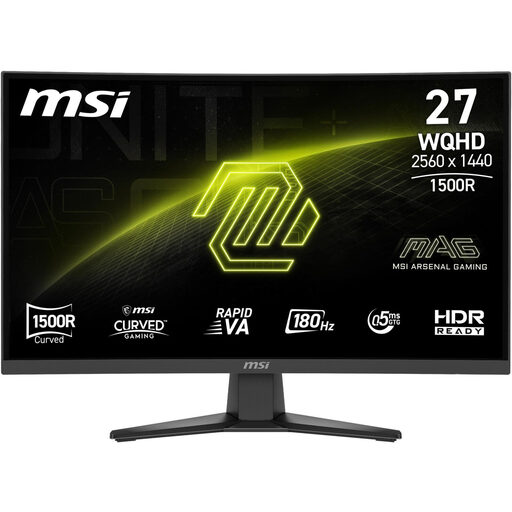
MSI MAG 275CQFDE E18
A 27-inch QHD option if you’re looking for a more compact format rather than an ultra-wide monitor.
27 inches, 2.560 × 1.440 pixels, 16:9, Rapid-VA panel and 180 Hz.
It has less horizontal screen space than the ultra-wide formats featured here.
Joybuy
Frequently asked questions
How do I set the field of view once everything is set up?
In your usual driving position, measure the distance between your eyes and the screen surface, as well as the screen width including and excluding the bezels. In iRacing, you can select a flat or curved single monitor in the monitor settings, enter your measurements and use “Compute”. Other games have their own settings.
Is the stated refresh rate enough to choose a connection?
No. Check the combination of input and resolution too. For the Dell G2725D, Dell Germany lists up to 180 Hz at QHD over DisplayPort and up to 144 Hz over HDMI. Compare the specifications for your particular monitor and computer.
How can I compare a monitor’s energy consumption?
Compare the EU energy label and EPREL entry for the exact model number. The European Commission explains that the energy label for electronic displays can also include HDR information. Your personal electricity costs also depend on how long you use the monitor and your electricity tariff.
What are your rights when shopping online in Germany?
For goods ordered online, you generally have a 14-day right to cancel from the date you receive them; exceptions and the circumstances of the contract should also be taken into account. The Verbraucherzentrale also distinguishes the statutory guarantee against the seller from a voluntary manufacturer’s or retailer’s warranty.
Does the energy label have to be shown when these monitors are sold online?
The energy label must also be displayed online for electronic displays covered by the rules. The European Commission includes computer monitors in this labelling category; this doesn’t mean you have to buy a monitor in a particular efficiency class.


