For practising braking points
If you want to brake repeatedly at the same track markers, consistent calibration and a pedal feel you can tailor to your setup will help. iRacing treats pedal calibration separately from setting up the monitor view.


Choose racing pedals that work with your PC or the specific supported wheelbase, and can be secured firmly to your setup. An adjustable load-cell brake lets you tailor the feel to the force you apply; pedals that measure travel can be a simpler option. Set up your multi-monitor view and calibrate your pedals separately: no pedal set determines your visual braking point.
If you want to brake repeatedly at the same track markers, consistent calibration and a pedal feel you can tailor to your setup will help. iRacing treats pedal calibration separately from setting up the monitor view.
Whether you use a desk, wheel stand or less rigid rig, the pedals should stay put when you brake. Heusinkveld requires a very rigid base for the Sprint; this requirement does not automatically apply to every pedal set.
If you want to add pedals to an existing wheelbase, check the connection for the specific model and the supported device combination. A USB connection to a PC does not automatically mean the pedals will work with every console.
First decide what kind of braking feel you want to practise, then check how the pedals are mounted and connected. Set up your monitor view and pedal input separately.
| Priority | What to check before buying | Who should pay particular attention? |
|---|---|---|
| Repeatable braking feel | Check the brake sensor type, any adjustable springs or elastomers, and the calibration options for the specific model. | If I want to brake repeatedly at a track marker and adjust the resistance to suit me, braking feel is my main priority; around 36% of consumers prioritise this. |
| Secure mounting | Check the mounting options, available pedal area, and the stability of the pedals and seat on your setup. The manufacturer specifically recommends a very rigid base for the Heusinkveld Sprint. | If the pedals or seat might move under braking, I want to make sure my setup is stable first; around 29% of consumers prioritise mounting. |
| Connection compatibility | Check the manufacturer’s information against your PC or console, wheelbase model, game and intended USB or pedal connection. | If I want to keep using my existing wheelbase and gaming platform, the specific combination needs to be compatible; around 21% of consumers prioritise connection compatibility. |
| Multi-monitor view and pedal input | Treat monitor geometry and pedal calibration as separate settings; don’t assume the pedal set will improve your multi-monitor view. | If I want to fine-tune my existing view and input first, rather than mainly buying a different braking feel, separate setup is essential; around 14% of consumers prioritise this adjustment. |
A figure in kilograms may refer to the sensor or to the force applied to the pedal plate. Fanatec explicitly states that the figure for the CSL Elite Pedals V2 refers to foot force at the pedal plate; Heusinkveld gives the maximum force at the brake pedal for the Sprint.
Only compare force figures when they refer to the same measurement. Also check the adjustment range and mounting requirements for each model.
Because of the potential braking forces, Heusinkveld requires a very rigid base for the Sprint. A moving pedal plate or sliding seat can change how the pedals respond while you practise.
Before buying, check how the pedals and seat will be secured to your setup. Don’t assume the Sprint’s requirement applies to other pedal sets without checking.
A pedal set that can connect directly to a PC via USB will not automatically work with every console or game.
Check the pedal model, wheelbase, platform and game against the relevant manufacturer documentation.
iRacing treats setting up the monitor view and calibrating the controller as separate tasks. Changing your pedals will not set the monitor angles or field of view.
Set up your monitor view based on your seating position and screen geometry, then calibrate the pedals in the game.
The T-LCM pedals are a three-pedal set with a load-cell brake and interchangeable brake springs.
The CSL Elite Pedals V2 are a three-pedal load-cell set with USB connection to a PC or connection to a supported wheelbase.
The documented CRP2 configuration includes an adjustable two-pedal set with accelerator and brake.
The Sprint pedals are designed for PC users with a rig that can be firmly mounted; the instructions distinguish between two- and three-pedal sets.
The PRO RACING PEDALS are a modular three-pedal set with a load-cell brake and adjustable pedal positions.
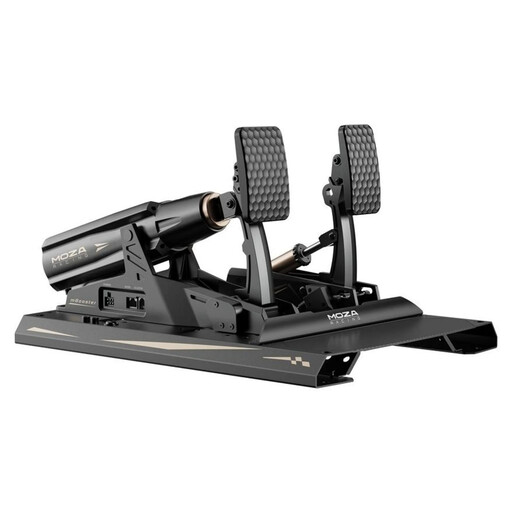
This selection is for setups where adjustable load-cell pedals and calibratable input are a priority.
 No image available
An option for a setup that calls for adjustable load-cell pedals and calibratable pedal input.
Specifications listed in the product name: 200 kg, 15 Bit, USB Type-A to USB Type-B and USB Type-C.
Secure the set firmly to your rig, use only the supplied 48-V power adapter, and keep your fingers away from moving pedal mechanisms.
No. The pedals control your braking input; iRacing describes the monitor view as a separate setup based on the distance to the central monitor, screen dimensions and the angles of the side monitors. Then practise using a track reference you can recognise.
Assign the pedal axes in the game you’re using and calibrate them. For iRacing, support recommends a Brake Force Factor of 0.00 for load-cell pedals and 1.60 to 2.00 for the position-based pedals mentioned there. These values are for iRacing and do not automatically apply to other simulators.
Thrustmaster recommends using just one connection at a time for the T-LCM pedals: USB to a PC or RJ12 to the wheelbase. Also check that your specific platform and game are supported.
Before buying, check whether a clutch is included with the version you’ve chosen and what kind of mounting base it requires. According to the instructions, a clutch is included with the Heusinkveld Sprint only in the three-pedal set you order; the manufacturer also requires a very rigid base for mounting.
When you buy from a trader, you have statutory rights if the goods are faulty; the European Union’s consumer information states that these rights last for at least two years from receipt of the goods. A voluntary manufacturer’s warranty does not replace your rights against the seller. For ordinary online purchases, you also generally have a 14-day right to cancel from the date of delivery; exceptions and any conditions on return costs should be taken into account.